
how do you audit a website: A Proven Framework
Think of a website audit as a complete physical for your online storefront. It's a deep dive into every corner of your site, from the technical nuts and bolts to the quality of your content, all to figure out what's holding you back. This isn't just about spotting broken links; it's a strategic mission to find real growth opportunities.
Your Essential Website Audit Framework
Before you start running reports and getting lost in data, let's zoom out. A random, scattershot approach will just waste your time and you'll likely miss critical issues. The best audits are structured, focusing on four core pillars that all influence each other. When I think about how do you audit a website, I always come back to this organized method. It ensures you’re covering all your bases, from the code that visitors never see to the product descriptions they rely on.
For a restaurant equipment seller, this framework is your direct line to better business. A strong technical setup means Google can find your commercial refrigeration pages. Great content answers a chef's questions about a specific convection oven, building trust and authority. A fast-loading site prevents a frustrated buyer from bouncing to a competitor. It all works together.
The Four Pillars of a Website Audit
Each part of the audit has a specific job, but they’re all interconnected. If you ignore one, you'll hamstring your efforts elsewhere. For instance, you could have the best blog content in the industry, but it won't matter if search engines can't even crawl your site because of a technical glitch. A technically sound site that takes forever to load will just send potential customers packing.
To help you visualize how these pieces fit together, I've broken them down into a simple table.
The Four Pillars of a Comprehensive Website Audit
| Audit Pillar | Primary Focus | Key Goal |
|---|---|---|
| Technical SEO | Website crawlability, indexability, and architecture. | Ensure search engines can easily find, understand, and rank your site's pages without any roadblocks. |
| On-Page & Content | Individual page elements, content relevance, and quality. | Optimize pages to meet user intent and clearly signal topic relevance to search engines. |
| Site Performance | Page speed, mobile-friendliness, and user experience (UX). | Deliver a fast, seamless, and intuitive experience for every visitor on any device. |
| Authority & Backlinks | Off-page signals, backlink profile quality, and brand trust. | Build a strong reputation and authority profile that Google recognizes and rewards. |
This organized approach keeps the audit focused and ensures that the findings from one area inform the next.
This visual shows how each step builds on the last, creating a comprehensive audit flow.
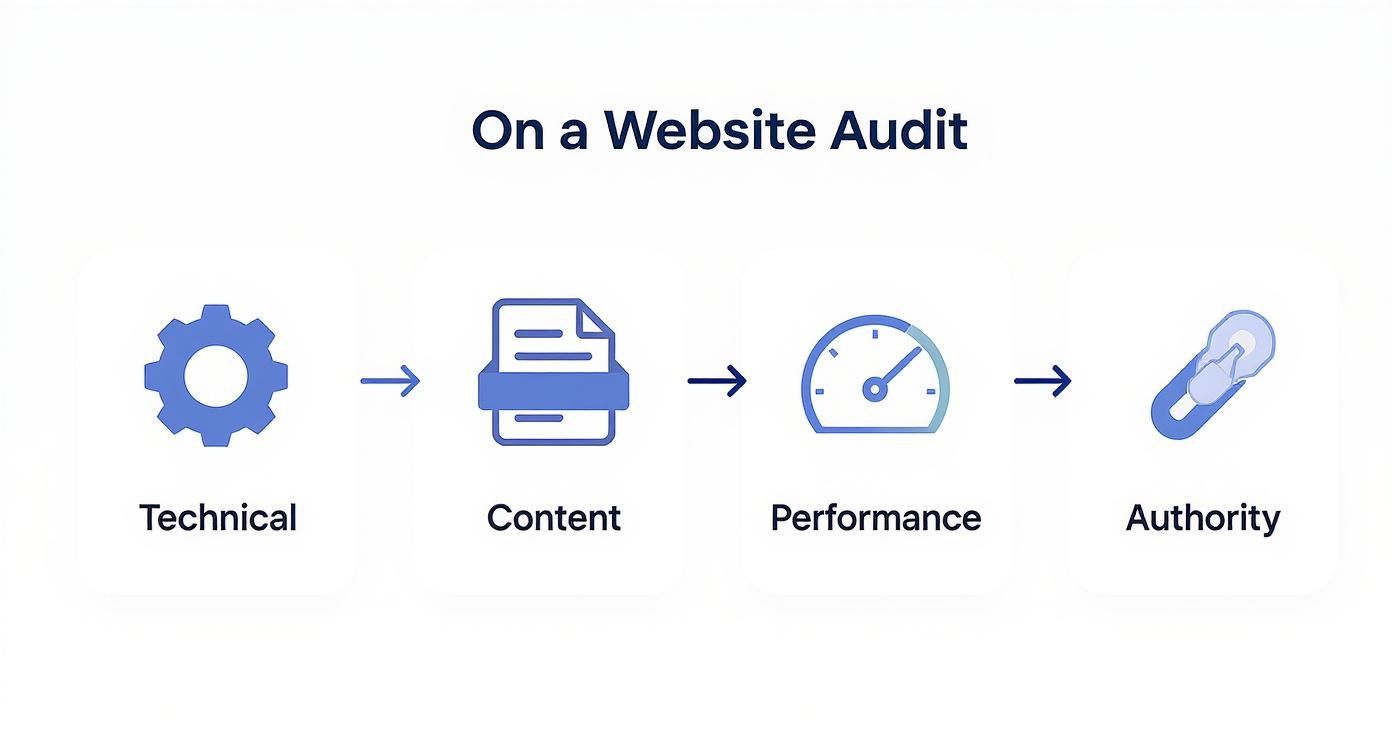
As you can see, a successful audit starts with the technical foundation before moving up through content, performance, and authority.
An effective website audit is more than a list of problems—it’s a roadmap for improvement. It transforms raw data into a prioritized action plan that aligns with your business goals, ensuring every change you make contributes to a better return on investment.
Ultimately, the insights you gather from these four areas will come together to form a powerful, cohesive strategy. This data won't just help you fix what's broken; it will give you the clarity needed to make smarter decisions down the road. By following this structure, you'll be in a much better position to understand how to measure SEO performance and see the real-world impact of your hard work. This is what turns a simple check-up into a game-changing business analysis.
Strengthening Your Technical SEO Foundation
Think of your website's technical health like the foundation of a building. If it has cracks, is uneven, or is built on shaky ground, everything you build on top—your slick design, killer product descriptions, helpful blog posts—is at risk. It's the same with your website. Technical SEO problems can make even the best content completely invisible to customers.
This is where we get under the hood. The goal isn't to turn you into a web developer overnight. It’s about learning to spot the most common and damaging technical roadblocks that stop search engines from understanding and ranking your site. You'll be surprised how many quick wins are hiding in plain sight.
Are Search Engines Finding and Storing Your Pages?
Before Google can rank your pages for commercial refrigerators or convection ovens, it has to find them (crawl) and add them to its massive library (index). If either of those steps breaks down, your page simply doesn't exist in search results.
Your first stop should always be Google Search Console. It's a free tool that acts as a direct line of communication with the search engine, showing you exactly how it sees your site.
Once you're in, head to the "Pages" report under the "Indexing" section. This is your command center for spotting problems. Keep a close eye on pages listed under "Discovered - currently not indexed" or "Crawled - currently not indexed." These are pages Google knows about but has chosen to leave out of its search results. Sometimes it's a content issue, but it often points directly to a technical snag you need to investigate.
I’ve seen this happen countless times. A restaurant equipment dealer launches a new line of ice machines, but weeks later, they’re getting zero organic traffic. A quick look in Search Console often reveals a rogue "noindex" tag a developer accidentally left on the category page, effectively telling Google to ignore the entire section.
Hunting Down and Exterminating Broken Links
Broken links, or 404 errors, are digital dead ends. They frustrate users who click on a link expecting to find a product, and they waste "link equity"—the authority passed from one page to another. When search engine crawlers hit too many of these, it signals a poorly maintained website, which can slowly chip away at your rankings.
This isn’t a minor issue. Industry data shows a staggering 66.5% of all backlinks are broken, which has a huge negative impact on a site's authority and visibility. Fixing these is low-hanging fruit with a fantastic return.
To find them, run a crawl of your site using a tool like Screaming Frog or the Site Audit feature in Ahrefs. It will spit out a nice, clean list of every 404 error. Start by fixing your internal broken links first, since those are entirely within your control. For your store, this might mean updating a link in an old blog post that points to a discontinued combi oven model.
Is Your Site Truly Mobile-Friendly?
Mobile isn't just an afterthought anymore; it's the main way many of your customers will find you. As of March 2025, mobile devices account for 63.31% of all web traffic. Yet, very few pages actually rank the same on both desktop and mobile, which shows just how critical a mobile-first approach is.
Start with Google's Mobile-Friendly Test for a quick pass, but don't stop there. The real test is pulling out your own phone and using your site.
- Can you easily browse product categories?
- Is the text readable without pinching and zooming?
- How easy is it to filter products by "Brand" or "Capacity" on a tiny screen?
Pay special attention to your checkout process. A clunky, frustrating mobile checkout is one of the biggest reasons for abandoned carts. This is a core part of understanding how do you audit a website from a real user's perspective, not just a search engine's. Any friction here costs you sales, period.
Tackling these kinds of issues is crucial for maintaining a solid foundation. When small problems are ignored, they can pile up and contribute to technical debt, making future updates slower and more painful. Making sure your Google Analytics is set up correctly is also fundamental. For help with that, check out our guide on finding your analytics tracking ID. A clean technical slate makes every other marketing effort more effective.
Diving Into Content Quality and On-Page SEO

Getting the technical stuff right is like building a solid foundation for your store. It's crucial, but it won't bring customers in the door. That's where your content comes in. Your product pages, category pages, buying guides, and blog posts are what actually sell your equipment.
This is where we shift from the "how" of your website's plumbing to the "what" of its message. If your content isn’t optimized or simply doesn't connect with your customers, it’s just digital dead weight. We need to make sure your page for a commercial convection oven isn't just a list of specs, but a truly helpful resource that answers a busy chef's questions better than anyone else online.
Taking Stock: The Content Inventory
First things first, you can't fix what you can't see. We need a complete map of everything you've published. A content inventory is just a methodical way of cataloging all your pages—from product and category pages to every last blog post and guide.
But this isn't just about making a list. The goal is to pull in key performance data for every single URL. This is how you find the hidden gems and identify the pages that are dragging your site down.
For each piece of content, I recommend tracking these core metrics:
- Organic Traffic: How many people are actually finding this page through search?
- Keyword Rankings: What specific queries is this page showing up for in Google?
- Bounce Rate: Are visitors hitting the page and leaving immediately, or are they sticking around?
- Conversion Rate: For your money pages, is this content actually leading to sales or leads?
- Backlinks: How many other websites see this page as a valuable resource and link to it?
Once you have this data compiled in a spreadsheet, you can start making some tough but necessary decisions.
The Big Sort: What to Keep, Kill, or Combine
With your inventory in hand, it's time to play judge, jury, and executioner. Every single page on your site should fall into one of four buckets. This framework makes the decision-making process much clearer.
- Keep: These are your all-stars. They're relevant, driving traffic and sales, and don't need much tinkering. Leave them alone.
- Update: Here’s where the opportunity lies. These pages have potential but are outdated or just not performing up to snuff. Think of a "Best Commercial Mixers of 2022" blog post—it’s a prime candidate for a 2024 refresh.
- Consolidate: Do you have three different blog posts on cleaning stainless steel equipment? They're likely competing with each other for the same keywords. Combine them into one definitive, powerhouse guide and redirect the old URLs to the new one.
- Delete: This is the deadwood. A blog post announcing a trade show from five years ago? It gets no traffic and has no backlinks. It's just clutter. Get rid of it and let Google know it's gone.
I tell my clients this all the time: a content audit isn't about creating more work. It’s about making the work you've already done work harder for you. By trimming the fat and beefing up your best assets, you focus Google's crawling and ranking power where it matters most.
Nailing the On-Page SEO Details
Now that we've dealt with the big picture, it's time to zoom in on the nitty-gritty page elements. On-page SEO is all about sending clear signals to Google and users about what a specific page is about. Your audit needs to put your most important pages—homepage, key categories, top-selling products—under the microscope.
Here are the critical components to check:
| On-Page Element | What to Look For | Example for a Restaurant Equipment Seller |
|---|---|---|
| Title Tag | Is it unique, descriptive, and under 60 characters? Does it feature the main keyword? | Bad: "Product Page" Good: "True T-49F Commercial Reach-In Freezer |
| Meta Description | Is it a compelling pitch (under 160 characters) that makes someone want to click? | Bad: "A freezer for your restaurant." Good: "Shop the reliable True T-49F Freezer. With durable stainless steel construction & free shipping, it's the perfect choice for any commercial kitchen." |
| Header Tags (H1, H2) | Is there one—and only one—H1 tag that clearly states the page's topic? Are H2s used to break up content logically? | An H1 of "Commercial Ice Machines" with H2s for "Types of Ice Machines," "Top Brands," and "Buying Guide." |
| Image Alt Text | Are your product photos described for search engines and visually impaired users? | Instead of alt="image123.jpg", use alt="Manitowoc UYF-0140A Undercounter Ice Machine". |
These details might feel small, but they have a massive cumulative effect on your relevance and authority. Getting them right can directly boost your click-through rates from search results and improve your rankings over time. To go even deeper, check out our full guide on what is on-page optimization, which breaks down these elements even further.
Evaluating Website Performance and User Experience
https://www.youtube.com/embed/SIR4Kn62bLQ
Technical health gets search engines to your door, and great content invites them to stay. But if your site is slow or confusing, visitors will walk right back out without buying a thing. This is where we look at your site through your customer's eyes, focusing on performance and user experience (UX).
A clunky website is a sales killer. It’s that simple. You could have the best commercial ice machine at the lowest price, but if the page takes an eternity to load or the "add to cart" button is buried, you’ve lost the sale. Auditing performance isn’t just a techy checkbox; it's a core business function.
Measuring What Your Users Actually Feel
For years, the buzzword was just "page speed." Thankfully, Google has given us a much smarter way to measure performance with Core Web Vitals. These metrics get to the heart of how a user actually perceives the speed, responsiveness, and stability of your pages.
Your audit needs to zero in on these three signals:
- Largest Contentful Paint (LCP): This is all about loading speed. It measures how long it takes for the most important content—usually the main product image on an equipment page—to appear. You're aiming for under 2.5 seconds.
- Interaction to Next Paint (INP): This new metric is about responsiveness. It measures the lag between when a user clicks something (like a filter or an "add to cart" button) and when the page visually responds. Quicker is always better.
- Cumulative Layout Shift (CLS): This tracks visual stability. Ever tried to click a button just as an ad loads and pushes it down? That's a high CLS, and it's incredibly frustrating. A low score means your page is stable.
A fantastic, free tool for this is Google's PageSpeed Insights. Just pop in a URL, and you’ll get a detailed report for both mobile and desktop, complete with specific, actionable suggestions for improvement.
Actionable Tips for a Faster Experience
When you get your PageSpeed Insights report, don't let the technical jargon overwhelm you. For a restaurant equipment seller, the culprit is almost always the same: massive, high-resolution product images.
One of the quickest wins I consistently find for e-commerce sites is image optimization. I had a client selling commercial ranges with gorgeous, high-def photos, but their LCP was creeping over six seconds. By simply compressing those images and serving them in modern formats like WebP, we cut that load time in half and saw a real drop in their bounce rate.
You don't have to sacrifice image quality. Modern tools can slash file sizes with almost no noticeable difference to the naked eye. This one fix can have a huge impact on your performance scores and, more importantly, your customer's experience.
Walking in Your Customer’s Shoes: The UX Audit
Beyond raw speed, you have to audit how intuitive your website is. This is the user experience (UX) part of the audit, and it requires you to forget you’re the business owner. You have to become a first-time visitor trying to solve a problem.
Start with a clear goal. For example: "I'm opening a small cafe and need an undercounter refrigerator that fits a 36-inch space."
Now, try to accomplish that on your own website.
- Navigation: From the homepage, is it crystal clear where to click? Is "Refrigeration" an obvious main category?
- Filtering: Once you're on the refrigeration page, can you easily filter by width, brand, or other critical features? How does it feel on a smartphone?
- Information Clarity: Is all the vital information—dimensions, price, shipping details—easy to spot on the product page?
If you struggle at any point, I guarantee your customers are struggling, too. Write down every single one of these friction points. They aren't failures; they're golden opportunities for improvement. A smoother path to purchase always translates to more sales.
The Power of Showing, Not Just Telling
When you're selling complex equipment, nothing builds buyer confidence like seeing a product in action. This is where video becomes a game-changer for both UX and SEO. With video now accounting for 82% of all internet traffic, its impact is undeniable.
In fact, pages with video are 53 times more likely to rank on the first page of Google than those with just text. Even better, users spend an average of 88% more time on websites that feature video content—a massive difference when the average time on a page is just 52-54 seconds. You can read more about these website audit trends to see how this can transform engagement.
For an equipment seller, this could be a short clip demonstrating a convection oven's fan system, a how-to on cleaning a meat slicer, or a testimonial from a local chef. Adding these to product pages not only helps customers make an informed decision but also dramatically increases their time on your site—a powerful positive signal to search engines.
Analyzing Your Backlink Profile and Authority

Alright, let's shift our focus from what's on your site to what's happening off of it. A website’s authority isn't built in a vacuum. It’s largely shaped by who links to you. You can think of these backlinks as votes of confidence from other websites.
The more high-quality, relevant sites that "vote" for your pages, the more Google sees you as a trustworthy source. But not all votes are created equal. A link from a major food industry publication is a powerful endorsement. A link from a spammy, irrelevant blog? That can actually do more harm than good. This part of the audit is all about sorting the gold from the junk.
Getting a Clear Picture of Your Backlink Profile
First things first, you can't just guess who is linking to you. To do this right, you need professional tools. I always recommend having a subscription to something like Ahrefs, Semrush, or Moz. They crawl the web constantly and give you a comprehensive report of every single site pointing back to your pages.
When you run that first report, the sheer volume of data can feel overwhelming. You’ll see a list of referring domains and the total number of backlinks. My advice? Don't get fixated on the raw numbers. The quality of those links is infinitely more important than the quantity.
The real goal here is to get a feel for the overall health of your profile. Are your links coming from relevant, authoritative sources, or is your profile cluttered with low-quality junk you never even knew existed?
Sorting the Gold from the Junk
With your list of links in hand, it's time to start evaluating. Your job is to categorize every link to figure out which ones are helping your SEO and which ones might be holding you back.
I find it helpful to assess link quality using a simple three-point framework:
- Relevance: Is the linking website actually related to the restaurant, food service, or B2B world? A link from a popular food blogger's review of a new mixer you sell is pure gold. A random link from a celebrity gossip site is, at best, useless.
- Authority: Does the linking site have a strong reputation of its own? SEO tools provide metrics like Domain Authority (DA) or Domain Rating (DR) to estimate this. While they aren't direct Google metrics, a high score generally points to a more powerful and trustworthy site.
- Anchor Text: This is the actual clickable text used in the link. Good anchor text looks natural and descriptive (e.g., "this commercial convection oven"). Over-optimized or spammy anchor text (e.g., "buy cheap freezer online") is a massive red flag for Google.
I usually create a simple spreadsheet to track everything, marking links as "High Quality," "Low Quality," or "Potentially Toxic." This process gives you a clear, actionable overview of your backlink health.
A healthy backlink profile is like a curated professional network. A few strong, relevant connections are far more valuable than thousands of random, questionable acquaintances. Your audit is the process of vetting those connections to protect your online reputation.
Dealing with Toxic Backlinks
During your audit, you will inevitably find some junk. We call these toxic backlinks. They often come from low-quality directories, sketchy private blog networks (PBNs), or foreign-language sites that have absolutely nothing to do with your business.
These links aren't just neutral—they can actively harm your site's authority and might even lead to a manual penalty from Google if they look manipulative. You can't just ignore them. You have to deal with them head-on.
Here’s the process for cleaning things up:
- Identify Toxic Links: Look for the obvious signs: bizarre anchor text, links from known spam hubs, or pages filled with scraped or nonsensical content.
- Request Removal: Your first move should be to try and contact the website owner and ask them to remove the link. Honestly, this has a pretty low success rate, but it's an important step to show Google you've made a good-faith effort.
- Disavow the Links: When removal requests go unanswered, you turn to Google's Disavow tool. This is you telling Google, "I don't endorse this link, so please ignore it when evaluating my site."
Creating a disavow file is a delicate process. It's just a simple text file listing the domains or specific URLs you want Google to ignore. Be extremely careful here—disavowing good links by mistake can crush your rankings. Only include links you are 100% certain are toxic. Think of it as a last resort, but a critical one for protecting your site's health long-term.
Auditing Your Website Security

In the world of e-commerce, trust is everything. A single security breach can undo years of hard work building your brand's reputation. This is why a security check isn't just a box to tick; it’s a core part of any real website audit.
You're not just selling equipment; you're handling sensitive customer data. A security audit is about making sure you haven’t left your digital front door wide open for attackers. It's how you find the weak spots before they do and show customers their information is safe in your hands.
Verify Your SSL Certificate
The most fundamental sign of a secure site is HTTPS. You know that little padlock you see in the browser bar? That's your SSL (Secure Sockets Layer) certificate at work, encrypting the connection between a customer's browser and your server. Without it, credit card numbers and contact details are sent out in the open.
When you're auditing, you need to confirm two key things:
- Is a valid certificate installed? You can use a free online SSL checker to see its status and, just as importantly, its expiration date.
- Does the entire site use HTTPS? Every single URL, from product images to tracking scripts, must load over a secure connection. If anything loads over insecure HTTP, you get a "mixed content" warning that breaks the padlock and kills customer confidence.
This is a simple check, but the stakes are high. Google has been using HTTPS as a ranking signal for years, so a secure site also tends to be a better-ranking site.
Hunt for Outdated Software
Most restaurant equipment sites run on platforms like Shopify, BigCommerce, or WordPress with WooCommerce. These platforms are constantly rolling out updates to patch security vulnerabilities. I've seen it time and time again: running an outdated platform, theme, or plugin is one of the easiest ways for an attacker to get in.
Website security isn't just a technical concern anymore; it’s a critical business issue. The average cost of a data breach hit $4.88 million in 2024. Considering the average site is targeted by 94 attacks every single day, you can't afford to be complacent.
Log into your website’s admin panel and look for any pending updates. Pay special attention to third-party plugins, as they are a very common entry point if they aren't kept up-to-date. If you really want to get into the weeds of protecting your digital assets, a detailed guide on conducting a software security audit is a great next step. Staying on top of your software updates is one of the most powerful and simple security measures you can take.