
How to create seo friendly urls: A Quick Guide to SEO URLs
If you're looking for the short version of how to create SEO-friendly URLs, here it is: keep them short, readable, and focused on a single keyword. For a restaurant equipment store, this means a URL like /commercial-ovens/convection-oven-xyz is always going to outperform a jumbled mess of codes and parameters.
Why Your URLs Are a Key Ingredient for SEO Success
Think of your website’s URLs as digital address labels. They're often the very first thing a potential customer or a search engine crawler sees. A clean, logical URL instantly builds trust and gives a snapshot of the page's content, while a messy, auto-generated one can look spammy or confusing.
For food service suppliers, where product specificity is everything, a well-structured URL acts like a mini-headline. It confirms to both users and Google that your page about a "36-inch gas griddle" is exactly what it claims to be. This simple act of clarity has a direct impact on how you perform in search.
To put this into perspective, let's look at some real-world examples from the industry.
Good URL vs Bad URL Examples for a Restaurant Equipment Store
This table breaks down the difference between a URL that works for you and one that works against you.
| URL Element | SEO-Friendly Example (Good) | Non-SEO-Friendly Example (Bad) | Why It Matters |
|---|---|---|---|
| Product Page | .../commercial-refrigerators/true-t49-reach-in |
.../products/item.php?id=85749A&cat=2 |
The good URL is readable, includes keywords, and tells the user exactly what to expect. The bad one is a confusing string of parameters. |
| Category Page | .../cooking-equipment/commercial-fryers |
.../category_1023_list.aspx |
A clear hierarchy helps Google and users navigate your site. The bad example offers zero context. |
| Local Service Page | .../restaurant-supply-new-york |
.../store-locations/ny/manhattan-11001 |
The good URL targets a clear local search term. The bad one is clunky and less likely to match a user's search query. |
| Blog Post | .../blog/how-to-clean-a-deep-fryer |
.../blog/post-id-10-12-2023 |
The keyword-rich slug tells search engines the topic immediately, while the bad one is just a date stamp. |
As you can see, the "good" examples aren't just prettier—they're strategic tools for better visibility.
The Impact of Clear URLs
Clear URLs do more than just look nice; they deliver tangible benefits that help you stand out in the crowded restaurant equipment market. Think about it: when you're scanning search results, a clean, descriptive URL can be the deciding factor that gets you the click over a competitor.
This isn't just a hunch. Studies have shown that websites with short, descriptive URLs (under 60 characters) can see up to a 35% higher click-through rate (CTR). In a competitive field, a concise URL like yourstore.com/commercial-kitchen-mixers immediately signals relevance and authority.
A great URL serves three masters: it tells search engines what the page is about, it informs users what to expect, and it's easy to share. Neglecting any of these three can undermine your entire content strategy.
Boosting Search Engine Efficiency
Beyond the user experience, a logical URL structure makes your website far easier for search engines to crawl and understand. When Googlebot can efficiently move through a clear hierarchy—say, from /refrigeration to /refrigeration/walk-in-coolers—it can index your pages more effectively. This is absolutely crucial for e-commerce sites with thousands of products.
A clean structure improves what we call "crawl efficiency," making sure search engines don't waste their limited resources trying to figure out confusing pathways. That means your new products and updated content get discovered and ranked faster.
For those on WordPress, it's worth noting that your URL structure is a core piece of the puzzle when you're trying to improve SEO rankings. This all ties back to how Google allocates its resources to your site, a concept you can dig into deeper by understanding what crawl budget is at https://restaurantequipmentseo.com/blogs/restaurant-equipment-seo-blog/what-is-crawl-budget.
Crafting the Perfect URL Naming Convention

Before you start building out pages, you need a solid blueprint for your URLs. Think of it less like a rigid formula and more like creating clear, consistent signposts for both your customers and the search engines trying to find you. The goal is simple: make your URLs predictable and descriptive.
It all starts with one non-negotiable rule: always use lowercase letters. Some web servers get confused and treat uppercase and lowercase letters as different characters. This means .../Ice-Machines and .../ice-machines could be flagged as two separate, duplicate pages. Sticking to lowercase from day one is the easiest way to avoid messy duplicate content issues that can seriously hurt your SEO.
Settle the Hyphen vs Underscore Debate
I see this question all the time, but the debate between hyphens (-) and underscores (_) has a clear winner for SEO. Hyphens are the standard, period. It’s not just a style choice; it’s about how search engines actually read and understand your URLs.
Google’s crawlers see hyphens as word separators. On the other hand, they often mash words connected by underscores together. So, undercounter-ice-maker is read as "undercounter ice maker," while undercounter_ice_maker might be interpreted as a single, jumbled mess: "undercountericemaker." It's no surprise that sites using hyphenated URLs tend to send much stronger keyword signals.
Eliminate Stop Words for Conciseness
Next, let's trim the fat. In the world of SEO, "stop words" are the small, common words that search engines usually ignore to save resources—think 'and,' 'the,' 'for,' 'a,' and 'in.' While essential for a proper sentence, they just add clutter and length to a URL without bringing any real value.
Removing them makes your URL slug cleaner and more potent.
-
Before:
/blog/how-to-choose-the-best-oven-for-a-pizzeria -
After:
/blog/choose-best-oven-pizzeria
See how the second version gets straight to the point? It’s shorter, easier to read, and laser-focused on the keywords your customers are actually searching for.
Front-Load Your Primary Keywords
The order of words in your URL matters more than you might think. A smart strategy is to "front-load" your most important keywords, placing them as close to the beginning of the URL as possible. This gives them more weight in the eyes of search crawlers and immediately tells a user what the page is about when they see it in search results.
A great example for an undercounter ice maker would be:
/ice-machines/undercounter-cube-ice-maker. Notice how this structure is far more logical and effective than a messy alternative like/products/undercounter-maker-ice-cube-model-123.
Establishing these simple rules is a core part of building a strong foundation for your entire website. If you want to zoom out and see how these URL conventions fit into the bigger picture, this comprehensive site architecture SEO guide is a fantastic resource. By setting these standards now, you’re creating a scalable and powerful system for every new product or category you add down the line.
Structuring URLs for Categories, Products, and Local Pages

Think of your website's structure as the floor plan of a massive warehouse. Your URLs are the aisle markers and shelf labels that guide everyone—from a new chef to a Googlebot—to exactly what they need. For a restaurant equipment supplier with thousands of products, a messy URL structure is like having a warehouse with no signs. It's confusing, inefficient, and terrible for business.
A clear hierarchy does more than just look neat. It helps search engines understand the relationship between your pages, which is a massive part of how to create SEO friendly URLs that actually drive traffic. It also helps spread link equity from your powerful category pages down to individual product pages, lifting everything up.
Building a Logical Product and Category Hierarchy
When you’re dealing with a huge inventory, a nested folder structure in your URLs is the most intuitive way to go. It mimics how a customer would naturally shop, moving from a general department to a specific aisle, and finally to the product on the shelf.
Here’s what that looks like in practice:
-
Top-Level Category:
yourstore.com/refrigeration/ -
Sub-Category:
yourstore.com/refrigeration/walk-in-coolers/ -
Product Page:
yourstore.com/refrigeration/walk-in-coolers/turbo-air-smart-7-sg
This structure immediately signals to Google that a "Turbo Air Smart 7 SG" is a specific type of "walk-in cooler," which belongs in the "refrigeration" category. Each layer of the URL adds context and reinforces the relevance for your target keywords.
A well-planned site architecture is one of the most powerful SEO tools you have. When you group related products under clean, logical category URLs, you’re telling search engines that you're an authority on that entire product line.
Tackling Local SEO for Suppliers
If you have showrooms or service specific regions, local SEO is where you can really dominate the competition. The key is creating dedicated pages for each location, each with its own optimized URL. One of the biggest mistakes I see is lumping all your locations onto a single, generic "contact us" page. Don't do it.
Instead, build out specific landing pages that target local buyers.
-
State-Level Page:
yourstore.com/locations/texas/ -
City-Level Page:
yourstore.com/locations/dallas-restaurant-supply/
This lets you tailor the content—think local testimonials, photos of the Dallas team, or directions to your showroom—directly to that market. The URL itself becomes a potent signal for geo-targeted searches like "restaurant supply dallas," putting you right in front of chefs who are ready to buy now.
This approach is a core piece of a much bigger puzzle. To see how it fits into your overall strategy, it's worth reading up on the fundamentals of site architecture for SEO.
Managing Product Variations Without Confusion
Product variations—different sizes, voltages, or finishes—can quickly turn your URL structure into a nightmare. A common question is, "Should a 24-inch and a 36-inch version of the same griddle have different URLs?"
My answer is almost always yes, but only if customers are actively searching for those variations as distinct products (e.g., "36 inch commercial griddle"). If they are, they deserve their own page and unique URL.
For minor variations like color that don't change the product's core function, avoid creating separate pages. Using URL parameters might seem like an easy fix, but it's a recipe for duplicate content issues that can dilute your SEO power. The best move is to use one canonical URL for the base product and let users choose options like color or finish right there on the page. This consolidates all your ranking authority onto a single, powerful product page.
Putting It All Together: Managing URLs in Shopify and WooCommerce
Knowing the theory behind great URLs is one thing, but actually putting it into practice on your e-commerce site is where the rubber meets the road. For most restaurant equipment suppliers, this means getting your hands dirty in Shopify or WooCommerce.
The good news? Both platforms give you the control you need to build clean, effective URLs. While they're built with SEO in mind, they still need you to steer them in the right direction. Taking a few moments to customize each URL slug before hitting "publish" is a small step that pays off big time in search visibility and customer trust.
Customizing Slugs in Shopify and WooCommerce
In both Shopify and WooCommerce, editing the end of your URL—the part they call the "slug" or "handle"—is refreshingly simple. You’ll usually find this setting right in the SEO section for any product, collection, or page you're working on.
Here’s a look at Shopify’s "Search engine listing preview" section, where the magic happens.
This is where you directly edit the URL handle (Shopify’s term for the slug). It’s your opportunity to apply all the principles we’ve covered—transforming a clunky, auto-generated URL into something short, descriptive, and packed with the right keywords.
Let's say you're adding a new page for "Manitowoc Ice Machines." The process is a breeze:
- Draft your page title: Start with something clear, like "Manitow-oc Undercounter Ice Machines."
- Find the SEO settings: Scroll down to the "Search engine listing" or "Permalink" area.
-
Edit the slug: The platform might suggest something like
/pages/manitowoc-undercounter-ice-machines. You can easily tighten that up to/manitowoc-undercounter-ice-machinesfor a much cleaner look.
It’s the same story over in WooCommerce. On any product or page editor, the "Permalink" field sits right below the title, giving you total control.
The Make-or-Break Role of 301 Redirects and Canonicals
Okay, so creating a new URL is straightforward. But what happens when you need to change an existing one?
Changing a URL without a plan is like moving your showroom to a new address and forgetting to leave a forwarding notice. Old links will break, customers will get lost, and all the SEO authority you've built for that page will simply evaporate.
This is where 301 redirects are absolutely non-negotiable. A 301 is a permanent instruction that tells browsers and search engines, "Hey, this page has moved for good." It automatically sends anyone who lands on the old URL to the new one, and crucially, it passes along nearly all of its ranking power. If you need a refresher, check out our guide on how to do a 301 redirect.
Pro Tip: Never, ever change an existing URL without immediately setting up a 301 redirect. It's the single most important thing you can do to protect your search rankings when you're making updates.
The other critical tool in your belt is the canonical tag. Think of it as a small piece of code that points to the "master" version of a page. This is a lifesaver for e-commerce sites, where filters and tracking codes can create dozens of different URLs for the exact same content (like /convection-ovens?sort=price or /convection-ovens?brand=blodgett).
By setting the canonical tag to the main URL (/convection-ovens), you're telling Google not to get confused by all the variations. This prevents duplicate content issues that can seriously dilute your SEO authority. Thankfully, both Shopify and WooCommerce handle most of this for you, but understanding how it works is key to fixing problems if they pop up.
Navigating Advanced URL Management and Migration
As your restaurant equipment business grows, so does your website. You'll eventually move past simple URL tweaks and face bigger challenges, like managing complex marketing campaigns or, the big one, a full site migration. These aren't just technical tasks; they are high-stakes projects where one wrong move can set your SEO back years.
What About Tracking URLs for Campaigns?
A common hurdle is dealing with tracking parameters. When you run a paid ad or email campaign, you’ll probably use UTM (Urchin Tracking Module) parameters to see what’s working. These tack on strings like ?utm_source=google&utm_medium=cpc to your clean URLs. While they are a goldmine for your analytics, they create a potential SEO headache.
Suddenly, a single page can have dozens of URL variations floating around. To a search engine, this can look like duplicate content.
The answer isn't to give up on tracking your marketing efforts. Instead, you need to lean on canonical tags. A canonical tag is a small piece of code that points all those variations back to the one "master" version of the page. This consolidates all your ranking power and keeps you out of trouble with Google for duplicate content.
Getting Ready for a Website Migration
Moving your entire website—say, from an outdated platform to a new one like Shopify or WooCommerce—is one of the most nerve-wracking things you can do in SEO. Get it right, and you could see a real performance boost. Get it wrong, and it can be absolutely catastrophic for your traffic and sales. The whole project really hinges on how you handle the URL transition.
Your first move should always be a full URL audit. Before you touch anything, you need a complete inventory of every single URL on your current website. A tool like Screaming Frog is perfect for this; it will crawl your site and give you a spreadsheet of every page. This list becomes your migration bible.
With your audit in hand, you move on to URL mapping. This is where the real work begins. You have to meticulously match every single old URL to its new equivalent on the new site. For instance, a clunky old URL like oldstore.com/prod.php?id=123 might now become newstore.com/commercial-fryers/brand-x-deep-fryer. Getting this one-to-one mapping right is non-negotiable for protecting your hard-earned SEO authority.
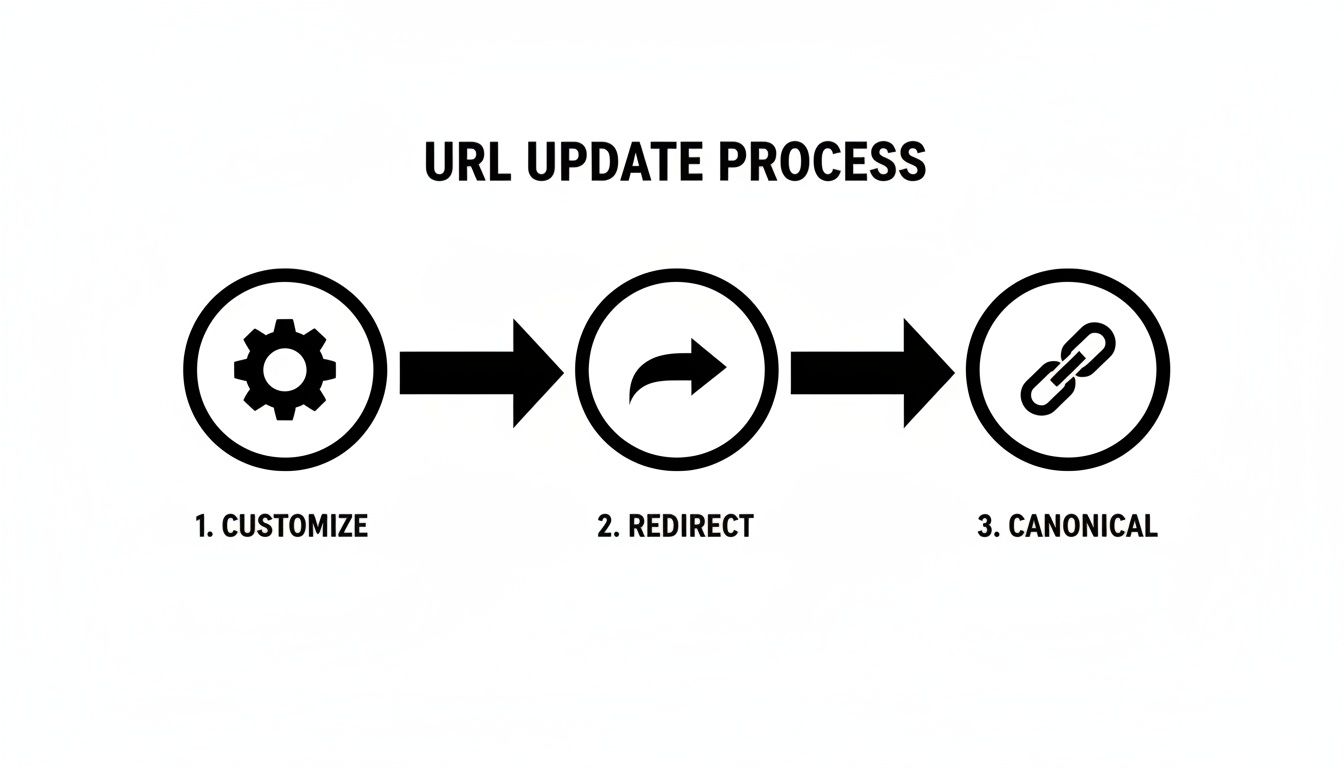
This workflow really drives the point home. Creating the new URL is just the start. Following up with proper redirects and canonical tags is what truly protects your site's SEO value during the change.
How to Execute the Migration Without Tanking Your SEO
Once your URL map is complete, it's time to implement. The single most important action you'll take during a migration is setting up 301 redirects. A 301 redirect permanently tells browsers and search engines that a page has moved, effectively passing its ranking power and link equity over to the new URL.
Think of it this way: a site migration without a solid 301 redirect strategy is like moving your entire showroom to a new address but forgetting to leave a forwarding note. Your loyal customers—and Google—will just show up to an empty building, confused.
Pulling off a migration without losing your rankings requires a careful, methodical approach. To help you stay on track, I've put together a safety checklist based on migrations I've managed over the years.
URL Migration Safety Checklist
| Phase | Action Item | Tool/Method | Key Consideration |
|---|---|---|---|
| Pre-Launch | Crawl the entire old website to get a complete list of all URLs. | Screaming Frog, Semrush, Ahrefs | Don't miss any subdomains or orphaned pages. This list is your foundation. |
| Pre-Launch | Create a detailed URL map, matching every old URL to its new one. | Google Sheets, Excel | This is the most critical step. Every old URL needs a new home. |
| Pre-Launch | Set up the new site on a staging (testing) server. | Staging environment, dev server | Test your 301 redirects here before going live to catch errors early. |
| Launch Day | Deploy the new website and implement all 301 redirects. | Server configuration, platform redirect manager | Double-check that your server is configured to handle permanent redirects correctly. |
| Launch Day | Immediately crawl the new site to check for broken links (404s). | Screaming Frog | Look for redirect chains or loops. Fix any 404 errors on the spot. |
| Post-Launch | Submit your new XML sitemap to Google Search Console. | Google Search Console | This helps Google discover and index your new URLs faster. |
| Post-Launch | Monitor GSC for crawl errors, 404s, and indexing status. | Google Search Console Coverage Report | Keep a close eye on this for the first few weeks. Spikes in errors are a red flag. |
| Post-Launch | Track organic traffic and keyword rankings closely. | Google Analytics, Semrush, Ahrefs | Expect some initial volatility, but watch for any sustained, significant drops. |
Following a checklist like this turns a high-stress, chaotic process into a series of manageable steps. It's the professional's way of ensuring that when you're learning how to create SEO-friendly URLs during a major overhaul, you're protecting the business at every turn.
Common Questions About SEO-Friendly URLs
I've walked you through the fundamentals, but I know there are always a few lingering questions that come up in practice. Let's tackle some of the most common ones I hear from restaurant equipment suppliers to clear up any confusion.
How Long Should a URL Be for Good SEO?
There's no single magic number here, but my rule of thumb is to keep it under 60 characters. Why? Because a shorter URL is just plain easier for a real person to read, remember, and even type out if they need to.
Instead of getting hung up on the exact character count, focus on this: include your main keyword and be ruthless about cutting out anything that doesn't need to be there. A URL like /commercial-griddles/36-inch-gas-flat-top tells a potential buyer exactly what they're about to see. It’s concise and powerful, which is always the goal.
Think of your URL as a tiny headline for the page. If it’s long and confusing, you’re creating friction before anyone even clicks. Simplicity always wins in SEO.
What Should I Do If My E-commerce Platform Creates Ugly URLs?
This is a problem I see all the time, but thankfully, most modern platforms have a fix. Whether you’re on Shopify or WooCommerce, you can usually edit the URL directly.
Look for a section labeled "SEO" or an editable field called a "URL Handle" or "Permalink" on your product and category pages. If your system is spitting out URLs with junk like ?id=123 or &cat=2, you have to change it. Your job is to transform that mess into a clean, keyword-focused slug.
And here’s the most important part: if you change a URL that’s already live and getting traffic, you absolutely must set up a 301 redirect from the old URL to the new one. No exceptions.
Will Changing My Old URLs Hurt My SEO Rankings?
If you do it carelessly, yes—it can absolutely tank your rankings. It's one of the riskiest things you can do in SEO if you don't know what you're doing.
However, when you use 301 redirects correctly, the long-term benefit of having clean, optimized URLs is massive. A 301 redirect is basically a permanent change-of-address form for search engines. It tells Google that the page has moved for good and passes almost all of its ranking power over to the new URL.
Forgetting this step is like moving your showroom to a new address and not telling anyone. Customers get lost, search engines get confused, and your traffic will disappear overnight. This is a critical piece of the puzzle when learning how to create SEO-friendly URLs that stand the test of time.
Ready to stop guessing and start ranking? Restaurant Equipment SEO provides specialized strategies that drive real results in the food service industry. Book a discovery call with us today.