
What Is Keyword Cannibalization In SEO and How Do You Fix It
Ever heard of keyword cannibalization? It's a surprisingly common SEO problem where you accidentally make your own website pages compete against each other for the same search terms. When this happens, you're splitting your authority, confusing search engines, and making it much harder for any of your pages to rank well.
Deconstructing Keyword Cannibalization

Think of it like this: you wouldn't send two of your top salespeople to pitch the exact same product to the same client on the same day, would you? It would create confusion, undermine your company's message, and probably cost you the deal.
That’s exactly what keyword cannibalization does to your website. Instead of presenting Google with one clear, authoritative page on a topic, you're sending multiple weaker ones. This forces Google to guess which one is the most relevant, and its guess might not be the one you want. Or worse, it might decide none of them are strong enough to deserve a top spot.
The Signal Dilution Problem
Search engines look for signals—like backlinks, internal links, and user engagement—to figure out which pages are the most valuable. When multiple pages are fighting for the same keyword, you’re essentially splitting those signals.
- Backlinks: Instead of all your hard-earned external links pointing to one "hero" page, they're scattered across two, three, or more different URLs.
- Content Depth: Your expertise gets fragmented. You might have three decent articles on a topic instead of one knockout, comprehensive resource.
- User Engagement: Clicks, dwell time, and other important metrics get divided, meaning no single page looks as popular or helpful as it could be.
This dilution kills momentum. It stops any one page from accumulating the authority needed to break onto the first page of search results. This is a fundamental concept when you're optimizing your content for search engines, as internal competition can undo a lot of your hard work.
Keyword cannibalization is a self-inflicted wound that weakens your website from the inside out. By forcing your own pages to compete, you inadvertently tell search engines that you don't have a single, definitive answer for a user's query.
A Widespread and Costly Issue
This isn't some obscure technical issue. It's a real problem, especially for websites that have been creating content for years. Some research suggests up to 40% of large websites are dealing with keyword cannibalization.
The impact is significant. It can cause an average 25-30% drop in organic traffic for the affected keywords in as little as six months. For a restaurant equipment seller, that's not just traffic—that's thousands of dollars in lost sales.
To put this in perspective, let's compare what a healthy site structure looks like versus one plagued by cannibalization.
Healthy Site Structure vs Cannibalized Site Structure
This table gives you a quick visual of a well-organized site versus one struggling with internal keyword competition.
| Attribute | Healthy Site Structure | Site With Keyword Cannibalization |
|---|---|---|
| Keyword Targeting | Each important keyword has one dedicated, authoritative page. | Multiple pages target the same or very similar keywords. |
| Page Authority | SEO signals (links, engagement) are concentrated on one URL. | SEO signals are diluted and split across several competing pages. |
| Search Engine View | Google sees a clear, expert resource for a specific query. | Google is confused about which page is the best answer. |
| User Experience | Users find a comprehensive answer on a single, well-structured page. | Users may land on a less relevant or incomplete page. |
| Ranking Potential | The dedicated page has a high chance of ranking on page one. | Multiple pages rank poorly, or the "wrong" page ranks. |
Getting this right is a huge part of good on-page and technical SEO. A clean, logical site architecture, where every page has a distinct purpose, is your foundation for success. This ties directly into the principles we cover in our guide on what is on-page optimization.
Why Keyword Cannibalization Silently Kills Your Rankings
Keyword cannibalization isn't just a bit of a messy website structure—it's a silent saboteur that actively dismantles your SEO work from the inside out. When your own pages start fighting each other for the same spot in search results, you kick off a chain reaction that can slowly but surely tank your performance. Let’s break down the four most damaging ways this happens.
The biggest problem is that it dilutes your page authority. Think of authority like a vote of confidence. When another reputable site links to your page on "commercial convection ovens," they’re casting a vote for that specific URL.
But what happens if you have three different pages all gunning for that same keyword? Those precious backlinks get scattered. Instead of funneling all that link equity into one powerhouse page, you end up with three weaker ones that never gain enough traction to actually compete. It’s like trying to fill three buckets with one hose—none of them ever get full.
It Confuses Search Engines and Users
When Google’s bots crawl your site and find several pages all shouting about the same topic, they get confused. Which one is the real expert? Which page should get the top spot? This indecision creates a huge headache for your SEO: volatile and unpredictable rankings.
One week, your blog post on "choosing a commercial deep fryer" might be sitting on page two. The next, Google might decide your category page is a better fit and swap it in, but now it's on page four. This constant rank-shuffling makes it impossible to build any kind of momentum, turning your SEO tracking into a frustrating guessing game.
Keyword cannibalization forces search engines to make a choice they shouldn't have to. When you don't give them a clear signal about which page is most important, they might just pick a weaker, lower-converting page to show to searchers.
This confusion trickles right down to your customers. Imagine them seeing two or three similar-looking results from your site in their search. It looks disorganized and can be overwhelming, often leading to a lower click-through rate (CTR) as they skip your listings for a clearer answer from a competitor.
It Wastes Your Precious Crawl Budget
Every website gets a crawl budget—basically, the amount of time and resources Google will spend crawling your pages. For a big e-commerce site with thousands of restaurant equipment SKUs, that budget is a finite and incredibly valuable resource.
When you have multiple pages competing for the same keywords, you’re making Googlebot waste its time on redundant content. Every second it spends re-reading a similar page is a second it’s not spending discovering your brand-new product pages or your latest expert guide. This can seriously slow down how quickly your most important content gets indexed and starts to rank.
The financial hit is real, too. One of the most direct impacts of keyword cannibalization is a nosedive in user engagement and, ultimately, sales. When searchers are confused, they bounce. SEO reports have shown that cannibalized keywords can see their CTR drop by as much as 20-25%, and affected sites often report a 15% lower rate of organic conversions. You can discover more insights about the cost of keyword cannibalization and how to steer clear of it.
The Four Main Negative Impacts
To wrap it all up, here are the core ways this issue hurts your site:
- Splits Page Authority: Backlinks and internal links are spread too thin across multiple pages, weakening all of them.
- Damages User Experience: Confusing search results lead to lower click-through rates and make your site look disorganized.
- Wastes Crawl Budget: Search engines burn through their allotted crawl time on redundant pages instead of your fresh, high-value content.
- Creates Ranking Instability: Google is never sure which page to rank, causing your visibility and traffic to fluctuate wildly.
How To Find Keyword Cannibalization Issues On Your Site

Alright, enough with the theory. Let's get our hands dirty and figure out where these issues are hiding on your website. The good news is you don't need to be an SEO wizard to start diagnosing keyword cannibalization. It really just comes down to knowing where to look.
We'll cover a few different methods, from a quick and easy manual check to a more powerful, tool-assisted approach.
Perform A Manual Site Search
Sometimes the simplest method is surprisingly effective. This little trick uses a specific Google search operator to ask Google one simple question: "Show me every single page on this website that you think is relevant for this keyword."
It’s easy. Just head over to Google and type in the following command:
site:yourdomain.com "commercial ice machine"
If Google spits back a long list of your blog posts, category pages, and product detail pages all fighting for that exact phrase, you’ve probably got a problem. Seeing one or two results is fine, but a whole page of them is a massive red flag. It’s a clear sign that you’re sending mixed signals.
Dig Into Google Search Console Data
For a more concrete, data-backed approach, your best friend is Google Search Console (GSC). It's a free tool from Google that shows you exactly which search queries are bringing people to which pages on your site. No guesswork needed.
Here’s how to find the proof in GSC:
- Head into the Performance report.
- Click the + New button near the top and choose Query. Pop in a keyword you think might be causing trouble, like "commercial refrigerator."
- Once the report reloads, click over to the Pages tab.
This screen now shows you every URL on your site that has earned impressions or clicks for that one specific keyword. If you see two, three, or even more URLs with a decent number of impressions, you've just confirmed a cannibalization issue.
Leverage SEO Tools For Deeper Insights
While the free methods work great, dedicated SEO platforms like Ahrefs or Semrush can put this process on autopilot. These tools are built to track keyword performance across your entire site, making it incredibly easy to spot multiple URLs ranking for the same term.
Most of these tools feature a rank tracker. You give it your list of important keywords, and it monitors where you rank. If it sees different URLs from your site showing up for the same keyword on different days—a classic sign called "URL swapping"—it will flag it. To get the most out of this, you really need to know how to track keyword rankings properly.
Key Takeaway: No matter which method you use, your goal is the same: find search terms that bring up multiple pages from your own site. Whether you find it with a manual search or a fancy tool, the evidence points to the same conclusion—your pages are tripping over each other.
Finding these issues often comes down to choosing the right tool for the job. Some methods are quick and free, while others provide deeper, more automated analysis.
Tools For Detecting Keyword Cannibalization
| Tool/Method | Primary Use Case | Complexity | Cost |
|---|---|---|---|
| Google Search Operator | Quick spot-checks for a specific keyword across your domain. | Low | Free |
| Google Search Console | Analyzing real performance data to see which pages rank for specific queries. | Low | Free |
| Spreadsheet/Manual Audit | Creating a comprehensive keyword map to find overlaps across all site content. | Medium | Free |
| Ahrefs / Semrush | Automated rank tracking that flags URL swaps and multiple ranking pages. | Medium-High | Paid |
Each of these tools offers a different lens through which to view your site's structure. For a quick gut check, a manual search is perfect. For a serious, in-depth audit, you'll want to lean on GSC and a paid SEO platform to get the full picture.
Your 5-Step Plan To Fix Keyword Cannibalization
Finding out your own pages are fighting each other for search rankings can be a real gut punch. But here's the good news: this is a completely fixable problem. With a clear strategy, you can untangle the mess and get your SEO back on the right track.
Think of it like a disorganized stockroom. Right now, you’ve got similar products scattered across different shelves, making it impossible for your crew (or Google) to find what they need. The goal is to get everything organized, with a clear, designated spot for each item.
This five-step plan gives you the right tool for whatever kind of cannibalization mess you've found.
Step 1: Consolidate Weaker Content
The most common and effective fix is simply content consolidation. This is your go-to move when you have a handful of thin, weak pages all trying to rank for the same keyword.
Maybe you have three different blog posts on "commercial convection oven maintenance." None of them are doing much, and they’re splitting the tiny bit of authority you have. The solution is to merge them into a single, powerhouse resource.
- Pick Your Champion: Look at the competing URLs and identify the strongest one. This is usually the page with the most backlinks, the highest traffic, or just the cleanest URL. This page will become your new, consolidated hub.
- Merge the Best Bits: Pull all the valuable, unique information from the weaker pages and add it to your champion page. Now’s your chance to beef it up with new details, updated stats, and better images to make it the absolute best guide on the topic.
- Redirect the Old Pages: Once you’ve moved the content over, delete the now-empty pages. This next part is critical: you have to set up 301 redirects from each of the old URLs to your new, consolidated page. This tells Google that the old pages have moved for good, passing all their ranking power and traffic over to your new hero page.
Getting those redirects right is non-negotiable. To make sure you’re preserving every ounce of SEO value, check out our guide on how to do a 301 redirect for a simple walkthrough.
Step 2: De-Optimize Competing Pages
Sometimes, you have two pages that are both genuinely valuable but are accidentally competing. For example, you might have a detailed guide on "choosing a commercial ice machine" and a product category page that’s also trying to rank for that same phrase. You can't just delete the guide—it's a great asset for customers.
In this case, you need to do some strategic de-optimization. The goal isn't to hurt the page, but to give it a slightly different job to do.
You’d go into the guide and shift its focus to a more specific, long-tail keyword. Instead of the broad term, you could target "types of commercial ice makers" or "how to calculate ice machine capacity." By tweaking the title, headers, and body copy, you’re sending a clear signal to Google that this page has a more niche purpose. This frees up your main category page to own the broader term without any internal competition.
Step 3: Use Canonical Tags
What if you absolutely have to keep very similar pages live? This happens all the time on e-commerce sites. You might have the same commercial mixer available in different voltages or colors, resulting in nearly identical product pages.
This is the perfect scenario for the rel="canonical" tag.
A canonical tag is just a small piece of HTML code that points search engines to the "master copy" of a page. It’s like saying, “Hey Google, I know these pages look alike, but this is the one I want you to index and rank.”
This trick lets you avoid duplicate content penalties without having to delete pages or use redirects. It's the ideal tool for handling product variations and other necessary duplications on your site.
Step 4: Audit Your Internal Linking
The way you link between your own pages tells Google which ones you think are most important. Keyword cannibalization is often made worse by a messy internal linking profile. You might have dozens of blog posts all using the anchor text "commercial refrigerators" but linking to three or four different competing pages.
It’s time for an internal linking audit.
Go through your site and find all the links pointing to the weaker, competing URLs. Your job is to update every single one of them so they point to your one, true, authoritative page. This funnels all that internal authority to a single spot and reinforces to Google which page should be ranking.
Step 5: Create a Proactive Keyword Map
The first four steps are about fixing problems that already exist. The best long-term strategy, however, is to stop them from happening in the first place. That’s where a keyword map comes in.
A keyword map is just a spreadsheet that assigns a specific target keyword to every important URL on your website. It becomes your SEO bible.
- Before writing a new blog post or creating a new page, you check the map. Has that keyword already been taken? If so, you pick another one.
- When you’re updating old content, you refer to the map to make sure you’re staying true to that page's original purpose.
This simple organizational tool is the single most effective way to prevent keyword cannibalization. It makes sure every piece of content has a unique mission, building a clean, powerful site architecture from day one.
The Hidden Threat of AI Content Cannibalization
Just when you think you've wrapped your head around keyword cannibalization on your own site, a new player enters the game. This isn't about you accidentally competing with yourself; it's about something far more insidious: AI content cannibalization.
This happens when third-party AI tools scrape your expert content, spin it into a slightly different version, and publish it elsewhere on the web. Suddenly, you're competing against a soulless echo of your own work. To really understand the problem, it helps to know what AI-generated content is and how these tools operate. Unlike classic cannibalization, this threat erodes your authority and leeches away your traffic without you ever creating a second page.
The Rise of the AI Clone
When these AI-generated clones start popping up, they muddy the waters for search engines. Google is left wondering, "Who's the real authority here?" In a worst-case scenario, an AI-rewritten copy can actually outrank the original article it was stolen from, especially if it lands on a site with a higher domain authority.
This isn't just a hypothetical problem. Recent data reveals that AI clones are already siphoning off 15-20% of the original traffic shares for some queries. What's more, a staggering 60% of top-10 search results for certain informational keywords now feature AI-generated variants, pushing the original creators down two to three spots.
AI content cannibalization shifts the battlefield. You're no longer just doing an internal audit; you're playing an external monitoring game. Your biggest competitor for a keyword might not be another business, but a machine-generated echo of your own expertise.
So, how do you fight back? The best defense is a good offense. Double down on creating content with unique data, firsthand experiences, and insights that an AI can't easily fake. You can also use structured data (schema markup) to signal your authorship to search engines and make it a habit to monitor for plagiarism. Catching these AI clones early is key to stopping them from doing real damage.
While the flowchart below deals with fixing traditional keyword cannibalization, the underlying principle is the same: identify the problem and apply a specific solution.
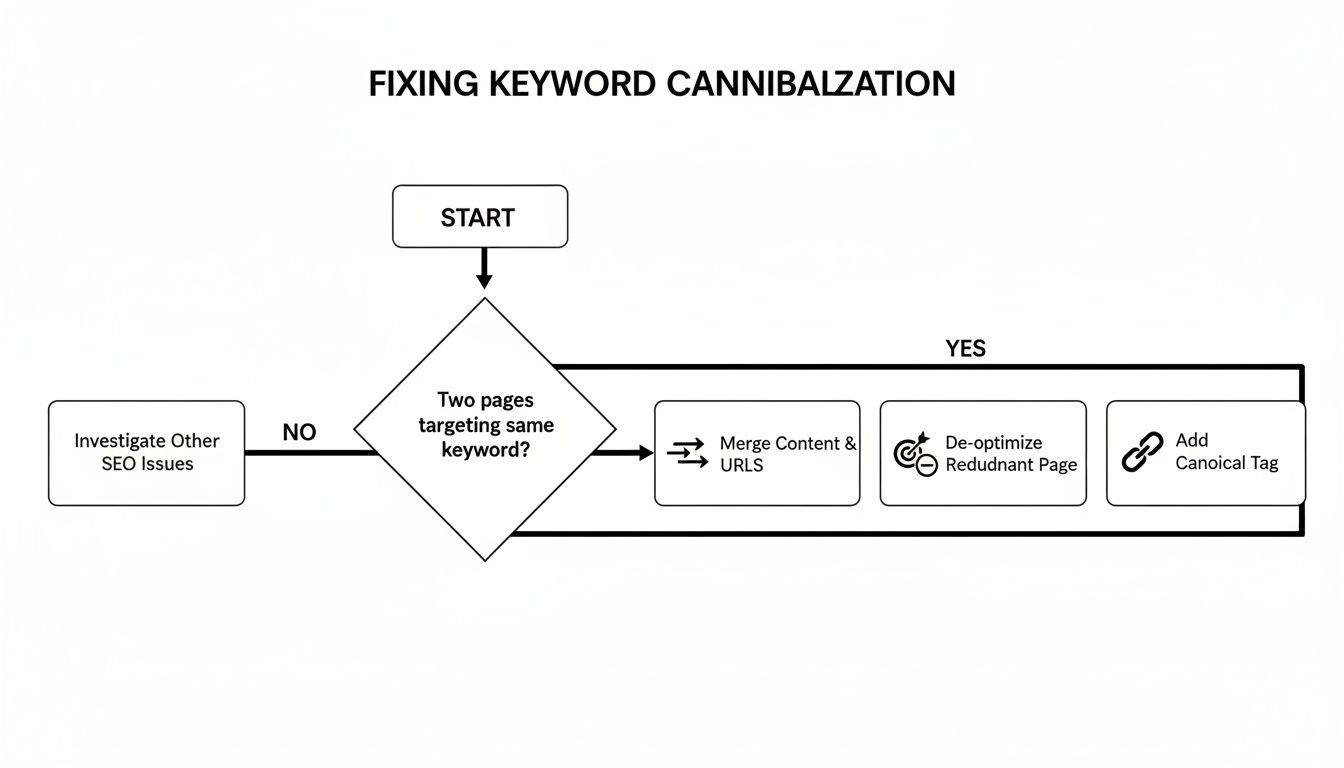
Whether it's merging your own content or dealing with an AI clone, every cannibalization issue has a clear path to resolution, from content consolidation to using canonical tags.
Got Questions? We've Got Answers
Let's tackle a few common questions that pop up when you're wrestling with keyword cannibalization. Think of this as a quick-reference guide to help solidify your understanding and get you moving in the right direction.
Is It Always Bad To Have Multiple Pages About The Same Topic?
Not at all. In fact, it's often a smart strategy. You might have a whole cluster of pages around a big topic like "commercial refrigeration," and that's perfectly fine.
The real trouble starts when two or more pages target the exact same keyword and user intent. The goal is to make sure every page has its own unique job. For instance, one page can go after "commercial walk-in coolers" while a completely different one targets "under-counter bar refrigerators." They're related, but they serve different needs.
How Often Should I Check For Keyword Cannibalization?
As a rule of thumb, it's a good idea to run a cannibalization audit quarterly. You could also bundle it in with your regular, larger content audits. If you're publishing new content at a rapid pace, you might want to check in a bit more often.
A great habit to build is checking for potential conflicts before you publish a new blog post or page. A quick search of your own site can prevent a headache down the road.
This kind of regular maintenance is crucial for keeping your site's SEO in top shape and truly understanding what is keyword cannibalization in SEO.
Can I Just Delete The Competing Page To Fix The Problem?
Whoa there! Hitting delete is usually a last resort. It's a risky move because if that page has valuable backlinks or is getting even a trickle of traffic, you'll lose all that equity and create a frustrating 404 error page. That's a bad look for both your visitors and Google.
The much safer—and smarter—play is to merge the best parts of the weaker page into your main one and then set up a 301 redirect. This tells search engines to pass all the authority and traffic from the old URL to your consolidated, more powerful page. You're combining your strength, not just throwing it away.
Ready to stop your pages from fighting each other and start dominating the search results? The experts at Restaurant Equipment SEO can audit your site, fix cannibalization issues, and build a powerful strategy that drives qualified traffic. Get your custom SEO plan today