
How to Analyze Log File Data for Maximum SEO Impact
To get a real handle on your technical SEO, you have to look past the usual analytics reports. You need to see the raw, unfiltered data showing every single request a search engine bot makes to your server. This is how you see your website exactly as Googlebot does, uncovering hidden problems and opportunities that other tools simply can't find.
Why Server Logs Are Your Secret SEO Weapon

Let's clear something up: server logs aren't just for developers hunting down server errors. For SEOs, they are an absolute goldmine of pure, unfiltered data that you won't find in platforms like Google Analytics. Logs show you precisely how search engine bots—from the well-known Googlebot to newer AI crawlers—are interacting with every single part of your site.
This gives you a direct line to the most accurate source of truth for your technical SEO. While other tools show you what your users are doing, logs show you what search engines are doing. That distinction is crucial for diagnosing the kinds of issues that directly tank your rankings.
Uncovering the Raw Truth
Every time a search bot hits your site, it leaves a little digital footprint in your server log file. When you start analyzing these footprints, you can finally answer critical questions instead of just guessing:
- Crawl Budget: Is Googlebot wasting its limited time crawling thousands of low-value faceted navigation URLs or old PDF spec sheets?
- Page Priority: Are your most important product category pages getting crawled frequently, or are they being overlooked?
- Error Discovery: Are bots constantly hitting hidden 404 "Not Found" errors or 5xx server errors that your users would never even think to report?
- Bot Behavior: How do different bots like Googlebot, Bingbot, and various AI crawlers behave? Are they even accessing the right content?
By interpreting this raw data, you move from making assumptions to making evidence-based decisions. It's the difference between guessing why a page isn't ranking and knowing that Googlebot hasn't even bothered to crawl it in three months.
A Real-World Impact on Growth
This isn't just theory—it has a massive impact. I've personally seen it happen. Our team recently used these exact principles to dive into a client's server logs and found a huge amount of crawl budget being wasted on outdated URL parameters.
After we implemented specific fixes based on what the log data told us, we were able to steer search bots toward their high-value pages. The result? A staggering 390% increase in organic traffic in just 11 months.
Learning how to read these files is a game-changing skill. If you're ready to get started, our comprehensive guide on log file analysis provides a great foundational overview. It’s all about turning abstract data into a clear action plan that drives serious organic growth.
Getting Your Hands on the Log File Data

Before we can dig into the good stuff, we have to actually get the data. This first step can feel a bit intimidating if you've never done it, but it’s usually much simpler than it sounds. Think of your server logs as the raw intel needed to uncover huge SEO opportunities—so let's go get them.
For most people, the easiest way in is through your web hosting control panel, like cPanel or Plesk. Just log in and look for an icon or menu item labeled "Raw Access Logs," "Access Logs," or just "Logs." From there, you can usually download the logs for your domain with a single click. They’ll often come as a compressed .gz file.
This is the perfect way to start since it doesn’t require touching the command line. But if you're comfortable working directly on the server or don't have a control panel, using SSH is the way to go.
Using the Command Line for Direct Access
If you have direct server access, a command like scp (which stands for secure copy) is a super-fast way to pull down your log files. It does exactly what it sounds like: securely transfers files from your remote server to your local machine.
A typical command will look something like this:
scp username@yourserver.com:/var/log/apache2/access.log /local/path/
Let’s quickly break that down:
-
scpis the command that kicks off the file transfer. -
username@yourserver.comis just your server login info. -
:/var/log/apache2/access.logis the file path on the server. This can change depending on your setup—for instance, an NGINX server might use/var/log/nginx/access.log. -
/local/path/is simply the folder on your computer where you want to save the file.
This direct method is a lifesaver, especially when you're dealing with massive log files or want to automate the download process.
Prepping the Data for Analysis
Once you have the files, you’ll probably be looking at several of them, maybe one for each day. For a complete picture, you need to combine them into one master file. Since these are just plain text files, you can merge them easily with a text editor or a simple command.
The amount of data you're about to work with can be staggering. The global log management market is expected to balloon by USD 3,228.5 million between 2025 and 2029, all because of the need to manage a data explosion projected to hit over 180 zettabytes worldwide by the end of 2025.
Key Takeaway: The goal here is all about preparation. You need a single, clean log file that contains all the Googlebot activity for the timeframe you're analyzing. Don't rush this part—trying to work with fragmented data is a surefire way to get frustrated and miss critical insights.
A dedicated tool makes parsing all this data manageable. For our purposes, the best place to start is the Screaming Frog SEO Log File Analyser. It’s built specifically to translate raw server logs into clear, actionable SEO reports. Once you know how to import your combined log file correctly, the real detective work can finally begin.
And if you’re getting all your tracking systems in order, this is a great time to also check out our guide on setting up your analytics tracking ID to make sure all your data sources are properly aligned.
Finding Critical SEO Issues in Your Crawl Data
Now that your log data is organized, the real fun begins. This is the detective work—connecting the dots between what search engine bots are doing and how your site is actually performing. We're moving beyond raw numbers to build a concrete action plan.
The whole point is to find the inefficiencies and errors that are dragging your site down.
First up, let’s look at crawl frequency. Are your most important pages—your main product categories, best-selling equipment, or key informational guides—getting a visit from Googlebot every day? If they aren't, that's a huge red flag. It tells you Google doesn't see them as a priority.
On the flip side, you need to figure out where your crawl budget is being wasted. This is easily one of the most common and damaging problems we uncover when we first analyze log file data for a new food service client.
Pinpointing Crawl Budget Waste
Crawl budget is simply the number of pages search engine bots will crawl on your website in a certain amount of time. If those bots spend their limited resources on junk pages, your important pages pay the price.
Let's say your restaurant supply site has a detailed faceted navigation system with thousands of potential filter combinations—brand, voltage, size, you name it. Your log files might show Googlebot crawling thousands of these parameter-heavy URLs that create duplicate content. All that time wasted could have been spent on your brand-new commercial convection oven category.
Keep an eye out for high crawl counts on pages like:
- Faceted navigation URLs that generate thin or duplicate content.
- Old redirect chains from a past site migration that are still being followed.
- Outdated resources, like old PDF spec sheets or discontinued product pages.
- Staging or development subdomains that were accidentally left open for bots to find.
Uncovering this kind of waste is a massive win. When you clean it up, you’re basically telling Googlebot, "Hey, stop looking at this junk and focus on the pages that actually make us money." This is often the quickest way to see a real, positive impact from your log file analysis.
Uncovering Hidden Status Code Errors
Your log files give you an unfiltered view of every single response your server gives to a bot. This is where you’ll spot errors that tools like Google Search Console, which often relies on sampled data, might miss.
To get to the bottom of these issues, you need to understand what the different HTTP status codes mean. These codes are like quick notes from your server telling bots (and browsers) the status of a request.
Here’s a quick-reference table to help you interpret the most common codes you'll find and what they mean for your SEO.
Common Log File Status Codes and Their SEO Impact
| Status Code | Meaning | SEO Action Required |
|---|---|---|
| 200 OK | Success! The page was found and delivered without any issues. | None. This is what you want to see for your important pages. |
| 301 Moved Permanently | The page has permanently moved to a new URL. | Monitor to ensure bots aren't crawling old URLs in long redirect chains. Update internal links. |
| 302 Found/Moved Temporarily | The page has temporarily moved. | Use sparingly. If the move is permanent, change to a 301 to pass link equity correctly. |
| 404 Not Found | The requested page doesn't exist. | Find and fix the source of the broken link (internal links, sitemaps, etc.). This is a major crawl budget waster. |
| 410 Gone | The page has been permanently removed and will not return. | Intentionally use this for pages you've deleted to tell Google to de-index them faster than a 404. |
| 500 Internal Server Error | Something is wrong with the server itself. | This is a high-priority issue. Work with developers to diagnose and fix the server-side problem immediately. |
| 503 Service Unavailable | The server is temporarily down (e.g., for maintenance). | A few of these are okay, but frequent HTTP 503 errors signal reliability problems that can harm rankings. |
While a 200 OK is the goal, your real mission is to hunt for the problems. A high number of 404 Not Found errors points to a minefield of broken internal links or an outdated sitemap. Bots repeatedly hitting these dead ends is a huge waste of their time.
The 5xx server errors are even more serious. A 500 Internal Server Error means your server is broken and can't show the page to anyone, including Googlebot.
Think of it this way: a 404 is like sending a bot to an address that doesn't exist. A 5xx error is like the bot getting to the right address, only to find the building is locked and no one has a key. Either way, your page isn't getting indexed.
Differentiating Between Search and AI Bots
Lastly, don't limit your analysis to just Googlebot. A modern approach to log file analysis has to account for all the different user agents crawling your site. Your logs will show traffic from Bingbot, DuckDuckGoBot, and a growing number of AI crawlers like ChatGPT-User and Google-Extended.
By segmenting your data by user agent, you can start to see how different bots interact with your content. You might find that AI bots are heavily focused on your blog and resource articles, which could give you ideas for your future content strategy. Understanding this wider ecosystem is no longer a "nice-to-have"—it's critical for a forward-thinking SEO strategy.
Choosing the Right Log Analysis Tools
You could technically try to open a raw server log file in a text editor, but you’d quickly find yourself staring at an endless mountain of gibberish. Trust me, it's not a good use of your time. The right tool doesn't just save you hours of manual work; it automatically pulls out the critical insights you need to make smart SEO decisions.
The best choice really boils down to your budget, how comfortable you are with technical tools, and the sheer volume of data your site generates.
For most SEOs and marketers in our space, the go-to choice is the Screaming Frog SEO Log File Analyser. It was built from the ground up specifically for this job. It takes those intimidating raw text files and turns them into charts and reports that actually make sense. In a few clicks, you can see which URLs are crawled the most, spot response code errors, and track search bot behavior over time—no coding required.
Tools for Different Needs
Screaming Frog is fantastic, but it's not the only game in town, especially as your needs get more complex. Generally, your options fall into one of three buckets:
- SEO-Specific Tools: These are built for people like us. On top of Screaming Frog, you've got tools that focus directly on SEO insights like crawl budget analysis and isolating bot traffic from specific search engines.
- Enterprise-Grade Platforms: Think big. Solutions like Splunk are absolute powerhouses designed for big data analytics across an entire organization, not just SEO. They offer incredible customization but come with a much steeper learning curve and a hefty price tag.
- Open-Source Alternatives: For those with development resources, tools like Graylog offer a free, highly customizable option. It takes more work to set up and maintain, but you get complete control over your data.
It's no surprise that log analysis has become a massive business. The market was valued at $2.5 billion in 2023 and is on track to hit $6.3 billion by 2032. Big players like Splunk serve over 17,915 customers worldwide, which shows just how vital this data is for everything from cybersecurity to marketing. For a food service site generating tons of log data, these tools are what turn all that noise into real operational wins. You can dig deeper into these trends and learn how to analyze log file data with modern tools on uptrace.dev.
Making Your Decision
When you're picking a tool, think about how it fits into your broader marketing stack. The insights you get from log files can supercharge the strategies you develop with other software. For instance, you can cross-reference crawl data with findings from our guide on the best tools for competitor analysis.
Here’s a quick look at what an enterprise-level tool like Splunk's interface looks like. It’s all about visualizing complex data into digestible dashboards.
A dashboard like this is designed to help you spot anomalies and trends across millions of log entries almost instantly.
If you’re ready to get even more advanced, you might explore some of the best AI tools for data analysis that can chew through large log datasets and find patterns you'd never spot on your own.
For most restaurant equipment sites just starting with log analysis, Screaming Frog really hits that sweet spot of power and usability. But it's good to know what other options are out there for when your site—and your data—starts to grow.
Turning Log Insights Into Actionable SEO Wins
You’ve done the hard part of collecting and wrangling the data. Now for the fun part: turning those raw numbers into an actual SEO action plan. The whole point of a log file analysis is to create specific, prioritized tasks, not just to admire pretty spreadsheets.
This is where you stop being a data analyst and start being an SEO strategist. Without a clear plan, you'll drown in information. We need a framework to focus your energy on changes that will actually move the needle.
A Framework for Prioritizing Fixes
Think of your findings as a raw to-do list that needs a serious dose of reality. Not all issues are created equal. A few hundred 404 errors on old, long-forgotten blog comments? Annoying, but not critical. Googlebot failing to access your main commercial refrigeration category page? That's a code-red problem.
Start by bucketing your findings into two simple categories: high-impact and low-impact.
- High-Impact Issues: These are the big ones. They directly harm your most valuable pages, torch your crawl budget, or scream "major site health problem!" Think frequent 5xx errors or key product pages getting ignored by Googlebot.
- Low-Impact Issues: This is the small stuff. Bots crawling a handful of unimportant URLs, a few broken links on a "meet the team" page from 2012, that sort of thing.
Focus your initial efforts exclusively on the high-impact list. Seriously. Fixing one major issue—like getting your top-selling products crawled daily—will deliver more SEO value than chasing down a hundred minor ones.
If you're still deciding on the right tool to even uncover these insights, this decision guide can help you match the software to your specific needs.
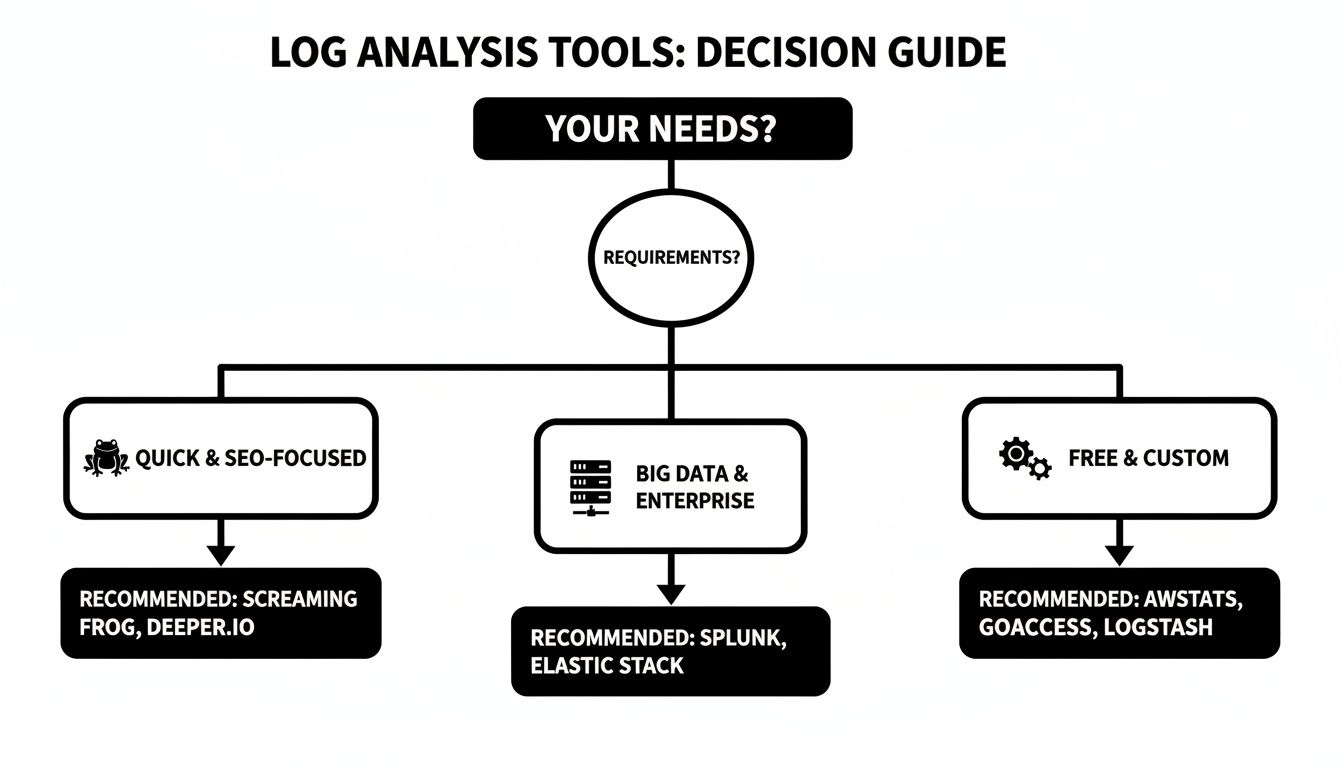
The takeaway here is simple: pick your tool based on your goal. Whether you need quick SEO answers, an enterprise-level data processor, or a free, custom-built solution, there's an option for you.
Mini Case Studies: If You See This, Do That
Let's make this more concrete. Here are a couple of real-world scenarios you’ll likely find in your own food service site's logs, and exactly what to do about them.
Scenario 1: Massive 404 Errors from an Old URL Structure
-
What You See: Your logs are on fire with thousands of daily hits from Googlebot to ancient URLs from a site migration you did years ago (e.g.,
/products.php?id=123). Every single one is a 404 "Not Found." - What You Do: This is a high-priority crawl budget killer. Drop everything and create a comprehensive 301 redirect map. You need to map every significant old URL to its new equivalent. This isn't just about stopping the crawl waste; it's about reclaiming any link equity pointed at those old pages.
Scenario 2: Key Product Categories Are Rarely Crawled
- What You See: Your log data shows Googlebot loves your homepage—it visits daily. But your brand new "Commercial Ice Machines" category? It gets a visit maybe once a month.
- What You Do: This is a classic internal linking and site architecture problem. The immediate fix is to add more internal links from your high-authority pages (like the homepage) to this under-crawled category. Make it easy for Google to find. Also, double-check that it's prominently listed in your XML sitemap and manually submit that category URL for indexing in Google Search Console to give it a nudge.
This kind of strategic analysis is becoming big business. The global log management market was valued at $2.51 billion in 2024 and jumped to $2.85 billion in 2025, growing at a healthy 13.3% clip. By getting their hands dirty in these logs, savvy SEOs can fine-tune their sites, leading to huge wins like the staggering 390% organic traffic boost we saw at Restaurant Equipment SEO in just 11 months. You can dive deeper into the trends by checking out the full report on the log management market.
Common Questions About Digging into Server Logs
Jumping into log file analysis for the first time can feel a little intimidating. It’s normal to have questions. Let’s tackle some of the most common ones I hear from clients and in workshops.
How Often Should I Actually Be Doing This?
For most websites, a quarterly analysis is a great rhythm. It gives you a solid baseline to monitor search engine bot behavior and spot any weird trends before they become major problems. Think of it as a regular health check for your site's crawlability.
That said, you’ll want to ramp things up to monthly or even weekly in a few specific situations. If you’ve just gone through a site migration, launched a huge batch of new content, or are wrestling with a tricky indexing issue, don't wait. A quick log analysis will tell you if Google is seeing your changes the way you intended.
Do I Need to Be a Developer to Analyze Logs?
Nope, not at all. While you might need to click around in your hosting panel or ask a developer for the raw file, the analysis part is surprisingly accessible these days. You definitely don’t need to know how to code.
Tools like the Screaming Frog Log File Analyser are built for SEOs and marketers, not just engineers. It takes that massive, unreadable text file and turns it into clean dashboards, charts, and reports that make perfect sense. It makes spotting patterns in crawl activity something anyone can do.
The single biggest mistake I see people make is diving in without a clear goal. The sheer volume of data is overwhelming, and it's incredibly easy to get lost in the weeds.
Before you even open the file, ask yourself what you’re trying to find. Are you hunting for wasted crawl budget? Are you checking if those new category pages are getting crawled? Having a specific question focuses your entire effort, turning noise into actionable insights. This one simple step is the key to an analysis that actually improves your SEO.
Ready to turn raw data into a powerful SEO strategy? The team at Restaurant Equipment SEO specializes in deep-dive technical analysis that uncovers hidden growth opportunities for your food service business. Get in touch with us today to see how we can help.