
Check SERP Position for Keywords A Guide for B2B Sellers
If you want to effectively check SERP position for a keyword, you need to do more than just type it into Google. Getting a true picture means combining a few different approaches: clean, unbiased manual checks, digging into Google's own tools like Search Console, and using dedicated rank tracking software to see how your business really shows up for potential customers.
Why SERP Position Is Your Most Important Business Metric

Knowing where you rank isn't just about stroking your ego—it's one of the most vital business intelligence activities you can perform. It has a direct, measurable impact on your bottom line. For a restaurant equipment seller, the gap between ranking #1 and #5 for a high-value term like "commercial convection oven" represents a massive difference in potential leads and sales.
Think of it this way: your SERP position is the digital version of your storefront's location. Are you on the bustling main street, or are you tucked away in a quiet alley? To really grasp this, you first have to understand What Is Search Engine Optimization and how it creates that all-important visibility.
The Direct Link Between Rankings and Revenue
The relationship between your search engine rank and the traffic you get is incredibly steep. You fight for that top organic result because it grabs a huge chunk of the user's attention and, more importantly, their clicks. Those clicks are the first step toward a sale.
The data doesn't lie. Take a look at the click-through rates (CTR) by SERP position. This table really drives home just how critical those top spots are, showing how quickly user attention drops off as you move down the page.
Click-Through Rate (CTR) by SERP Position
| SERP Position | Average Click-Through Rate (CTR) | Traffic Potential Impact |
|---|---|---|
| 1 | 39.8% | Maximum Exposure |
| 2 | 18.7% | Less than half of #1 |
| 3 | 10.2% | Significant Drop-off |
| 5 | 4.9% | Moderate Visibility |
| 10 | 3.0% | Minimal Visibility |
The numbers are pretty staggering. The top result gets more than double the clicks of the second spot and is 10 times more likely to get a click than the page ranking at position #10. With over 90% of searchers never even looking at the second page, if you're not on page one, you're practically invisible.
A Real-World Scenario for Equipment Sellers
Let’s put this into practice. Imagine your business is targeting the keyword "stainless steel prep tables." A top-three ranking for that term doesn't just bring in random clicks; it attracts highly qualified traffic from chefs, kitchen managers, and restaurant owners who are actively looking to buy.
That steady stream of organic leads can easily outperform a paid ad campaign in a single month.
Your SERP position dictates the quality and volume of your inbound leads. Tracking it isn't about ego—it's about monitoring the health of your sales pipeline and making smart decisions about your content and competitive strategy.
When you meticulously track your position, you can start to make some real strategic moves:
- Spot Growth Opportunities: You’ll see which product pages are climbing the ranks and deserve a little extra promotional push.
- Diagnose Content Problems: You can quickly identify pages that are slipping, signaling they might need a refresh or optimization.
- Analyze Your Competition: It becomes clear who is gaining ground on your most valuable keywords, allowing you to react.
Ultimately, to check SERP position for a keyword is to measure your market share in the digital world. It's that simple.
How to Manually Check Your Rankings Accurately
Just Googling your keywords is the fastest way to get bad data. I see it all the time—business owners get a skewed sense of their performance because Google’s results are tailored to them. The search engine knows your browsing history, your location, and what device you’re on, so what you see isn't what a potential customer sees.
To get a real sense of where you stand, you have to find a way to see what an unbiased, first-time searcher would see. That’s your true baseline.
Bypassing Google Personalization
First things first: always use an incognito or private browsing window. This is non-negotiable. It clears the slate by ignoring your past search history and cookies, which immediately gives you a cleaner, more realistic view of the SERP.
But incognito mode doesn't solve everything. Google still sees your IP address and uses it to guess your location, which is a massive ranking factor for local searches. If your business is in Atlanta and you search for "commercial refrigerators," you’re naturally going to see yourself ranking higher than a competitor checking from Miami.
To get around this, you have to simulate searching from different cities.
Pro Tip: I recommend using a VPN or a browser extension to change your location. This is the only way to accurately check how you rank for "commercial refrigerators in Atlanta" when you're not actually in Atlanta.
Simulating Different Devices
Your rankings can be completely different on a desktop versus a smartphone. With so many B2B buyers now doing their initial research on their phones, you absolutely have to know where you stand on mobile.
The good news is you don't need a bunch of different devices. Your web browser already has the tools you need built right in. In Chrome or Firefox, for instance, you can easily mimic a mobile device.
- Open Developer Tools: Just right-click on the page and hit "Inspect."
- Toggle Device Toolbar: Find the small icon that looks like a phone and tablet. Click it.
- Select a Device: A dropdown will appear, letting you see the SERP exactly as it would look on an iPhone, a Google Pixel, or other popular devices.
This simple check can uncover major discrepancies. If you're on page one on desktop but page three on mobile, you've likely got a technical SEO issue that needs immediate attention. For a deeper dive into this, you can read our guide on how to check keyword ranking.
Using Search Operators for Quick Checks
Sometimes you just need a quick-and-dirty check to see if a specific page is even on Google's radar for a certain term. This is where Google Search Operators are incredibly useful, especially the site: operator. It lets you search exclusively within your own website.
Let's say you just published a new guide to walk-in coolers. You could search for:site:yourdomain.com "best commercial walk-in coolers"
This query forces Google to show you only the pages on your site relevant to that phrase. It won't tell you your exact rank against competitors, but it's a fantastic way to quickly confirm that Google has indexed your page and understands what it's about.
Using Google's Free Tools for Deeper Rank Insights
Manual checks are good for a quick spot-check, but if you want a sustainable, data-backed SEO strategy, you have to go straight to the source. Google Search Console (GSC) is, without a doubt, the most important free tool in your arsenal. It gives you an unfiltered look at how Google sees your website, taking you from guesswork to genuine performance analysis.
This is where you stop just asking "where do I rank?" and start understanding the entire story of your organic visibility. GSC provides the hard data you need to make smart, informed decisions.
The Performance report, shown above, is the heart of GSC. It breaks down the keywords bringing people to your site, your average position for those terms, and how users are engaging with your listings. It’s essentially a direct line from Google telling you exactly what’s going on.
Unpacking the Performance Report
Once you're inside GSC, head straight for the 'Performance' report—this is your mission control for SEO. It’s built around four core metrics that are essential for tracking your SERP position over time.
- Total Clicks: The raw number of times someone actually clicked your link and landed on your site. This is your organic traffic.
- Total Impressions: How many times a link to your site was displayed in the search results. This is your visibility.
- Average CTR (Click-Through Rate): The percentage of impressions that turned into a click. A great indicator of how well your title and description are grabbing attention.
- Average Position: Your average rank for a specific keyword over a set period. This is the key metric for watching your SERP movement.
Let's put this into a real-world context. Say you published a detailed buyer’s guide on "how to choose a commercial dishwasher." In the Performance report, you can filter by that page's URL to see every single search query it's ranking for. You might find it’s holding steady at position 5 for your main keyword, but you might also discover it’s sitting at position 12 for an unexpected long-tail query like "high-capacity commercial dishwasher reviews." A manual search would almost certainly miss that.
Here's a pro tip: Look at your average position alongside your clicks and impressions. When you find keywords with high impressions but a low CTR, that's a golden opportunity. It often means you can get more traffic just by rewriting your page title or meta description to be more compelling—without even needing to improve your rank.
Connecting Rankings to Real Business Results
Knowing you rank #3 is great. Knowing that #3 ranking is driving sales is what really matters. This is where connecting GSC to Google Analytics becomes a game-changer. By linking these two free platforms, you can follow a customer's journey all the way from their initial Google search to a final purchase on your site.
This integration finally answers the most important question: "Are the keywords we're ranking for actually making us money?" You can build reports in Google Analytics that show you precisely which search queries from GSC are leading to the highest conversion rates. This lets you double down on the keywords that have a real commercial impact on your restaurant equipment business.
While GSC is your primary source of truth, it's good to know the limits of other free tools. Many businesses find out the hard way why Google Alerts is not working effectively for precise rank monitoring. For true performance insights, the one-two punch of Search Console and Analytics is your most reliable, cost-free solution.
Switching to Automated Rank Tracking with SEO Software
Let's be real: manual checks and digging through Google Search Console can only take you so far. They're great for a quick snapshot, but they just don't scale. If you're serious about your SEO, you need to graduate from random spot-checks to a professional, automated monitoring system.
This is where dedicated rank tracking software comes in. These tools are built to check SERP position for a keyword automatically, often daily, giving you a clean, consistent history of how you're performing. More importantly, they strip out all the noise from personalization and location that can skew your manual searches, giving you reliable data you can actually act on.
Finding the Right Rank Tracker for Your Business
For a B2B seller in the restaurant equipment space, not just any rank tracker will do. You have unique needs. While big names like Semrush, Ahrefs, and SE Ranking are solid contenders, you need to look past the brand names and focus on the features that will make a difference for your business.
So, what's on the checklist?
- Granular Local Tracking: Can the tool tell you how you rank for "ice machine financing in Dallas" versus "ice machine financing in Chicago"? Your customers are local, and your tracking needs to be, too.
- Competitor Benchmarking: A good tool lets you plug in your top three competitors and see exactly how you stack up against them for your most important keywords. This is pure strategic gold.
- SERP Feature Insights: Does it show you who owns the Featured Snippet? Or who's dominating the Local Map Pack? These SERP features are often more valuable than a standard blue link.
- Effortless Reporting: The best platforms can email you a clean PDF report every week or month. This saves you from hours of wrestling with spreadsheets. For a deeper dive, take a look at our guide on the best tools for competitor analysis.
This flowchart lays out a simple decision-making process for which tool to use and when.
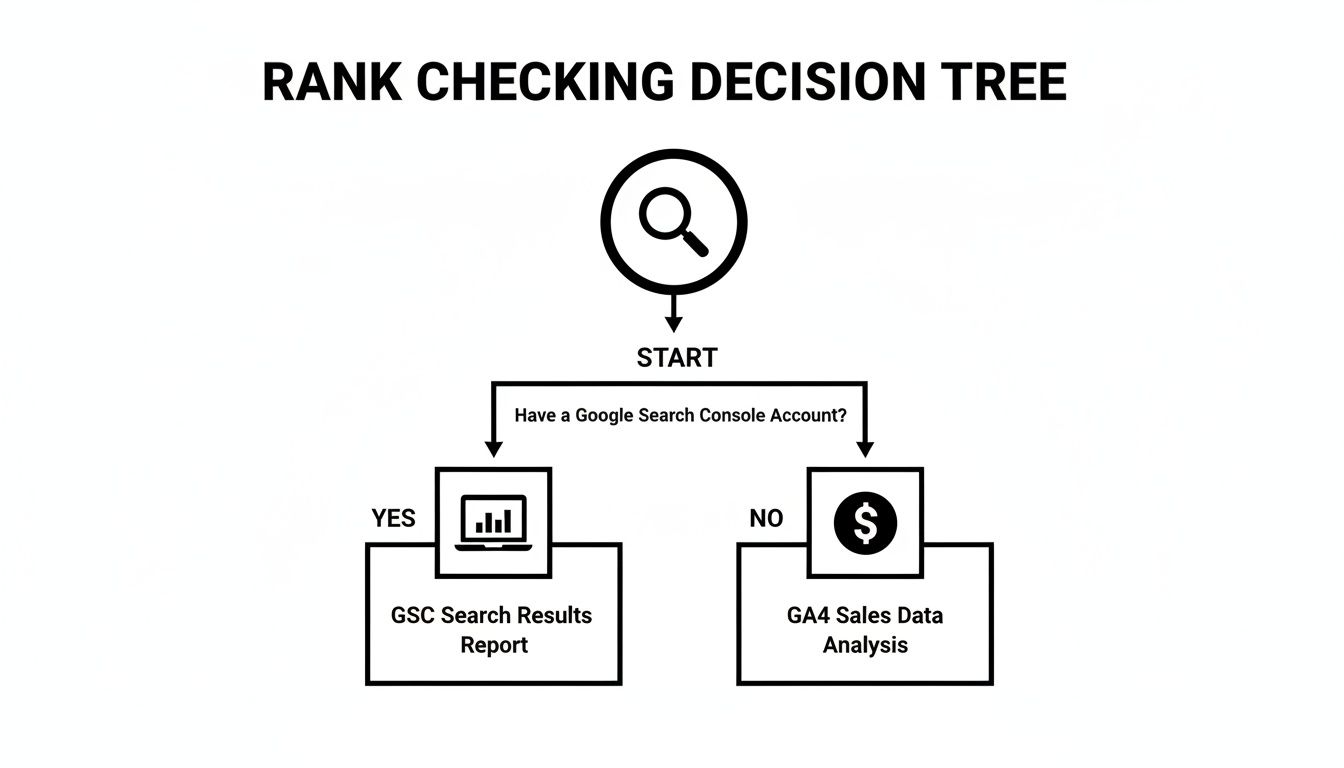
As the flowchart illustrates, the right tool depends on what data you have available and what specific questions you're trying to answer about your performance.
A Quick Look at Different Tracking Methods
To help you decide, here’s a quick breakdown of the different ways to track your rankings. Each has its place, but for consistent, scalable results, dedicated software is usually the winner.
Comparison of SERP Tracking Methods
| Method | Best For | Accuracy | Cost | Scalability |
|---|---|---|---|---|
| Manual Checks | Quick, one-off checks for a single keyword. | Low (affected by personalization). | Free | Very Low |
| Google Search Console | Seeing average positions and discovering new keywords. | Medium (provides averages, not daily rankings). | Free | Medium |
| Rank Tracker Software | Daily, accurate tracking of many keywords across locations. | High (unbiased, consistent data). | Paid Subscription | High |
| SERP APIs | Large-scale, custom tracking and data integration. | Very High (raw, real-time data). | High | Very High |
As you can see, while free tools are a great starting point, they lack the precision and scalability needed to manage a competitive SEO strategy for a growing business.
A Real-World Example in Action
I once worked with a regional commercial refrigeration supplier who provides a perfect case study. They were using a rank tracker to keep tabs on a handful of high-value keywords, including "walk-in freezer installation." For months, they were holding steady at position #2, right behind a huge national brand.
Then, one Monday morning, their automated report flagged a change. A smaller, local competitor had jumped out of nowhere to position #3, pushing our client down to #4. The software didn't just tell them they dropped; it pinpointed the exact URL that was now outranking them—an incredibly detailed, technical guide to freezer installation that put their own content to shame.
By spotting this change the moment it happened, the supplier was able to react immediately. They didn’t have to wait weeks for a drop in leads to realize there was a problem; the data gave them a crucial head start.
Armed with this intel, their marketing team got to work. They developed a new "Ultimate Guide to Walk-In Freezer Installation," complete with a video tutorial and a downloadable checklist. Within three weeks, their new, superior content had not only reclaimed the #2 spot but eventually leapfrogged the national brand to capture the #1 position.
That kind of swift, data-driven move would have been impossible without automated rank tracking.
Thriving in the New Era of AI Overviews

The SEO playbook has been flipped on its head. For years, the goal was straightforward: climb to the top of Google's blue links. But the introduction of AI Overviews—those AI-generated summaries now sitting at the top of many search results—means that just tracking your ranking isn't enough anymore. How you check SERP position for keyword performance has to change.
These AI-powered answers can pull traffic away from even the highest-ranking pages because they often give the user a complete answer right then and there. This is the new reality of "position zero," and for restaurant equipment sellers who know how to play the game, it’s a huge opportunity.
What Position Zero Means for Your Business
AI Overviews have completely changed how we should be looking at our rankings. With Google's AI now in front of 2 billion users a month, clicks to top-ranking organic results have dropped by 34.5% on some queries. That's a massive shift.
But here’s the upside: research also shows that 76.1% of the websites cited in these AI summaries also rank in the top 10. So, a strong organic ranking is still the price of admission. For a restaurant equipment business, this means your strategy can't just be about hitting number one; it has to be about getting featured. You can find more data on this in Elementor.com's AI SEO statistics.
This forces us to think differently about how we create content. You're no longer just writing for a potential customer; you're also structuring your information so a machine can easily understand and cite it.
How to Get Your Content Featured
So, how do you make this new feature work for you instead of against you? The trick is to structure your content so that it becomes the perfect source material for an AI Overview. Google's AI is looking for clear, well-organized information that gets straight to the point.
Let’s take a real-world example from our industry. Someone searches for "how to clean a commercial deep fryer." That's a perfect query for an AI Overview to pop up.
Your job is to create content so undeniably helpful and well-structured that Google’s AI has no choice but to feature it. You want to be the expert the AI relies on.
To make your content AI-friendly, here are a few things I always recommend:
- Use Descriptive Headings: Break your content into logical chunks with clear H2s and H3s. Think "Daily Cleaning Steps for Your Fryer" or "Choosing the Right Cleaning Solution." It gives the AI a perfect roadmap.
- Embrace Lists and Bullets: AI loves lists. Use numbered steps for processes and bullet points for features. It makes the information incredibly easy for an algorithm to pull out and reformat.
- Answer the Question Immediately: When you start a section, lead with a direct answer to the implied question. An FAQ format is gold for this.
By building your content this way, you're not just trying to rank; you're competing to become the definitive answer. For a deeper dive into this, take a look at our guide on what is a SERP feature.
Your SERP Tracking Questions, Answered
Even with the best workflow, you're bound to have questions once you start digging into your SERP data. It's totally normal. Things like why your rankings are bouncing around or just how many keywords you really need to watch can be a bit confusing. Let's clear up some of the most common questions we hear from restaurant equipment sellers.
Getting a handle on these details is what separates just gathering data from making smart moves that actually grow your business.
Why Are My Keyword Rankings All Over the Place?
First off, don't panic. It’s completely normal to see your rankings jump around, sometimes even from one day to the next. Think of your ranking not as a fixed number, but as a living, breathing thing that reacts to its environment.
Here’s a quick rundown of what's causing the commotion:
- Google's Constant Tinkering: Google is always tweaking its algorithm. Sometimes these are tiny adjustments you'll never notice. Other times, they roll out major "core updates" that can shake up the search results for everyone.
- The Competition Never Sleeps: Your competitors are busy, too. They’re publishing new content, earning new backlinks, and optimizing their pages. If a rival drops an amazing new guide on "commercial ice machines," it's going to make waves that could affect your spot.
- Shifts in Searcher Behavior: How people search and what they’re looking for changes over time. Google picks up on these new patterns and adjusts its results to match what it thinks is most helpful right now.
The trick is to avoid obsessing over tiny, day-to-day dips. Instead, zoom out and look at the bigger picture. Is your average position for your most important keywords trending up over the last quarter? That's the real sign of a healthy SEO strategy.
How Many Keywords Should I Actually Track?
There’s no single right answer here, but it's usually more than you think but fewer than you want. You're looking for the sweet spot between having enough data to see the whole picture and having so much that you can't see the forest for the trees. Tracking too few keywords means you'll miss opportunities; tracking thousands is a recipe for analysis paralysis.
For a restaurant equipment business, a great way to start is by breaking them into groups:
- "Money" Keywords: These are your bread and butter—high-intent terms like "commercial convection oven" or "stainless steel prep table." You’ll want to watch these like a hawk, maybe even check them daily.
- Informational Keywords: Think about terms related to your blog posts, like "how to clean a deep fryer." Tracking these shows you whether your content marketing is actually pulling its weight.
- Branded Keywords: This is simply your business name. You need to know what comes up when people search for you specifically, making sure you control that conversation.
For most sellers, starting with a list of 50 to 200 keywords is a fantastic balance. It gives you enough solid data to spot trends without feeling like you're drowning in spreadsheets. You can always add more as you grow, but start with a focused, manageable list that’s tied directly to your most profitable products.
At Restaurant Equipment SEO, our job is to turn this complex data into clear, straightforward strategies that boost your visibility and your sales. We handle the nitty-gritty of tracking and analysis so you can focus on running your business. See how our specialized SEO services can get your equipment in front of more buyers at https://restaurantequipmentseo.com.