
H Tags and SEO A Guide for Restaurant Equipment Sellers
When you look at a webpage, you see text of different sizes. Big headlines, smaller subheadings, and then the main body text. Those aren't just stylistic choices—they're HTML heading tags (H1–H6), and they form the structural backbone of your content. For search engines like Google, these tags are critical clues that help them understand and rank your site.
They're far more than just a way to make text bold or large. Heading tags create a logical hierarchy, a roadmap that improves how people read your content and how search engines index it.
How H Tags and SEO Work Together to Boost Visibility
Think of H tags as an outline or table of contents for a single web page. They build a clear, logical structure that both search engines and human readers can scan and understand in seconds. A page without proper headings is just a wall of text—intimidating for visitors and a real headache for Google to figure out.
This hierarchy is everything when it comes to getting found online. Let’s use a simple restaurant menu analogy. The H1 tag is the name of the entire menu, like "Dinner Menu." The H2 tags are the main sections, like "Appetizers," "Entrees," and "Desserts." Then, H3 tags would be the individual dishes listed under each section, like "Calamari," "Ribeye Steak," or "Cheesecake."
This diagram shows you exactly how that flow should look, moving from a main topic down to its specific sub-points.
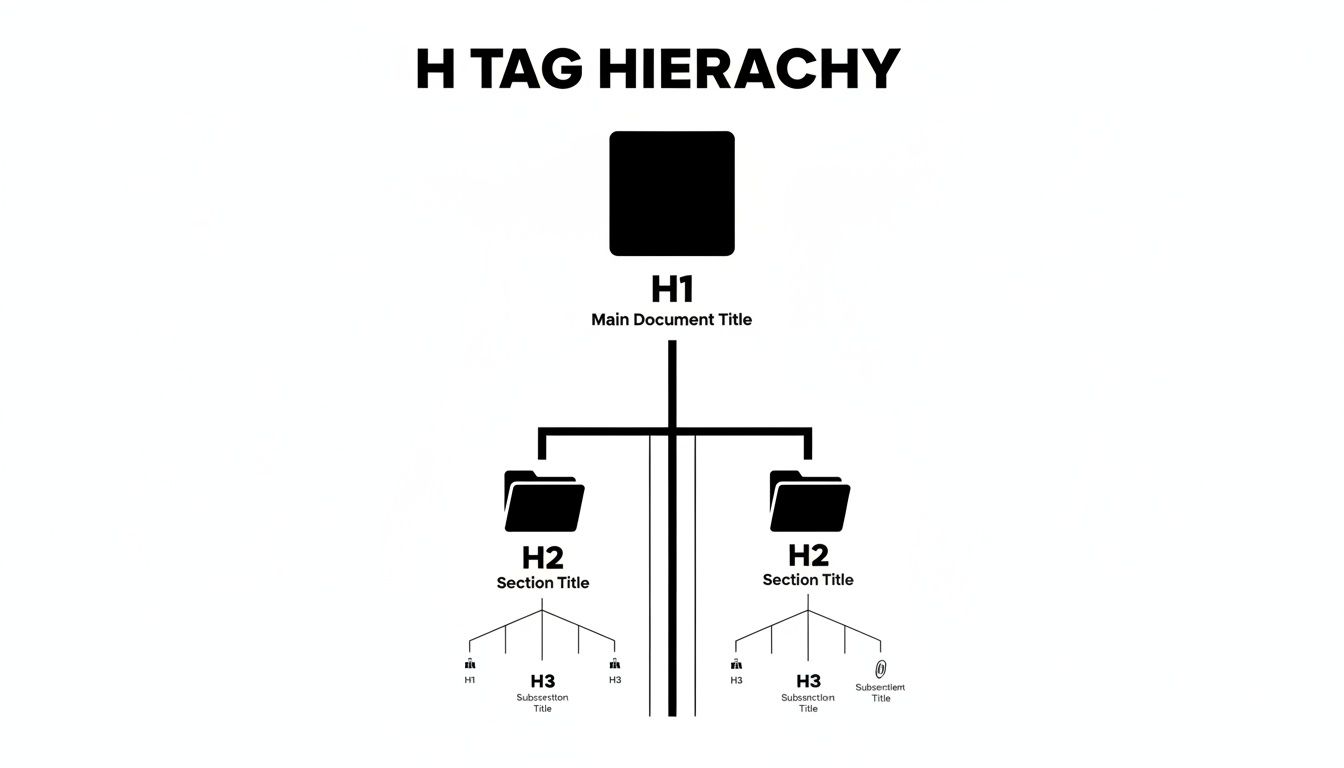
As you can see, the structure flows naturally from the broadest concept (H1) to more specific details (H2, H3), creating an easy-to-follow path for both search engine crawlers and your readers.
Why This Structure Is a Game-Changer for Your Business
For a restaurant equipment seller, getting this organization right is a powerful advantage. It’s the difference between a potential customer finding your "Commercial Refrigerators" category page versus getting lost and clicking over to a competitor.
When your H tags clearly define what a page is about, Google can match it to a user’s search with much higher confidence. This leads to some major benefits:
- Improved Search Rankings: Search engines reward well-structured content because it’s a strong signal of a good user experience.
- Enhanced User Engagement: Visitors can scan your pages, find what they need faster, and are more likely to stick around.
- Better Accessibility: Screen readers rely on headings to navigate a page, making your site usable for visually impaired customers.
A logical heading structure isn't just a technical box to check; it's a fundamental part of making your content clear, accessible, and valuable. It tells Google exactly what your page is about, making sure you show up for the right searches.
While H tags are a huge piece of the puzzle for structuring content and making it readable, they are just one part of a much bigger strategy. To see how these elements fit into a complete e-commerce plan, the guide on SEO for Shopify and Ecommerce offers some fantastic, in-depth insights.
Ultimately, mastering H tags is a foundational skill in your overall on-page optimization efforts. Get this right, and you're well on your way.
Why A Single H1 Is Your Most Powerful SEO Signal
Think of your webpage like a book. The H1 tag is its title. It's the big, bold statement right at the top that tells everyone—visitors and search engines alike—exactly what the page is about. While all the other headings (H2, H3, etc.) act like chapter titles organizing the content, the H1 declares the page's entire purpose. There's no room for confusion.
This is precisely why sticking to a one-H1-per-page rule is such a fundamental best practice in SEO. Using more than one H1 is like giving a book two different titles; it just creates chaos. When Google's crawlers find a single, clear H1, they can instantly grasp your page's main topic, which is the first and most critical step to ranking for the right keywords.

And this isn't just a hunch. The data is pretty clear on this. In a study analyzing thousands of search results, a powerful pattern jumped out: a whopping 93.5% of pages ranking in the top 10 used exactly one H1 tag. This isn't a coincidence. The best-performing pages almost always follow this rule, a finding you can dig into deeper in the full research on H1 tags as a ranking signal.
Crafting a High-Impact H1 Tag
A great H1 doesn't just name the topic; it directly matches what your potential customers are typing into Google. It has to be specific, descriptive, and woven around the main keyword phrase you want that page to rank for. This turns a simple headline into a powerful magnet for both search engines and the right kind of traffic.
For a restaurant equipment site, the difference between a weak H1 and a strong one is night and day. A generic tag like "Commercial Ovens" is far too broad and gets lost in a sea of competition. But an H1 like "High-Performance Commercial Convection Ovens" is a different story. It's specific, targeted, and speaks to a customer who knows what they're looking for.
Think of your H1 as the direct answer to a user's search query. It should immediately signal, "Yes, you're in the right place." This builds instant confidence and keeps them on your site.
Let’s look at a few examples to see just how much of a difference a few words can make.
H1 Tag Strategy Comparison
The table below shows how you can transform bland, generic H1s into powerful, SEO-friendly headlines for your restaurant equipment store. Notice how the better versions are way more descriptive and dial into what a real customer would search for.
| Page Type | Weak H1 Tag (Avoid) | Strong H1 Tag (Use This) |
|---|---|---|
| Category Page | Mixers | Heavy-Duty Commercial Stand Mixers |
| Product Page | Ice Machine | Undercounter Commercial Cube Ice Machine |
| Blog Post | Restaurant Tips | How to Choose the Right Commercial Dishwasher |
By locking in a single, keyword-rich H1 on every page, you're giving Google the clearest possible signal about your content's relevance. It's the cornerstone of your on-page SEO—your page's most powerful first impression.
Building a Logical Page Flow with H2 and H3 Tags
Once you’ve set the stage with a single, clear H1, it’s time for your H2 and H3 tags to do the heavy lifting. Think of these subheadings as signposts that break your content into manageable, easy-to-understand sections. They create a clear path for both your customers and for search engine crawlers.
I like to use a retail store analogy here. Your H1 is the giant sign outside that says "Restaurant Equipment." Simple and direct.
Once a customer walks in, the H2 tags are the big aisle markers hanging from the ceiling: 'Work Tables,' 'Commercial Sinks,' 'Refrigeration.' They show the major categories at a glance.
Then, the H3 tags are the smaller signs on the shelves within each aisle. Look down the 'Work Tables' aisle, and you'll see H3s for 'Stainless Steel Tables,' 'Butcher Block Tables,' and 'Tables with Undershelves.' This hierarchy makes it incredibly easy for someone to find exactly what they’re looking for.
How Structure Drives Deeper SEO Value
This kind of clean organization isn't just for human visitors. It gives Google a detailed roadmap of your content, showing exactly how different concepts connect. When search engines can see the depth and breadth of your expertise on a topic, they're far more likely to reward you with better rankings.
For an equipment supplier, this pays off by helping you rank for more specific, high-intent searches. A logical flow helps you capture those valuable long-tail keywords, like ‘stainless steel work table with adjustable undershelf.’ This level of detail is also what gets you chosen for Google's featured snippets, putting your content right at the very top of the search results.
This is more important than ever. SEO statistics show that click-through rates for the #1 spot are dropping, largely because of features like snippets taking up more space. A solid heading structure is one of your best tools to compete. Shockingly, about 25% of small business websites don't even have an H1 tag, a massive missed opportunity in an industry where customers live and die by search. You can see more data on how SEO trends are evolving on increv.co.
Creating a Scannable User Experience
Let's be honest—most people don't read websites word-for-word. They scan. Your H2 and H3 tags are the first things their eyes latch onto. Clear, descriptive subheadings let them jump straight to the information they care about, which dramatically improves their experience on your site.
When users can easily find what they need, they stick around longer. This sends a huge positive signal to Google that your content is valuable, which in turn can give your rankings a real boost over time.
This organization is also fundamental to building a strong overall site architecture. When your pages are structured logically, you create a solid foundation for all your other SEO efforts. To see how this all connects, check out our guide on understanding internal linking in HTML.
Practical H Tag Templates for Your Equipment Store
Theory is one thing, but putting it into practice is what actually gets you results. Let's move past the concepts and look at some concrete examples you can use right away on your restaurant equipment website.
These templates give you a clear, repeatable structure for your most important pages. The goal is to make sure they're set up perfectly for both search engines and the busy restaurant owners you're trying to reach.
A well-structured page takes the guesswork out of it for Google and makes it incredibly simple for a customer to find what they need. That kind of clarity is a huge driver for better rankings and, ultimately, more sales.
Let's break down the ideal H tag structure for the three pillars of your site: product pages, category pages, and blog posts.
Product Page Template: Walk-In Freezer
When someone lands on a product page, your job is to answer every single question they might have. Your headings are the roadmap, guiding them from features and specs to social proof, making the path to the "add to cart" button as smooth as possible.
Here’s a structure that works every time:
- H1: TrueChill 8' x 10' Walk-In Freezer Combo Unit
-
H2: Key Features and Benefits
- H3: High-Efficiency Refrigeration System
- H3: Durable Cam-Lock Wall Panel Construction
- H3: Digital Temperature Control and Display
- H2: Technical Specifications
- H2: Included Warranty Information
- H2: Customer Reviews and Testimonials
- H2: Frequently Asked Questions
This logical flow anticipates what a buyer is thinking, from their initial interest in what the freezer does to their final need for validation through reviews and FAQs.
Category Page Template: Commercial Ice Machines
Think of your category pages as the aisles in your digital showroom. Your H tags need to organize a wide variety of products into easy-to-understand subgroups. This helps customers narrow their choices without getting overwhelmed, and it's fantastic for targeting those broader search terms.
Try this template for a category like "Commercial Ice Machines":
- H1: Commercial Ice Machines
-
H2: Shop Ice Machines by Type
- H3: Undercounter Ice Machines
- H3: Modular Ice Machine Heads
- H3: Ice Dispensers
- H2: Shop Ice Machines by Brand
- H2: Choosing the Right Commercial Ice Machine
- H2: Related Categories and Parts
Your category page structure should act like a helpful salesperson, guiding the customer from a general need ("I need an ice machine") to specific options ("I need a small undercounter model").
Blog Post Template: Choosing the Right Equipment
For your blog, your headings need to be more engaging. Frame them as questions that directly address the problems your audience is trying to solve. This approach not just organizes your content but also makes it much more likely to get picked up for Google's featured snippets.
Here’s a simple template for an informational article:
- H1: How to Choose the Right Commercial Dishwasher
-
H2: What Are the Different Types of Commercial Dishwashers?
- H3: High-Temp vs. Low-Temp Machines
- H3: Undercounter, Door-Type, and Conveyor Models
- H2: How Much Capacity Do You Really Need?
- H2: Key Features to Look for in 2024
- H2: Our Top Commercial Dishwasher Recommendations
This structure turns a basic article into a genuinely useful resource. It shows you know your stuff, building trust with potential buyers long before they're ready to pull out their credit card.
How User Experience Boosts Your SEO Rankings
Let's be honest, well-structured H tags aren't just for search engines—they're for the real people visiting your site. Imagine a chef landing on your page for a new commercial convection oven. If they're met with a giant, intimidating wall of text, they're gone. They'll just click back to Google.
But what if they instantly see clear, scannable headings like “Key Features,” “Technical Specifications,” and “Customer Reviews”? Now they can jump straight to the information they care about most. That simple change makes all the difference.
This kind of positive experience is a huge ranking signal for Google. When people can easily find what they need on your page, they stick around longer. This metric, known as dwell time, is pure gold. A long dwell time basically tells Google, "Hey, this page is super helpful and answered the user's question perfectly."
It all snowballs from there. A great user experience leads to better engagement signals, which boosts your SEO rankings. Higher rankings bring in even more traffic, and the cycle repeats. It’s a direct line from a thoughtfully organized page to real business growth.
The Impact of Improved User Signals
The ripple effect of optimizing your headings for a better user experience can be staggering. Take one marketing blog, for example. They overhauled their page structure and saw jaw-dropping results. Before the update, their page had a measly dwell time of 1:15 minutes and a painful 72% bounce rate. Unsurprisingly, it was stuck at the #12 spot in the search results.
After implementing a logical heading structure and making other on-page tweaks, the numbers exploded. Dwell time shot up by an incredible 210% to 3:40 minutes, the bounce rate was slashed to just 34%, and their click-through rate doubled. The result? The page jumped into the top 5 search results.
This proves that the connection between H tags and SEO is all about user satisfaction.
When you focus on making your headings clear and easy to scan, you're not just optimizing for search engine bots—you're optimizing for people. And that human-centric approach is exactly what search engines are designed to reward.
Turning Browsers into Buyers
For a restaurant equipment supplier, this isn't just theory; it's mission-critical. Your potential buyer is a busy professional who needs information fast. A smart heading structure acts like a silent, expert salesperson, guiding them through the decision-making process without any hassle.
Think about the user-focused benefits of a solid heading hierarchy:
- Reduced Friction: Customers can compare different models much faster, finding the specific specs they need without getting frustrated.
- Increased Trust: A well-organized, easy-to-read page makes you look like a professional, credible authority in the industry.
- Higher Conversion Rates: When users can find answers to their questions effortlessly, they feel more confident about buying from you.
At the end of the day, a great heading structure makes your website do the heavy lifting for you. It smooths out the customer journey, sends all the right signals to Google, and helps turn casual browsers into loyal, paying customers. To really nail this down, you can learn more about optimizing the user experience on your website in our detailed guide.
Your Top H Tag Questions, Answered
Even after you've got the basics down, you're bound to run into some specific questions when you start putting H tags into practice. This is totally normal. Think of this section as a quick FAQ where I'll tackle the most common questions we get from restaurant equipment sellers.
Getting these little details right is what separates a good heading structure from a great one.
Do H4, H5, and H6 Tags Really Matter for SEO?
Honestly? Not as much as the first three. Your H1, H2, and H3 tags do all the heavy lifting for your page's structure and SEO.
Think of H4, H5, and H6 tags like the fine print or footnotes in a super detailed manual. They can be useful for adding extra structure to very long, complex content—like a technical specification sheet with tons of subsections. For most product pages, category pages, and blog posts, you'll probably never need to go past an H3.
Focus on getting your H1s, H2s, and H3s perfect first. That’s where you’ll get 99% of the SEO value. Using the lower-level tags correctly won't hurt, but forcing them in just makes things messy.
Can I Use the Same H2 Tag More Than Once on a Page?
You can, but it's not a great idea. Each heading is supposed to introduce a new, unique topic. If you have "Key Features" as an H2 multiple times on the same page, it's confusing for both your customers and for Google. It breaks the logical flow of the page.
My rule of thumb: Strive for unique, descriptive headings for every single section. If you feel the need to repeat an H2, take a step back. It’s usually a signal that your content needs better organization. You could probably break that larger topic into its own H2 section with unique H3s underneath it.
How Can I Check if My Headings Are Set Up Correctly?
Going through every page by hand is a recipe for a headache and missed mistakes. Luckily, there are tools to make this easy. You can find browser extensions that will show you the heading structure of any page you visit, or you can always right-click and use the "Inspect" tool in your browser to see the HTML.
For a really clear and quick audit, a dedicated Header Validator tool is a game-changer. It gives you a clean, simple outline of all your H1-H6 tags, so you can instantly spot problems like having more than one H1 or accidentally skipping a level.
What's the Single Biggest H Tag Mistake I Should Avoid?
Without a doubt, the most common and damaging mistake is skipping heading levels. This means jumping from an H1 straight to an H3, or from an H2 down to an H4. It completely breaks the logical outline of your page.
This is a huge problem for accessibility, as people using screen readers rely on that structure to navigate the content. It's also a red flag to search engines that your page is poorly organized.
Always, always follow a sequential order:
- An H2 must come after an H1.
- An H3 must be nested under an H2.
- An H4 must be nested under an H3.
Think of it like a report outline from your school days—you wouldn't have a sub-point 'a' without a main point '1' to put it under. This hierarchy is critical.
At Restaurant Equipment SEO, we transform your online presence by building this kind of foundational strength into every page of your site. Our targeted strategies are designed specifically for the food service industry, driving qualified traffic and measurable growth. Discover how our SEO services can help you dominate your market.