
Boost SEO with internal linking in html: A Simple Guide
Internal linking in HTML is all about using simple anchor tags (<a href="...">) to connect different pages on your own website. Think of it less like a technical task and more like building hallways inside your online store, making sure every room is easy to find.
Why Internal Linking in HTML Is a Non-Negotiable SEO Tactic
Let’s get straight to it. For a restaurant equipment store, getting your internal linking right is like having a perfectly organized kitchen during the Saturday night dinner rush—everything just flows. These links are the digital roadmap for both Google and your customers, creating clear, logical paths through your entire inventory.
Picture a blog post you wrote on "How to Choose the Right Commercial Oven." A smart HTML link within that article can send a restaurant owner directly to your best-selling convection oven page. Just like that, you’ve turned a curious reader into a serious buyer. That’s the real power of a well-planned linking structure.
Spreading Link Equity and Boosting Visibility
Every page on your site holds a bit of SEO authority, often called "link equity." When you link from one of your pages to another, you're essentially passing some of that authority along. It's a foundational concept in SEO.
By strategically linking from your high-authority pages (like a popular "Ultimate Guide to Ghost Kitchens") to your most important product pages, you give those product pages a much-needed SEO boost. This simple action helps your most profitable categories show up higher in search results.
If you're just getting started, it helps to understand how to start an SEO strategy from the ground up, as internal linking is a core part of it. The benefits directly impact your bottom line:
- Better Rankings: These links tell Google which pages are your heavy hitters, helping them rank higher for searches like "stainless steel prep tables" or "commercial ice machines."
- A Smoother User Experience: A logical site structure makes it effortless for chefs and managers to find exactly what they need, which keeps them on your site longer and lowers your bounce rate.
- More Sales Inquiries: By guiding visitors seamlessly from an informational blog post to a product page, you naturally shorten the path to a purchase.
Internal linking is one of the most underrated yet powerful SEO tactics because you have 100% control over it. It’s not just about connecting pages; it’s about crafting a journey that leads both users and search engines to your most valuable content.
In the hyper-competitive world of restaurant equipment SEO, the data doesn't lie. Pages with strong internal links can see nearly 50% more traffic than those without. This isn't just a theory. In fact, 51% of digital marketers recommend adding two to three internal links in every blog post to make sure your key pages don't become invisible "orphan pages."
Crafting Anchor Text That Converts and Ranks
The clickable text of a link—what we call anchor text—is more than just a navigational tool. It’s a powerful signal you send to both your customers and to search engines. It’s the signpost that tells them what’s on the other side of that click.
Getting this right is a game-changer for your site’s SEO and the user’s experience. After all, "click here" tells a busy restaurant owner absolutely nothing. But something like "browse our commercial pizza ovens" is crystal clear. It communicates value, relevance, and helps Google understand precisely what that destination page is about, which is critical for ranking.
Finding the Right Mix of Anchor Text
You wouldn't want every link pointing to your ice machine page to say the exact same thing, would you? That's a huge red flag for search engines. It looks unnatural and manipulative. The secret is to vary your anchor text, creating a natural and diverse link profile.
Here’s a look at the different types you should be rotating:
-
Exact-Match: The anchor text is the precise keyword you're targeting, like
commercial ice machines. Use these with care—they are potent but should be deployed sparingly from your most relevant pages. -
Partial-Match: This is your keyword mixed with other words, creating a more natural phrase. Think
our best ice machines for bars. It still sends strong contextual signals without being overly aggressive. -
Branded: Simply using your brand name, like
BrandName's ice makers, is fantastic for building authority and trust. These are perfect for linking back to your homepage or top-level categories from blog posts. -
Naked URL: This is just the raw URL itself, like
https://yoursite.com/ice-makers. While not the prettiest, it looks perfectly natural in certain spots, like a source list at the end of an article.
If you really want to get into the weeds on this, our full guide breaks down exactly what anchor text is in SEO and provides even more advanced strategies.
Anchor Text in Action: A Real-World Scenario
Let's make this practical. Say you've written a fantastic blog post on "Choosing the Best Walk-In Freezer" and you want to guide readers to your main category page where you sell them.
Here's what works and what doesn't:
| Good Anchor Text (Natural & Descriptive) | Bad Anchor Text (Vague or Over-Optimized) |
|---|---|
| "explore our walk-in freezer options" (Partial-match) | "walk-in freezer, commercial freezer" (Keyword-stuffing) |
| "our complete selection of walk-in coolers" (Related) | "click here for more" (Generic and unhelpful) |
| "BrandName's freezer units" (Branded) | "read more" (Lacks specific context) |
Pro Tip: When in doubt, read the sentence out loud. If the link feels clunky or forced, it’s a sign to rethink it. The best anchor text flows naturally with the surrounding text, guiding the reader without interrupting them. Your primary goal is to be helpful; the rankings will follow.
Building a Powerful Site Structure with Topic Silos
Great internal linking is about more than just sprinkling links here and there. It’s about building a blueprint for your entire website. I like to think of a well-structured online store as a perfectly organized warehouse—nothing is left to chance. This deliberate design is what we call "topic siloing," and it’s one of the most effective ways to show search engines what you're an expert in.
Your main product categories—like 'Refrigeration' or 'Cooking Equipment'—are the main aisles of that warehouse. These are your pillar pages: the big, comprehensive hubs for a major topic. Everything else related to that topic should be organized neatly within that aisle, creating a super clear hierarchy.
Mapping Your Content Silos
Once you have your main "aisles," you use internal links to connect everything together logically. For example, your 'Refrigeration' pillar page should link down to more specific subcategories like 'Walk-In Coolers' and 'Commercial Ice Machines.'
From there, those subcategory pages link down to individual product pages. They should also link to helpful, supporting content like a blog post on "How to Maintain Your Walk-In Cooler." This top-down linking keeps all the authority and relevance focused on one topic, which sends a massive signal to Google that you know your stuff when it comes to commercial refrigeration.
If you want to go deeper on this, we've put together a full guide on building a strong site architecture for SEO. The whole point is to create these tight-knit, relevant content clusters.
The anchor text you use is the glue that holds these silos together.
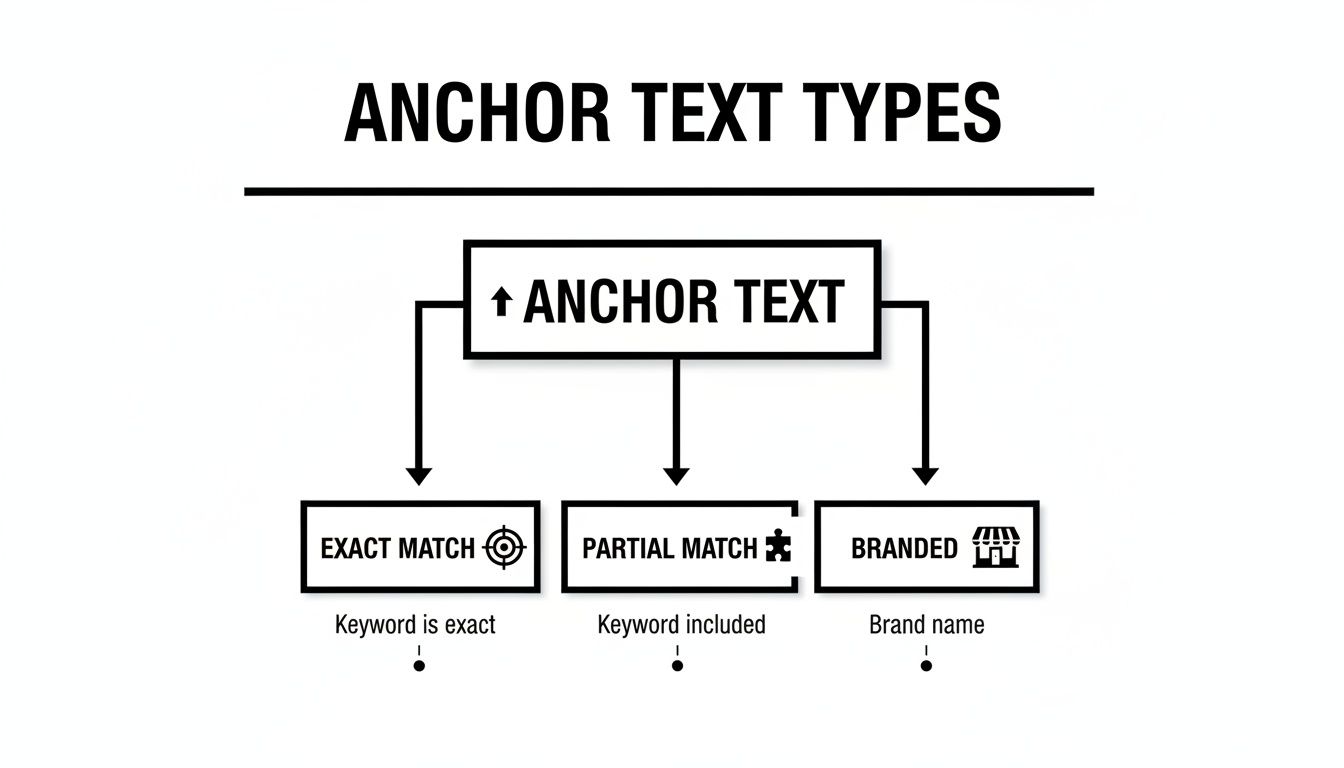
As you can see, mixing up your anchor text types helps create a natural, powerful linking profile within each silo.
To give you a clearer picture, here’s how a topic silo might look for a typical restaurant equipment store.
Example Silo Structure for a Restaurant Equipment Store
| Pillar Page (Main Category) | Cluster Content (Subcategory) | Supporting Content (Blog Post/Guide) |
|---|---|---|
| Cooking Equipment | Commercial Ranges | How to Choose the Right Commercial Range |
| Cooking Equipment | Commercial Ovens | Convection vs. Combi Ovens: A Buyer's Guide |
| Cooking Equipment | Deep Fryers | 5 Essential Maintenance Tips for Your Fryer |
This table shows how the main "Cooking Equipment" pillar page acts as a central hub, distributing authority and relevance down to its more specific sub-pages and articles.
Let’s be clear: this isn't just for search engines. This kind of logical structure makes your site incredibly easy for a busy chef or restaurant owner to use. When they land on your 'Cooking Equipment' page, they can find the exact commercial range they’re looking for in just a couple of clicks. That great user experience keeps them on your site longer and moves them closer to a sale.
A siloed structure transforms your website from a random collection of pages into a library of expertise. Each silo acts as a dedicated section, making your content more discoverable for users and more understandable for search engine crawlers.
The results can be pretty dramatic. We’ve seen companies completely overhaul their site with this strategy and achieve a 390% traffic surge. Considering that search engines still count links as one of their top three ranking factors, building a smart silo structure is non-negotiable if you want your most important pages to compete.
Using Advanced HTML Linking to Improve Navigation
Once you've mastered the basics, you can start using some more advanced HTML elements to really dial in your site's navigation. These are the technical details that separate a good user experience from a great one, and they give search engines the clear signals they need to understand your entire product catalog.
Think of it this way: simple text links are like local roads, but these advanced techniques are the highways and signage that make navigating a massive store effortless.
A perfect example of this is breadcrumbs. You've seen them a million times—that little trail at the top of a page that looks like Home > Cooking Equipment > Commercial Ranges. They're incredibly useful for customers, showing them exactly where they are. But from an SEO perspective, they're pure gold, creating a perfect, keyword-rich internal link path right back to your most important category pages.
Taming Pagination for Deep Category Pages
If your store has hundreds of commercial ovens or refrigerators, you're going to have pagination. It's a necessity. But if you don't manage it properly, you’re basically telling Google to ignore everything past page one. That’s a huge problem.
The fix is surprisingly simple: the rel="next" and rel="prev" attributes.
When you add these tags to the <head> of your paginated pages, you’re creating a logical sequence. You're telling search engine crawlers, "Hey, this isn't just a random page of products. It's page 2 of a series, and here's the link to page 3." This encourages them to crawl the entire set, ensuring every single product gets a chance to be indexed and ranked.
Understanding Rel Attributes for Link Control
The rel attribute is a powerful little tool that lets you tell search engines how to treat a specific link. You won't use it on most of your internal links, but knowing when and how to deploy it is key to maintaining a clean link profile.
Here’s a quick breakdown of the big ones:
-
rel="nofollow": This is your main tool for links you don't endorse. Think user-generated content like blog comments or forum posts where people might drop sketchy links. Usingnofollowtells Google not to pass any of your site's authority through that link. -
rel="sponsored": If a link is an ad, a paid placement, or part of any sponsorship deal, you must use this. It’s all about transparency and lets Google know that the link is commercial in nature. -
rel="ugc": This stands for "User-Generated Content." It’s another great option for blog comments and forum posts, specifically signaling that the link was placed by a visitor, not by you.
Getting these technical details right is like fine-tuning an engine. It ensures every part of your site works in harmony, giving customers a smooth journey while sending crystal-clear signals to search engines. This is the kind of behind-the-scenes work that truly separates a basic e-commerce site from a highly optimized one.
How to Audit and Optimize Your Internal Links
Your internal linking strategy isn't something you can just set up once and walk away from. If you really want to squeeze every last drop of SEO value out of your HTML links, you need to get in the habit of regularly auditing your site, hunting down those sneaky problems, and constantly tweaking your approach. It's this ongoing work that ensures you're not leaving ranking potential on the table.

First things first, you have to find the issues that are actively hurting you. Think of these as the technical gremlins quietly sabotaging all your hard work. The most obvious culprit? Broken links that lead to 404 errors. Every single broken internal link is a dead end for both search engine crawlers and your customers, which wastes link authority and just creates a bad experience all around.
Uncovering Hidden Linking Issues
One of the biggest problems I see is the dreaded "orphan page." This is a page you've put work into—maybe a detailed product page for a high-margin commercial freezer—that has zero internal links pointing to it. If you don't link to it, Google might never find it, which means it’s completely invisible in search results. Finding these is priority number one. Our guide on fixing orphan pages for SEO can show you exactly how to tackle this.
To do this right, you'll want to use some specialized SEO and internal linking tools. Platforms like Ahrefs' Site Audit or Semrush are fantastic for automating the hunt for these critical issues:
- Broken Links (404s): They'll spit out a neat list of every link that points to a dead page.
- Redirect Chains: These tools can find and help you clean up messy redirect loops that slow your site down and weaken your link equity.
- Orphan Pages: You can quickly discover important pages that are floating in cyberspace, totally disconnected from the rest of your site.
An audit isn't just about finding what's broken. It's about finding opportunities. When you identify your most authoritative pages, you can start using their power to lift up other important parts of your site.
Prioritizing Your Optimization Efforts
Okay, so you have a list of problems. Where do you start?
Begin with the low-hanging fruit: fix all the broken links. It’s an easy win that provides immediate value. After that, move on to connecting your orphan pages. Look for relevant, high-traffic blog posts or category pages where you can naturally add a link to that forgotten page.
Finally, identify your "power pages"—those articles or guides that have earned a lot of backlinks and get solid organic traffic. Scour these pages for chances to add new internal links to important (but maybe underperforming) product categories. For instance, a popular blog post on "Designing a Commercial Kitchen Layout" is the perfect spot to link out to your "Stainless Steel Prep Tables" category page.
This isn't just theory. Data from Zyppy SEO reveals that pages with internal URL anchors can pull in 50% more traffic. And a whopping 51% of marketers make it a rule to add 2-3 internal links to every new post to strengthen topical authority. This continuous process of refinement is what turns a basic linking structure into a true SEO powerhouse.
Got Questions About HTML Internal Links? We’ve Got Answers.
When you get down to the nitty-gritty of internal linking, a lot of questions pop up. It's one thing to know you should be doing it, and another to feel confident you're doing it right. Let's clear up some of the most common sticking points for restaurant equipment store owners.
How Many Internal Links is Too Many?
There’s no magic number here, but context is everything. A good starting point for a blog post is 3-5 internal links that point to genuinely helpful products or categories. If the link doesn't add value for the reader, don't force it.
Your big category pages, like 'Commercial Refrigeration,' are a different story. They're hubs, so they’ll naturally have a lot more links—often 40-50 pointing down to subcategories and key products. Don't sweat the high number; it’s about relevance, not just counting links. In fact, a study from Zyppy SEO found a sweet spot of around 40-44 internal links per page for getting the most clicks from Google, so don't be shy if the links are helpful.
Quick tip: The most powerful links you can build are the ones embedded right in your main content. Footer and sidebar links are fine for navigation, but search engines see those contextual links as a much stronger vote of confidence.
What's the Real Difference Between Internal and External Links?
Getting this straight is core to any SEO strategy. Think of it this way:
-
Internal Links: These are the pathways within your own website. When you link from your 'Commercial Fryers' page to a specific 'twin-basket countertop fryer,' that's an internal link. They’re crucial for guiding users, helping search engines map your site, and spreading authority from your strong pages to your weaker ones.
-
External Links: These are links coming from other websites to yours. If a well-known food blogger links to your guide on "Choosing the Right Commercial Oven," that’s an external link (or backlink). They’re basically third-party endorsements that tell Google your site is a credible resource.
Both are essential, but the beauty of internal links is that you have 100% control over them.
Can I Use the Same Anchor Text Over and Over?
You can, but you really shouldn't. Using the exact same anchor text—like "commercial ovens"—for every single link pointing to that page can look spammy to search engines. It's a classic sign of over-optimization.
A much better approach is to vary the anchor text. This creates a more natural and trustworthy profile for both real people and search engine crawlers.
For a commercial oven page, you could mix it up with anchors like:
- "our full range of commercial ovens"
- "choosing a high-capacity convection oven"
- "browse our deck and pizza ovens"
How Do I Find the Best Pages to Link From?
This is where you can get really strategic. Look for what we call "power pages"—these are the heavy hitters on your site that already have a ton of authority, either from earning backlinks or ranking well and getting lots of traffic.
Tools like Ahrefs or Semrush are great for this, but you can also find solid candidates right in Google Search Console's performance reports.
Once you’ve identified a popular blog post like "The Ultimate Guide to Restaurant Kitchen Design," that's your gold mine. Go into that article and find a natural spot to add a link to your 'Stainless Steel Work Tables' category. By doing this, you're passing some of that page's hard-earned authority over to a commercial page that needs a boost.
At Restaurant Equipment SEO, we translate these technical SEO details into real, measurable growth. If you’re ready to build an internal linking structure that brings in more qualified customers, we’re here to make it happen. Check out our specialized SEO services at https://restaurantequipmentseo.com.