
How to Get Your Website Indexed by Google A Practical Guide
If you want Google to index your website, the very first thing you need to do is tell it your site exists. The most direct way to do this is by verifying your site in Google Search Console and handing over an XML sitemap. This opens a direct channel to Google and gives its bots a clear roadmap to all your important pages. It's the single fastest way to get the ball rolling.
Building Your Foundation for Fast Google Indexing
Getting indexed isn't some dark art; it’s about having a rock-solid technical setup. Think of it like this: you're building a house, and you need a strong foundation and a clear blueprint before you can even think about inviting people over. For your website, that foundation makes it incredibly easy for Google's crawlers to find, read, and understand your content.
Without a good technical base, Google’s bots can get lost, miss critical pages, or just give up. This initial setup is hands-down the most important part of the entire indexing process.
Before anything else, you need a reliable web host. A slow or flaky server can kill your indexing chances before you even get started, causing Google's crawlers to time out. If you're new to this, a guide on how to choose a web hosting provider is a great starting point to make sure your server can keep up with your SEO goals.
Master Google Search Console
Google Search Console (GSC) is your command center. It's a free, incredibly powerful tool that gives you a behind-the-scenes look at how Google sees your website. Getting your site verified here isn't optional—it's essential.
- Why you need it: GSC is where you'll find data on crawl errors, see your indexing status, and spot performance problems. It’s your go-to for troubleshooting.
- How to get verified: Google gives you a few options. You can upload an HTML file, add a meta tag to your homepage, or verify through your domain name provider.
You'll spend a lot of time in this dashboard, checking which pages are indexed, figuring out why others aren't, and making sure your technical fixes are actually working.
Create and Submit Your XML Sitemap
Think of an XML sitemap as the blueprint for your website. It's just a file that lists every single important URL you want Google to know about. When you submit this file in GSC, you're essentially handing Google a map to your site, making sure no key pages get missed.
For a restaurant equipment seller, this is a game-changer. Submitting a sitemap can get new product pages for commercial fryers or walk-in freezers indexed in hours, not weeks. You're pointing Google's crawlers directly to the pages that make you money.
Pro Tip: Most modern platforms like Shopify or WordPress (if you're using an SEO plugin like Yoast or Rank Math) will create and update your sitemap automatically. Just make sure you've submitted the right URL—it's usually
yourdomain.com/sitemap.xml—in the 'Sitemaps' section of GSC.
Control Crawlers with Your Robots.txt File
A sitemap tells Google where to look, but a robots.txt file tells it where not to look. This is a simple text file that lives in your site's root directory, and its job is to block crawlers from unimportant areas. Think admin login pages, internal search results, or shopping cart pages.
By blocking these irrelevant URLs, you help Google focus its time and energy on the pages you actually want indexed. It’s all about managing your what is crawl budget—the finite amount of resources Google will dedicate to your site. A well-configured robots.txt file stops Google from wasting its time on junk pages, making the whole process much more efficient.
Optimizing Your Site for Google's Crawlers
Once your technical foundation is solid, it's time to make your website as friendly as possible for Google's crawlers. Think of these crawlers like little explorers charting the territory of your site. Your job is to create clear, well-marked paths for them so they can find all your important pages without hitting dead ends.
This is where on-page signals really shine. These are the clues you leave for Google right on the page itself, helping it understand what the page is about, how important it is, and its overall quality. A few simple tweaks here can make a massive difference in how quickly your pages get indexed.
Build a Smart Internal Linking Structure
Internal linking is probably one of the most powerful—and most overlooked—ways to guide Google's crawlers. It’s simply the practice of linking from one page on your own website to another. When done right, it creates a spiderweb that connects all your content, passing authority and relevance from your stronger pages to your newer ones.
For an e-commerce store, this is absolutely essential. Let's say you publish a new blog post, "How to Choose the Right Commercial Convection Oven." It’s a golden opportunity. Inside that article, you should be linking directly to your actual product pages for convection ovens.
This simple act accomplishes two critical things:
- It helps crawlers discover your key pages. You're literally handing them a map.
- It creates topical relevance. You're showing Google that these pages are related, which builds your site's authority on that topic.
Without these internal links, your most important pages can become "orphans"—they're disconnected from the rest of your site and nearly invisible to crawlers.
Use Canonical Tags to Avoid Confusion
Duplicate content is a classic indexing killer, and it’s especially common on e-commerce sites. Think about product variations. A single commercial mixer might have different URLs for different colors or attachments, even though the core description is identical.
This throws Google for a loop. It doesn't know which version of the page is the "real" one, so it might just get confused and ignore them all. That’s where the canonical tag saves the day. It's a tiny snippet of code that tells Google which URL is the main, or "master," version you want indexed.
By adding
rel="canonical"to the duplicate pages and pointing it to your preferred URL, you’re basically saying, "Hey Google, I know these pages look similar, but this is the one that matters. Please index this one and pass all the ranking power here."
This one tag cleans up duplicate content issues and focuses all your SEO value onto a single, powerful URL. Properly implementing canonicals is a fundamental part of learning what is on-page optimization.
Clarify Your Content with Clean URLs and Schema
Finally, you want to remove any guesswork for Google. Make it dead simple for crawlers to understand your pages at a glance.
A great place to start is with clean, descriptive URLs. A URL like yourstore.com/equipment/commercial-refrigerators is infinitely more helpful to both people and crawlers than something like yourstore.com/cat-id?prod=481&v=2.
Take it a step further with structured data, often called Schema markup. This is a special vocabulary of code you add to your pages to explicitly tell search engines what your content is about. For an equipment seller, you can mark up things like:
- Product name, price, and availability
- Customer reviews and star ratings
- Brand and model numbers
This markup not only helps Google understand your content better for indexing but also helps you earn "rich snippets" in search results—those star ratings or prices that show up right under your link. It removes all ambiguity. For those working with specific site frameworks, this complete guide to static site SEO provides some excellent, deeper insights into optimizing these technical elements.
Fine-Tuning Your Site’s Technical Health and Performance
Think of it this way: if Google’s crawlers have a hard time accessing your website, they’re not going to stick around. A slow, buggy, or insecure site is like a shop with a jammed front door—customers, and crawlers, will simply give up and go elsewhere.
Getting your technical house in order isn't just a nice-to-have; it's a non-negotiable for getting indexed. Google wants to send its users to websites that work well, and that experience starts with solid performance and security.

Speed Is a Signal: Nail Your Core Web Vitals
Nothing tells Google "this site is high-quality" quite like speed. In a world where most people are browsing on their phones, pages need to load in the blink of an eye. If those high-resolution images of your commercial ovens are causing a five-second delay, you’re creating a frustrating experience that Google absolutely notices.
The best way to measure and improve this is by focusing on Google's Core Web Vitals. These are the key metrics that evaluate how a user actually experiences your page's speed.
- Largest Contentful Paint (LCP): How fast does the main content (like a big image or text block) show up? You want this to be under 2.5 seconds.
- First Input Delay (FID): How quickly can a user interact with your page, like clicking a button? Aim for less than 100 milliseconds.
- Cumulative Layout Shift (CLS): Does your page jump around while it loads? This measures visual stability. Your score should be below 0.1.
Not sure where you stand? The free PageSpeed Insights tool from Google gives you a full report card. It even provides specific, actionable advice like "compress these images" or "reduce this script" to help you improve your scores.
Lock It Down With HTTPS
In today's internet, security is not optional. An SSL certificate encrypts the connection between your website and your visitors, changing your URL from http:// to the much safer https://. That little "s" makes a big difference—Google has used it as a positive ranking signal for years.
Even more critically, modern browsers like Chrome will slap a big "Not Secure" warning on sites without it. That warning alone can scare away potential customers and signals to crawlers that your site isn't trustworthy. If you don't have that padlock icon in the address bar, make it your top priority. Most web hosts now offer free and easy-to-install SSL certificates.
Eliminate Dead Ends: Fix Your Broken Links
Broken links, which lead to 404 errors, are dead ends for both people and search engines. When a crawler follows a link and hits a wall, it's a wasted effort. This chews up your crawl budget and can stop Googlebot from discovering other valuable pages on your site.
Make it a habit to regularly check for broken internal links. You can find them right in Google Search Console, or use a tool like Screaming Frog to crawl your site and hunt them down.
Pro Tip: When you find a broken link, don't just delete it. The best move is to set up a 301 redirect. This tells browsers and crawlers the page has permanently moved, automatically sending them to the new, correct URL. It's a simple fix that preserves link equity and keeps everyone on the right path.
If you really want to see what Googlebot is up to, you can go a step further with a log file analysis. This shows you the raw data of every hit from a crawler, revealing exactly where it's going and where it might be running into trouble. You can learn more about this advanced technique in our guide on log file analysis.
Technical SEO Health Checklist for Indexing
Here’s a quick-reference table to help you audit the technical elements that are most critical for getting your pages seen by Google.
| Technical Element | Why It Matters for Indexing | Quick Fix Action |
|---|---|---|
| Page Speed (Core Web Vitals) | Slow pages frustrate users and can cause Googlebot to abandon the crawl, wasting your crawl budget. | Use Google's PageSpeed Insights to identify and fix specific issues like image compression or code optimization. |
| HTTPS Security | Google prioritizes secure sites. An "http" site is a negative signal and can deter both users and crawlers. | Install an SSL certificate (often free from your hosting provider) to switch your entire site to https://. |
| Broken Links (404s) | Dead-end links create a poor user experience and stop crawlers in their tracks, preventing further page discovery. | Run a site crawl using Screaming Frog or GSC to find 404s. Implement 301 redirects to relevant, live pages. |
| Mobile-Friendliness | With mobile-first indexing, how your site works on a phone is more important than how it works on a desktop. | Use Google’s Mobile-Friendly Test and ensure a responsive design for a seamless experience on all devices. |
Nailing these technical basics is the foundation of any successful SEO strategy. With these elements in place, you're giving Google’s crawlers a clear, fast, and secure path to find and index your content.
Creating Content That Google Wants to Index
Getting the technical side right is like opening the door for Google. It gets the crawler's attention, but it’s what they find inside—your content—that makes them want to stick around and, more importantly, index your pages.
Think about it from Google's perspective. Its entire business model rests on giving people the best, most relevant answers. So, it’s always on the lookout for content that is genuinely helpful, original, and trustworthy.
This is a massive stumbling block for many e-commerce sites, especially in a niche like restaurant equipment. It’s just so easy to grab the product descriptions straight from the manufacturer's website. But that’s a fast track to being ignored. When your page looks identical to ten others, why should Google bother indexing yours?
Move Beyond Manufacturer Descriptions
You absolutely have to write unique product descriptions. And I don't mean just swapping a few words around. You need to add real, tangible value that a manufacturer’s spec sheet simply can't provide.
- Talk about real-world use: How does that specific commercial deep fryer actually perform during a chaotic dinner rush? Is it a workhorse or does it struggle to keep up?
- Highlight your own selling points: Maybe you've noticed it's incredibly easy to clean, or that its energy consumption is lower than advertised. These are the details a busy chef needs to know.
- Answer questions before they're asked: Speak directly to the restaurant owner. What are their biggest concerns when buying a new convection oven? Address them head-on in your description.
The manufacturer gives you the "what." Your job is to fill in the "why" and the "how." This unique angle is a powerful signal to Google that your page offers something genuinely different and more valuable than the competition.
The Knot’s Real Wedding Survey found that a staggering 90% of planning now happens online, and 73% of couples use Google to find vendors. Sure, that's the wedding industry, but the behavior is universal. Your customers are deep in research mode online long before they ever pick up the phone. Your content has to be there to meet them.
Show Off Your Expertise and Build Real Trust
Google is big on a concept they call E-E-A-T: Experience, Expertise, Authoritativeness, and Trustworthiness. This is where you prove you’re not just another reseller. You're an expert in the food service industry.
The best way to do this? Create content that genuinely helps people make smarter decisions.
Think about publishing in-depth buying guides like "The Ultimate Guide to Choosing a Commercial Ice Machine" or "Walk-In Cooler vs. Reach-In Freezer: What Your Restaurant Actually Needs." When these are written by someone with hands-on experience, they become incredibly powerful assets. They don't just attract potential buyers early on; they build the kind of trust that leads to sales.
Keep Your Content Fresh and Alive
Finally, Google notices when a site is collecting dust. If your content hasn't been touched since 2019, it looks abandoned. Regularly updating your pages, even in small ways, tells Google that your site is an active and reliable source of information.
You don't need to rewrite your entire site every month. Small, meaningful tweaks can have a huge impact.
- Update product pages with info on the latest models or features.
- Add a new section to a buying guide about recent industry trends.
- Refresh an old blog post with new stats, better images, or a glowing customer testimonial.
Every single update gives Google a fresh reason to come back, recrawl the page, and reassess its value. This consistent activity is one of the clearest signals you can send that your content is current, valuable, and a prime candidate for a solid spot in the index.
How to Actively Submit and Monitor Your Pages
Once your technical foundation is solid and your content is ready for prime time, you can’t just sit back and wait. Don't leave it to chance for Google's crawlers to stumble across your brilliant new product page. By actively submitting your URLs and keeping a close watch on their status, you can really kickstart the indexing process.
Think of it as giving Google a friendly nudge, saying, "Hey, I've got something new and valuable over here—you should come see it." It’s a simple move, but it’s powerful.
The Power of Direct Submission With the URL Inspection Tool
Your best tool for this job is the URL Inspection tool right inside Google Search Console. It’s your direct line to Google's indexing queue. The moment you publish a new page, like a detailed spec sheet for a new commercial refrigerator, you can use this tool to ask Google to crawl it immediately.
It's an incredibly simple process:
- Go to your Google Search Console property.
- Paste the full URL of your new page into the search bar at the very top and hit enter.
- GSC will check its index. If the page isn't indexed, you'll get a message like "URL is not on Google."
- Just click the "Request Indexing" button.
That’s all there is to it. You’ve officially put your page on Google's to-do list. While it isn't an ironclad guarantee of instant indexing, I’ve seen this get a page crawled and indexed within a few hours to a couple of days, which is a massive improvement over waiting weeks.
A quick word of advice from Google itself: "Submitting a page multiple times will not change its queue position or priority." Mashing the request button won't help your cause. Submit it once, then let the system do its work.
Don't Underestimate High-Quality External Links
Another powerful way to signal a new page’s importance is to get some high-authority external links pointing its way. When a reputable, trusted website links to your new content, it's like a vote of confidence. Google's crawlers discover new content by following links, so a link from a popular industry blog or a partner's site can lead them straight to your doorstep.
For example, if you publish a killer guide on "Energy-Efficient Restaurant Kitchen Design," reach out to industry publications or partners. If they link to it, you're not just getting referral traffic—you're creating a high-value pathway for Googlebot to find and index your content fast.
This whole process circles back to content quality. Google isn't going to index a page just because you ask nicely. It has to be worth their time.
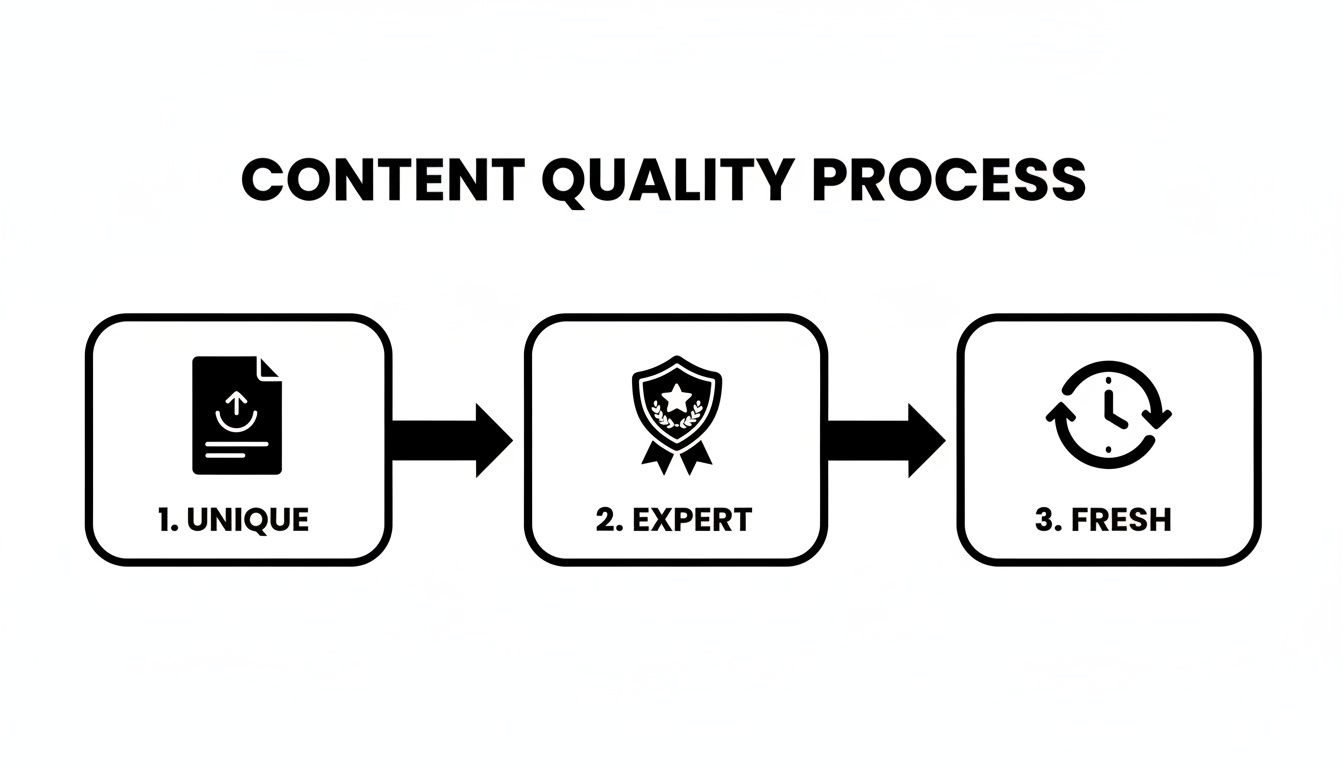
As you can see, Google wants to see unique, expert-level content that’s kept fresh. If your page ticks those boxes, your chances of getting indexed shoot way up.
How to Monitor Your Indexing Status
Submitting is just the first step. The real work happens in monitoring, where you find and squash problems before they grow. For this, your best friend is the Pages report (what used to be called the "Coverage" report) in Google Search Console. This report gives you a complete overview of your entire site from Google's perspective.
It breaks down all of your URLs into two main buckets: Indexed and Not indexed. That "Not indexed" tab is a goldmine for troubleshooting because it tells you why certain pages are left out, with specific reasons like:
- Discovered - currently not indexed: Google knows the page exists but hasn’t gotten around to crawling it. This often happens with new sites or if Google is worried about overloading your server.
- Crawled - currently not indexed: This is a big one. It means Googlebot visited the page but decided it wasn't good enough for the index. This almost always points to thin or duplicate content.
- Page with redirect: These pages aren't indexed because they just point somewhere else. That's usually fine, but you should double-check that the redirects are correct.
-
Blocked by robots.txt: Your
robots.txtfile is explicitly telling Google to stay away. Make sure you meant to do that!
By checking this report regularly, you can catch problems early. If you spot a key product page under "Crawled - currently not indexed," you know it's time to roll up your sleeves, improve the content, add more unique value, and build some internal links. This loop of submitting, checking, and fixing is what separates a healthy, fully-indexed site from one that's struggling to be seen.
What to Do When Google Still Won't Index Your Page
You’ve done everything right. You submitted your sitemap, built some solid internal links, and you know the content is good. But for some reason, one of your pages is still ghosting Google. It’s a maddeningly common problem, but don't worry—it usually boils down to a few specific technical roadblocks.
When a page just won't get indexed, it's time to play detective. More often than not, the issue is a signal you’ve accidentally sent to Google, telling it to either stay away or that the page isn't worth its time.
Is the Page Blocked by Robots.txt?
The most common and straightforward culprit is the robots.txt file. This little text file is meant to tell search engines which parts of your site to avoid, but a tiny typo or a rogue wildcard (*) can end up blocking huge, important sections of your site. It happens more than you'd think.
For instance, a simple rule like Disallow: /products/ might look harmless. But what if you have a helpful subfolder you want indexed, like /products/guides/? That rule will block it, too. Always give your robots.txt file a thorough once-over for rules that are too broad. The easiest way to check is with Google Search Console's robots.txt Tester, which will tell you flat out if a specific URL is being blocked.
Is There a Stray 'noindex' Tag on the Page?
This one is a classic. I've seen it countless times, especially on sites fresh out of development. A developer will slap a noindex tag across the whole site to keep it out of the public eye while it's being built, and then... they simply forget to remove it before launch.
The noindex tag is a direct command in your page's HTML <head> section. It looks like this:<meta name="robots" content="noindex">
It literally tells Google, "Do not add this page to your search results. Period." You can quickly check for this by right-clicking on your page, selecting "View Page Source," and using CTRL+F (or CMD+F) to search for "noindex." If you find one on a page that needs to be indexed, getting rid of it is priority number one.
Dealing With the Dreaded 'Crawled - Currently Not Indexed' Status
This is probably the most frustrating status you'll find in Google Search Console. What it means is that Googlebot successfully visited your page, had a look around, and decided, "Nah, this isn't worth keeping." This isn't a technical error—it's a quality problem.
Google might come to this conclusion for a few key reasons:
- Thin Content: The page is just a skeleton. Think of a product page with only a single image, a price, and nothing else.
- Duplicate Content: The content on the page is a carbon copy, or very close to it, of another page on your site or somewhere else online.
- Low Perceived Value: Google simply doesn't think the page offers a useful or satisfying answer for anyone searching.
The fix here isn't about code; it's about content strategy. You have to give Google a reason to care. Beef up the page with unique product descriptions, add customer reviews or user-generated photos, embed a how-to video, or build out a detailed FAQ section. Make the page undeniably valuable.
Are Server Errors Blocking Googlebot?
Sometimes, the problem isn't your page at all—it's your server. If Googlebot knocks on the door and gets a server error (like a 500 Internal Server Error or 503 Service Unavailable), it won't wait around. It will just leave and try again later. If this keeps happening, Google will eventually assume the page is gone for good and drop it from the index.
You can hunt for these issues in the Pages report within Google Search Console, which will flag server-side errors. Often, the root cause is a misconfiguration in your .htaccess file or an issue with your hosting provider. For a deeper dive, a server log analyzer can show you the exact response codes Googlebot gets on every visit, pointing you right to the source of the problem.
Got Questions About Google Indexing? We've Got Answers
When you're trying to get your site indexed, a few questions always seem to pop up. I've heard them all over the years. Let's clear up some of the most common head-scratchers so you can stop worrying and start getting your pages seen.
How Long Does It Really Take for Google to Index a New Site?
Honestly, there's no single answer. I've seen it take anywhere from a couple of days to a few weeks. It all comes down to a few key factors: Google's own crawl schedule, how authoritative your site is (or isn't), and whether you've laid the proper technical groundwork.
A brand-new site with zero backlinks is naturally going to be at the back of the line. But you can definitely speed things up. If you've submitted your XML sitemap through Google Search Console and used the URL Inspection tool to give Google a heads-up, you’re doing everything you can to shorten that wait time.
Why Is My Page 'Crawled – Currently Not Indexed'?
Ah, this one. Seeing this status in Search Console is frustrating, but it tells you something very specific. It means Googlebot successfully visited your page, took a look around, and then decided not to add it to the index for now. This isn't usually a technical bug; it's almost always a content quality issue.
Google essentially decided the page wasn't valuable enough to show its users. Maybe the content is too thin, it looks like a dozen other pages already online, or it just doesn't offer a real solution. Your best bet is to go back to that page and make it genuinely useful. Add unique insights, more detail, or solve a problem better than anyone else.
Think of this status as Google saying, "We saw it, but we're not impressed yet." Your job is to go back and give them a compelling reason to change their mind.
Can I Just Force Google to Index My Page Right Now?
You can't force it, but you can definitely give Google a firm nudge in the right direction. The single most direct way to ask for an index is the “Request Indexing” feature inside the URL Inspection tool.
When you do this, you’re essentially putting your URL into a priority crawl queue. It often works wonders, getting a page indexed within a few hours or a couple of days. But it’s not a 100% guarantee. And please, only click it once—spamming the button won’t make Google move any faster.
Will a Noindex Tag Hurt My Whole Site?
Nope, a noindex tag is very specific. When you add that tag to a page, you’re only telling Google to ignore that single URL. It has absolutely no effect on the rest of your website.
The only way this could become a site-wide catastrophe is if you accidentally put the noindex tag in a global header template that’s shared across all pages or configured it in your server's HTTP header responses. Always double-check where these tags are implemented to avoid accidentally telling Google to ignore your entire site.
At Restaurant Equipment SEO, our entire focus is on getting your product pages out of the weeds and in front of buyers. If you're tired of the indexing guessing game, we can build a clear strategy that gets results. Find out how we do it at https://restaurantequipmentseo.com.