
Fixing Orphan Pages SEO for Higher Rankings
Think of orphan pages as the silent killers of your SEO strategy. These are pages on your website that have zero internal links pointing to them. Because of this, they're essentially invisible to search engine crawlers and nearly impossible for a real person to find just by clicking around your site. Their invisibility means they have almost no chance to rank or bring in organic traffic.
Why Orphan Pages Are So Damaging to Your SEO

Imagine building a brand-new, fully-stocked showroom for your commercial kitchen equipment but forgetting to build any doors or put up any signs. Customers would never find it. All that valuable inventory would just sit there, completely useless. That's exactly what an orphan page is online—a piece of your site existing in total isolation.
This isolation creates some serious headaches for your SEO and can directly hit your bottom line. They often pop up after a site migration, when you've pruned old content without setting up proper redirects, or even just by forgetting to link to a new blog post. Whatever the cause, the result is always negative.
They Squander Your Crawl Budget
Google and other search engines only dedicate a certain amount of resources to crawling your site. We call this a "crawl budget." When their bots have to waste time finding and indexing these disconnected orphan pages (which they might only stumble upon through an XML sitemap or an old external link), they have less time to spend on your truly important pages—the ones that actually make you money.
This isn't a minor issue. It’s surprisingly common for websites with over 500 pages to have 15-25% of them be orphans. For massive e-commerce sites, this can spiral out of control, with orphan pages eating up 30-40% of their total crawl budget.
They Hoard and Weaken Link Authority
One of the biggest problems with orphan pages is how they disrupt the flow of authority across your site. Understanding what Domain Authority is and why it matters for your Google ranking is crucial here. Internal links act like a network of pipes, distributing "link equity" or authority from your powerful pages to others.
An orphan page is a dead end. Since it has no internal links pointing to it, it can't receive any of that shared authority. Any SEO value it might have gets trapped, which in turn weakens the authority of your entire website.
This means even a fantastic, perfectly optimized page has little chance of ranking if it's been orphaned. To learn how to build these pathways correctly, take a look at our guide on site architecture for SEO.
They Frustrate Your Customers
Beyond all the technical SEO issues, orphan pages just create a terrible experience for your visitors. A potential customer might click an old link from a social media post or another website and land on an orphan page. From there, they have no obvious way to get to your homepage, browse your product categories, or find related content.
It’s a digital dead end. This leads to frustration, higher bounce rates, and ultimately, a poor impression of your brand.
To give you a clearer picture, here’s a quick summary of how these isolated pages can harm your site's health.
How Orphan Pages Impact Key SEO Metrics
| SEO Metric | Direct Impact of Orphan Pages | Why This Is a Problem |
|---|---|---|
| Crawlability | Pages aren't discoverable through internal links. | Search engine bots can't find and index the content efficiently, wasting crawl budget. |
| Link Equity | Fails to receive or pass authority. | Traps "link juice" and weakens the overall SEO power of your entire domain. |
| Organic Traffic | Extremely low chance of ranking in search results. | The page generates no visitors, offering zero return on your content investment. |
| User Experience (UX) | Creates dead-end navigation paths for visitors. | Leads to high bounce rates, user frustration, and a negative perception of your site. |
As you can see, leaving orphan pages unaddressed isn't just a minor housekeeping task—it's actively holding your website back from its full potential.
How to Find Every Hidden Orphan Page
Finding orphan pages is a bit like an archaeological dig. A standard site crawler, starting from your homepage, will only see the "surface" of your site—the pages connected by internal links. It will completely miss the valuable assets buried just beneath. To unearth these hidden pages, you have to cross-reference data from multiple sources. A single tool just won't cut it.
The basic idea is to compare a list of all URLs a crawler can find against a master list of every URL that exists for your domain. Anything on that master list that the crawler missed is an orphan. Let's walk through how to build that master list and pinpoint exactly what's gone missing.
Start With a Comprehensive Site Crawl
First, you need a map of what's currently discoverable on your site. This is your baseline. I always start this process with a powerful SEO crawler like Screaming Frog or the Ahrefs Site Audit tool.
Configure the tool to crawl from your homepage, mimicking how Googlebot would explore your site. This crawl will follow every internal link, mapping out your entire known site architecture. Once it's finished, export that list of URLs. This is your "crawled URL" list—the official, public-facing version of your website.
My Two Cents: Make sure your crawl settings respect your
robots.txtfile and are set to crawl only indexable pages. This gives you a much cleaner list that reflects what Google actually sees, saving you from sifting through junk URLs later.
Uncover the Ground Truth with Server Logs
While a crawl shows you what should be there, your server logs reveal what has actually been requested. Server log files are the definitive record of every single request made to your server—every page, image, and script. Honestly, it's the most complete list of URLs you can possibly get.
You might need to ask your hosting provider or dev team for access, but the data is gold. Once you have the files, you can use a log file analyzer (Screaming Frog has a great one) to pull a clean list of all unique page URLs that have received at least one hit.
This is where you'll often find old pages, previously redirected URLs, and, most importantly, orphan pages that still get occasional traffic from old bookmarks or forgotten external links.
Cross-Reference Your XML Sitemap
Your XML sitemap is literally the map you hand to search engines, telling them which pages you consider important. So, what happens when that map doesn't match reality?
Download your sitemap (usually at yourdomain.com/sitemap.xml) and extract all the URLs. Now, compare this list against the list from your initial site crawl. Any URL that's in your sitemap but was not found by the crawler is, by definition, an orphan page. This is a huge red flag for your site’s technical health.
The gap can be shocking. Research from ClickRank shows that 40-50% of orphan pages on typical websites are only indexed because they're in an XML sitemap, never being found through crawling. Relying on a sitemap instead of a solid internal linking structure is a major weakness in your SEO foundation.
Dig into Your Google Analytics 4 Data
Google Analytics 4 gives you another source of truth: actual user behavior. You can pull a report of every single page that has received traffic over a long period—I recommend looking at the past year to catch everything.
- In your GA4 property, head over to the Reports section.
- Navigate to Engagement > Pages and screens.
- Set the date range as far back as you can.
- Export the full list of URLs.
This report almost always uncovers pages that crawlers miss but are still getting clicks from social media posts, old email campaigns, or referral links from other sites. These are prime suspects for being orphans.
Use Google Search Console for the Final Check
Finally, let's see what Google itself knows about your site. Google Search Console (GSC) is the ultimate source for this. Head to the "Pages" report under the "Indexing" section and export the list of all URLs Google has indexed.
This GSC data is the final piece of the puzzle. If a URL is indexed by Google but doesn't show up in your site crawl, you can be almost certain it's an orphan. It means Google found it at some point—maybe through that sitemap or an old backlink—but can no longer find a path to it from within your own site. This is a critical check in any technical review, which you can read more about in our guide on how to perform a website audit.
By pulling lists from these five sources—the site crawl, server logs, your sitemap, GA4, and GSC—and consolidating them into one master list, you have everything. Compare that master list against your initial crawl, and every URL that doesn't match up is a hidden orphan page, ready for you to rescue.
A Smart Strategy for Fixing Orphan Pages
Okay, you've done the hard part and now have a list of every orphan page on your site. The first instinct is usually to just jump in and start fixing things. But hold on—that's a classic mistake.
A prioritized, strategic approach will save you a ton of time and deliver much better SEO results. The truth is, not all orphan pages are created equal. Some are just digital dust, totally worthless. Others are hidden gems just waiting for a little polish to start driving traffic and sales.
The key is to figure out the business value of each page before you decide what to do with it. Think of yourself as an SEO triage doctor. Your job is to quickly assess which pages can make a full recovery, which can be used for parts, and which need to be retired gracefully. This keeps you from wasting precious time on URLs that will never move the needle.
This diagram shows how all the different data sources come together to build that comprehensive list of orphan pages—the critical first step before you can even think about prioritizing.
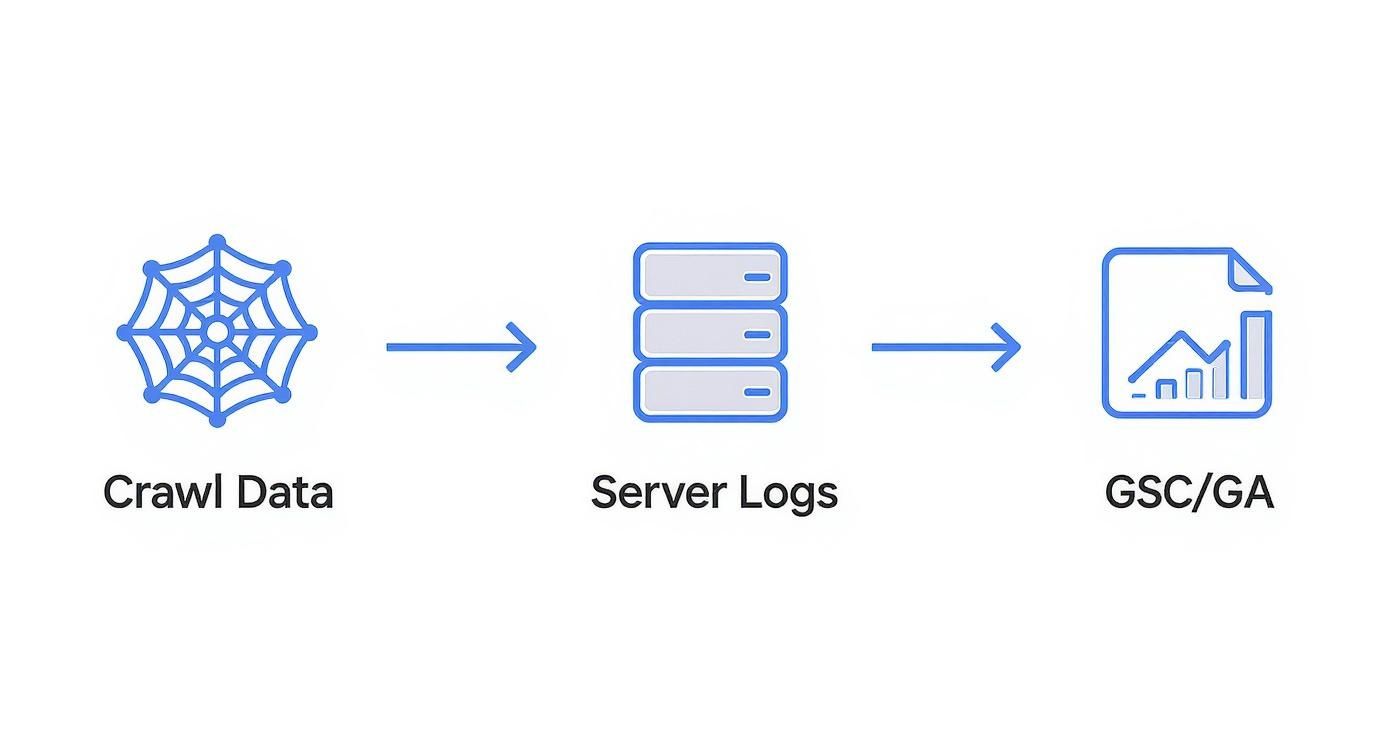
As you can see, pulling from your crawler, server logs, GA4, and GSC gives you the complete picture. You can be confident nothing important has slipped through the cracks.
Prioritize Based on Value and Potential
Before you can decide how to fix an orphan page, you need to know its current state and what its potential is. This is where a smart orphan pages SEO strategy really begins. For every single URL on your list, start by asking a few crucial questions:
- Does it have backlinks? Fire up a tool like Ahrefs or Semrush and check for external links. A page with existing backlinks, even if it's an orphan, already has some authority built up. Deleting it would be a huge waste.
- Does it get any traffic? Your Google Analytics data is your friend here. Even a tiny bit of direct or referral traffic tells you the page has some value or is being found somehow.
- Is the content valuable and relevant? Actually read the page. Is it a genuinely helpful blog post about commercial refrigeration maintenance? Or is it an expired landing page for a Black Friday sale from three years ago? Be honest about its quality and relevance to your business today.
- Does it target important keywords? Was the page built to rank for specific, high-intent keywords? If it was, that's a strong sign it should be folded back into your site architecture.
Answering these questions helps you sort your orphan pages into clear-cut buckets, which makes the next step—the actual fix—so much easier.
My Takeaway: I always build a simple spreadsheet for this. Just a few columns: URL, Backlinks (Yes/No), Traffic (Yes/No), and Content Quality (High/Medium/Low). This quick sorting exercise makes the path forward incredibly clear and efficient.
Choose the Right Remediation Tactic
Once you've sorted your pages, you can apply the right fix for the right situation. There are really only four paths you can take. Acting decisively here is what turns a messy audit into measurable SEO gains.
Integrate High-Value Content with Internal Links
This is the best-case scenario. You've unearthed a genuinely valuable page—a forgotten blog post, a detailed product guide, or a useful FAQ—that just needs to be plugged back into your website. The fix is simple but incredibly powerful: weave it back into your site structure with strategic internal links.
Find relevant, high-traffic pages on your site and add links from them to the orphan page. Make sure you use descriptive anchor text. For a restaurant equipment site, this could mean linking from your main "Commercial Ovens" category page to an orphaned blog post titled "How to Choose the Right Convection Oven."
This one action immediately funnels link equity to the orphan page, helps Google and users find it, and gives it a real shot at ranking. I always aim for at least two to three strong internal links to give it a solid foundation.
Consolidate and Redirect with a 301
Sometimes, you’ll find an orphan page that has some value but is no longer needed on its own. Maybe it has a few decent backlinks or gets a trickle of traffic, but the content itself is thin, outdated, or redundant. For example, you might find two old, orphaned posts like "Best Commercial Ice Makers of 2021" and "2022 Commercial Ice Maker Reviews."
In this case, consolidation is your best friend. Create one new, comprehensive guide—something like "The Ultimate Guide to Commercial Ice Makers"—and incorporate the best bits from both old pages. Then, set up a permanent 301 redirect from each of the old orphan URLs to your new, consolidated powerhouse page.
This strategy is a triple win: it cleans up your site architecture, gets rid of thin content, and—most importantly—it funnels all the link equity from the old pages into one powerful new asset. If you need a refresher, check out our in-depth guide on how to do a 301 redirect the right way.
Noindex Low-Value but Necessary Pages
What about pages that need to exist but have zero SEO value? I'm talking about things like landing pages for a super-targeted PPC campaign or maybe an internal login portal. These pages serve a specific business function, but you definitely don't want them in Google's index, competing with your real money pages.
For these, the solution is the "noindex" meta tag. This tag is a simple instruction to search engines: "You can crawl this page, but please don't show it in your search results." This keeps the page perfectly functional for its intended audience without cluttering your SEO profile or wasting Google's crawl budget.
Delete and Let It 404
Finally, there are the pages that offer no value whatsoever. These are the expired promotional pages, old test URLs, or thin content pieces with no traffic, no backlinks, and zero relevance. For these, don't be afraid to just pull the plug. Delete them.
When a page is deleted, it will return a 404 (Not Found) status code, and that's perfectly fine. Google understands that websites evolve and pages get removed. Over time, it will simply de-index the URL. This is the cleanest and most straightforward way to get rid of digital junk.
Building a System to Prevent Future Orphan Pages
Fixing a long list of existing orphan pages feels like a solid technical SEO win, but honestly, it’s a reactive move. The real game-changer is to stop creating them in the first place. Setting up a proactive system is far more efficient and protects the SEO equity you've worked so hard to build.
This isn't about running a massive, once-a-year audit. It's about shifting your team's mindset from cleanup to prevention by weaving small, consistent checks into your everyday operations. This approach helps your site's architecture grow stronger over time, not weaker.
Make Internal Linking Part of Your Publishing Workflow
The most frequent culprit behind new orphan pages is shockingly simple: someone hits "publish" on a new page and forgets to link to it. The best way to combat this is to make internal linking a mandatory step in your content process, not something you get around to later.
Before any new blog post, category page, or product spec sheet goes live, it needs to pass a basic internal linking check. I recommend adding a non-negotiable final step to your content team's checklist: "Add at least 2-3 relevant internal links to this new page."
This simple habit makes it impossible for new content to be born an orphan. It also forces your team to think critically about where each new piece fits into the site’s bigger picture, naturally strengthening your topic clusters and improving how link authority flows across your domain.
Implement Regular, Scheduled Audits
Even with the best workflow, things can slip through the cracks. Links get accidentally removed during content refreshes, or pages get disconnected during small site tweaks. That’s why a regularly scheduled audit is your essential safety net.
You don’t need a massive, multi-tool deep dive every month. A quick, focused check is usually all it takes.
- For large e-commerce sites: A monthly check is a smart move. I typically use a crawler like Screaming Frog to compare crawled URLs against my XML sitemap. Any URL in the sitemap that doesn't show up in the crawl is an immediate red flag.
- For smaller business sites: A thorough audit every quarter is generally enough to catch new issues before they snowball into bigger problems.
This is less about just finding problems and more about establishing a rhythm of maintenance. Consistent, smaller audits are way less daunting and far more effective than a huge annual cleanup. It keeps your orphan pages SEO strategy sharp and on point.
Create Protocols for High-Risk Activities
Certain business activities are notorious for creating orphan pages in batches. By having clear protocols for these events, you can get ahead of the problem. These are the moments when your site architecture is most vulnerable, so a playbook is a must.
Your team needs a clear, step-by-step guide for handling these common scenarios. Documenting the process removes the guesswork and drastically reduces human error.
High-Risk Scenario Protocols
| Scenario | Protocol to Prevent Orphans | Key Action |
|---|---|---|
| Product Deactivation | When a product is discontinued, its URL must be 301 redirected to the most relevant category page or a similar replacement product. | Never simply delete the page. This preserves any link equity and prevents a dead-end for users who might have the old link bookmarked. |
| Marketing Campaign Conclusion | Once a campaign-specific landing page has served its purpose, evaluate it. If it earned valuable backlinks, redirect it. If not, apply a 'noindex' tag or delete it. | Don't leave old campaign pages lingering. They become digital clutter and can dilute your site's authority and focus. |
| Website Redesign or Migration | A comprehensive URL mapping and 301 redirect strategy is non-negotiable. Every old URL must be mapped to its new equivalent before the switch is flipped. | Thorough pre-launch testing is the only way to be sure no links were missed and no old pages were stranded in the process. |
By establishing these simple but powerful systems, you shift from a constant state of repair to one of sustained site health. It transforms orphan pages SEO from a periodic emergency into a routine part of great site management, ensuring your website stays clean, navigable, and powerful for both people and search engines.
Measuring the ROI of Your SEO Cleanup

Let's be honest: fixing orphan pages isn't just a technical chore. It’s a strategic investment that pays real dividends. To justify the hours and resources you pour into this kind of SEO work, you have to connect the dots between your actions and the bottom line.
This is how you turn a dry conversation about "crawl budget" into an exciting discussion about revenue and growth. When you can prove a strong return on investment (ROI), you don't just get a pat on the back—you get the buy-in needed to maintain a healthy site for the long haul.
Setting Your Performance Benchmarks
You can't show how far you've come without knowing where you started. Before you touch a single page, you need to capture a clear snapshot of its current performance—or, more likely, its lack thereof.
For every high-value page you’re about to rescue, grab some baseline data. How much organic traffic does it get now? What keywords does it rank for, if any? What’s the bounce rate? This is your "before" picture, the benchmark you'll measure all future success against.
Key Performance Indicators to Monitor
Once your fixes are live—the redirects are working, the internal links are in place, and the content is properly consolidated—it’s time to see what changed. Your two best friends here will be Google Analytics 4 and Google Search Console.
Keep a close eye on these specific KPIs:
- Increased Organic Traffic: This is the most obvious win. Jump into your GA4 reports and filter the traffic data to view only the specific URLs you fixed. You’re looking for a clear, sustained lift in organic sessions.
- Improved Keyword Rankings: Head over to the "Performance" report in Google Search Console. Filter by your target URLs and watch their average position for key queries. As those new internal links pass authority, their rankings should start to climb.
- New Keyword Visibility: This is a fantastic bonus. You'll often see these pages start ranking for new long-tail keywords you weren't even tracking. It’s a sure sign that Google finally understands the page's context and relevance.
- Higher Engagement Metrics: In GA4, look for a drop in the bounce rate and a rise in the average engagement time for these pages. It means people are finding the content, liking what they see, and sticking around.
By isolating the "Organic Search" channel in your reports and filtering by the specific page paths, you can create a powerful visual that shows traffic growth directly from your orphan pages SEO project.
Connecting SEO Metrics to Business Outcomes
A traffic graph that goes up and to the right is great, but proving how that traffic actually helps the business is what really gets people’s attention. The final, most important step is to tie your SEO wins to core business goals like leads, sales, and revenue.
The financial impact is not trivial. Websites with a high percentage of orphan pages can see 25-40% lower conversion rates compared to well-structured sites. For a business generating significant revenue from organic search, this translates into substantial lost income.
A critical way to measure success is to see how your efforts increase organic traffic that actually converts. If you reintegrated a blog post about "choosing a commercial fryer" and it's now sending qualified users to your fryer category page, you can directly track the conversion rate of that specific user journey.
Use GA4 to track key conversions, whether it's a quote request form or an actual online purchase. By creating a segment for users who landed on a page you fixed, you can start attributing real revenue to your cleanup project. This changes the story from "we got more clicks" to "this project generated an extra $10,000 in sales last quarter." That's how you prove undeniable ROI.
Common Questions About Orphan Pages
Even after you've hunted down and fixed a bunch of orphan pages, a few tricky questions always seem to linger. The world of orphan pages SEO has some gray areas, so let's clear up the most common ones. This will help you make the right calls for your site down the road.
Are All Orphan Pages Bad for SEO?
For the most part, yes. The vast majority of orphan pages are accidents—leftover pages from a site migration, old products you forgot to redirect, that kind of thing. They hurt your SEO by wasting your crawl budget and hoarding authority that could be flowing to more important pages.
But there are a few rare, strategic exceptions. Think about a landing page built specifically for a Google Ads campaign. You might intentionally keep it separate from your main site navigation to keep paid traffic hyper-focused on one call-to-action, without any distracting links.
In that specific scenario, the page should have a "noindex" meta tag. This tells search engines to ignore it in organic search results. The page still works perfectly for your ad campaign, but it won't mess with your overall SEO.
How Often Should I Check for Orphan Pages?
There's no magic number here; it really depends on how often your site changes.
- Large, Dynamic Sites: If you're running a big e-commerce store with constantly changing product inventory or a blog that publishes new content daily, a monthly check is a good idea. Think of it as routine maintenance.
- Smaller, Static Sites: For a more straightforward business site where you only add a new blog post or service page once in a while, a quarterly audit is probably enough to stay on top of things.
Crucial Tip: Always run an audit after any major site change. Things like a website redesign, switching to a new CMS, or overhauling your URL structure are notorious for creating batches of new orphan pages. Don't wait—check right away.
Can an XML Sitemap Fix My Orphan Page Problem?
No, submitting an orphan page in a sitemap is like putting a band-aid on a broken bone. It's a temporary fix that completely misses the point.
Sure, including a page in your XML sitemap helps Google find it. But the real problem is the lack of internal links. Internal links are what tell search engines how a page fits into your site's structure, what it’s about, and why it’s important. Without those connections, the page gets no authority—or "link equity"—from the rest of your site.
Here’s an analogy: the sitemap might give Google a map to a house, but if there are no roads leading to it, Google assumes that house isn't very important. The page might get indexed, but it will be seen as an isolated island with no authority, and it will almost certainly never rank for anything meaningful. The only real solution is to build the roads by fixing your internal linking.
At Restaurant Equipment SEO, we turn technical headaches like orphan pages into real, measurable growth. Our strategies are built to make sure every single page on your site is pulling its weight and contributing to your bottom line. Find out how our specialized SEO services can fortify your online presence and bring more qualified buyers to your site. Learn more at https://restaurantequipmentseo.com.