
What Are Core Web Vitals Your Ultimate Guide
Core Web Vitals are a set of specific, real-world metrics Google uses to size up a website’s user experience. They essentially measure how a page feels to a visitor, focusing on three key areas: loading speed, how quickly it responds to clicks, and whether things jump around on the screen unexpectedly.
Think of them as your site's performance report card, graded from a user's point of view.
Your Website Speed Is Your Customer's First Impression
Picture a chef in the middle of a chaotic dinner rush. Their commercial oven just died. They pull out their phone, find your restaurant equipment site, but the page loads at a snail's pace. The high-resolution product images take an eternity to appear. Frustrated, they're gone in seconds, already buying from a competitor whose site just works.
This is the exact scenario Google’s Core Web Vitals (CWV) are designed to prevent. They aren't just abstract technical terms; they're Google's way of putting a number on your customer's digital experience. When a site meets the CWV thresholds, users are a full 24% less likely to abandon the page. For an e-commerce business, that's a number you can't ignore.
From Storefront to Screen
The easiest way to grasp Core Web Vitals is to think of your website as a physical storefront. Each metric lines up with a critical part of the in-person customer experience:
- Largest Contentful Paint (LCP): This is how quickly a customer can see the main event in your window display. A good LCP means the hero image of that brand-new walk-in freezer loads almost instantly, grabbing their attention.
- Interaction to Next Paint (INP): This is the equivalent of a sales associate responding immediately when a customer asks a question. When someone clicks "Add to Cart," INP measures how fast the site reacts and shows that the action was registered.
- Cumulative Layout Shift (CLS): This reflects the stability of your store. Imagine price tags suddenly swapping places as a customer reaches for an item. CLS makes sure your "Buy Now" button doesn't shift away from the cursor just as they're about to click.
Core Web Vitals directly connect your site's technical performance to business outcomes. A slow, clunky website feels like poor customer service, sending potential buyers to competitors who offer a smoother, more reliable online experience.
Introduced back in 2020, CWV officially became a Google ranking factor in June 2021, kickstarting a massive push for a faster web. Still, by early 2023, only 40.1% of mobile sites managed to pass all three thresholds. This collective effort has saved users an incredible 10,000 years of waiting time in 2023 alone, as detailed in this faster web analysis.
Here's a quick breakdown of what each Core Web Vital means for your e-commerce site.
Core Web Vitals At a Glance
| Metric | What It Measures | Goal for Your Site |
|---|---|---|
| LCP | Loading Performance: How long it takes for the largest image or text block to become visible. | The main product image on your category or product pages should load in under 2.5 seconds. |
| INP | Responsiveness: How quickly the page responds to user interactions like clicks, taps, and key presses. | When a user clicks "Add to Cart" or opens a menu, the site should visually respond in under 200 milliseconds. |
| CLS | Visual Stability: Measures how much the content unexpectedly shifts around as the page loads. | The "Buy Now" button and other interactive elements should not move, keeping the score below 0.1. |
Each of these vitals gives you a tangible way to measure what was once a subjective concept: "user-friendliness."
Understanding this framework makes it clear that CWV are a critical business metric for sales, not just another item on a developer's to-do list. They are a fundamental piece of a great user experience optimization strategy, which is absolutely essential for turning casual browsers into loyal customers.
Decoding The Three Core Web Vitals
To really get what Core Web Vitals are all about, we need to stop thinking in acronyms and start thinking like a customer. Each one of these metrics measures a specific, crucial moment in their experience on your website, directly shaping how they feel about your business.
Let’s break them down using a few real-world examples from a restaurant equipment store.
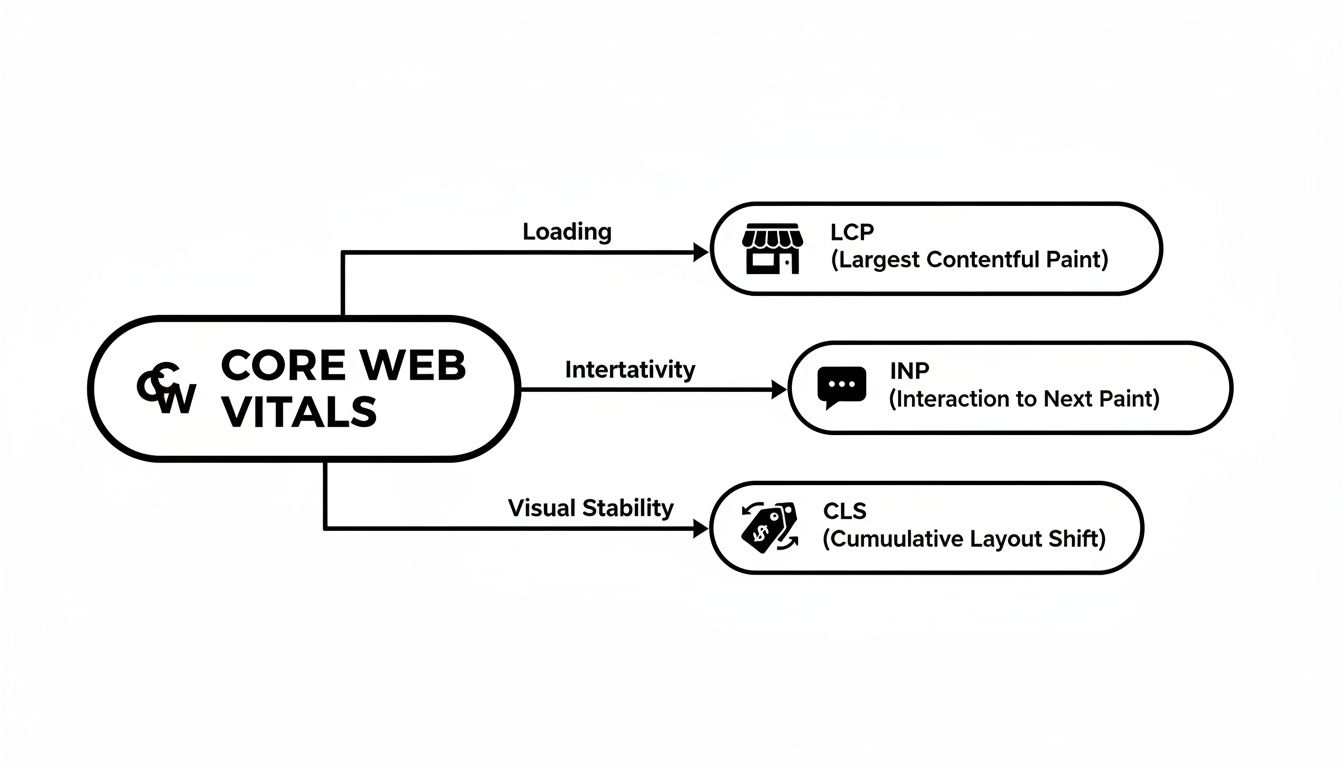
This diagram shows how LCP (loading), INP (interactivity), and CLS (visual stability) all work together to create a smooth and satisfying experience for anyone visiting your site.
Largest Contentful Paint (LCP)
Largest Contentful Paint (LCP) is all about loading performance. Think of it as your website’s grand opening. When a chef lands on your product page for a new commercial refrigerator, LCP is how long it takes for the main hero image of that fridge to fully load.
That main image is often the most important thing on the page. A slow LCP is like staring at an empty storefront window—it’s boring, frustrating, and makes you want to walk away. A fast LCP, on the other hand, immediately grabs their attention, shows them exactly what they came for, and keeps them hooked.
Google's LCP Thresholds:
- Good: Under 2.5 seconds
- Needs Improvement: Between 2.5 and 4.0 seconds
- Poor: Over 4.0 seconds
Interaction to Next Paint (INP)
Next up is Interaction to Next Paint (INP), which measures responsiveness. It answers a simple question: "When I click a button, does anything happen right away?"
Imagine a busy restaurant owner trying to add a set of prep tables to their cart. They click the "Add to Cart" button. INP measures the time it takes for the site to visually react—maybe by showing a loading spinner or updating the cart icon. A noticeable delay leaves them wondering, "Did my click even register? Is the site broken?" A snappy, low INP provides instant confirmation that everything is working as it should.
- Good: Under 200 milliseconds
- Needs Improvement: Between 200 and 500 milliseconds
- Poor: Over 500 milliseconds
Cumulative Layout Shift (CLS)
Finally, Cumulative Layout Shift (CLS) tackles visual stability. This one is designed to stop one of the most maddening things that can happen on a webpage: things suddenly jumping around.
Picture this: A customer is about to click "Buy Now" on a brand-new ice machine. Just as their mouse is about to land on the button, an ad or a banner pops into view at the top of the page, pushing everything down. They miss the button and accidentally click something else. That infuriating experience is exactly what CLS measures.
A low CLS score means your page is stable and predictable, so users can click with confidence. If you want to dive even deeper, check out this comprehensive guide on Core Web Vitals.
- Good: A score below 0.1
- Needs Improvement: Between 0.1 and 0.25
- Poor: A score over 0.25
How Core Web Vitals Impact SEO and Sales
Getting a handle on the technical side of Core Web Vitals is one thing, but the real magic happens when you connect those numbers to your bottom line. These aren't just abstract scores for your web developer to worry about; they're a vital part of your SEO and sales engine, directly impacting how many restaurant owners find you and, more importantly, how many actually buy from you.
Think of it this way: Google's page experience algorithm is watching. It uses these vitals as a major ranking signal, meaning a faster, smoother website can climb right over slower competitors for valuable keywords like "commercial ice machine for sale." When your site gives people a better experience, Google notices and rewards you with more visibility. That means more qualified buyers landing on your product pages.
From Better Scores to Bigger Sales
Beyond just climbing the search rankings, the effect on customer behavior is massive. A clunky digital experience is one of the fastest ways to lose a sale. In fact, over 50% of people will ditch a page if it takes more than three seconds to load. Every extra second a customer waits for your commercial oven page to appear is another second they could be clicking "buy" on a competitor's site.
Nailing your Core Web Vitals brings real, tangible results to your business:
- Lower Bounce Rates: Fast, stable pages don't frustrate people. When visitors aren't annoyed, they stick around instead of hitting the back button. Knowing what bounce rate in SEO means makes it clear why keeping users on your site is so critical for your rankings.
- Higher User Engagement: A snappy, responsive site invites exploration. Shoppers are more likely to click through different product categories, compare specs on walk-in coolers, and spend more time getting to know your inventory.
- Increased Conversion Rates: This is the big one. Studies have shown that improving site speed by just 0.1 seconds can boost conversion rates by as much as 8%. That’s a serious return.
For an e-commerce business selling high-ticket items, this connection is crystal clear. Better Core Web Vitals don't just make your website feel nicer—they directly lead to fewer abandoned carts and more completed sales.
At the end of the day, working on these metrics isn't just a technical task or an expense. It's a direct investment in generating more leads, closing more deals, and building a more powerful online presence. Every millisecond you shave off your load time and every layout shift you fix is a step toward a healthier, more profitable business.
Where to Check Your Vitals: The Essential Toolkit

Knowing what LCP, INP, and CLS are is one thing. Actually measuring them on your own site is where the magic happens. Fortunately, you don't need a development degree to get started. Google offers a handful of free, powerful tools that show you exactly what your customers are experiencing.
Think of it this way: you can use these tools to diagnose why a high-value commercial refrigerator page is slow, or figure out what's causing your checkout process to feel clunky. Let's walk through the main players.
For a Quick Spot-Check: PageSpeed Insights
Your first stop for a fast diagnosis on any single page should be PageSpeed Insights (PSI). It’s incredibly straightforward: you pop in a URL—say, your best-selling convection oven page—and within seconds, you get a detailed performance report.
The beauty of PSI is that it gives you two kinds of data: "lab" data from a simulated test and "field" data from real users. It’s the perfect starting point to see how one specific page stacks up against those Core Web Vitals thresholds.
The report gives you a clear pass/fail grade for your LCP, INP, and CLS scores, based on actual visitor data. You'll know right away if that page is in the green or needs some serious attention.
For the Big Picture: Google Search Console
While PSI is like a thermometer for a single page, Google Search Console is your full-on health dashboard for the entire site. The Core Web Vitals report inside Search Console uses data from real Chrome users to track your performance across every page over time.
This is where you spot the trends. Are all your product detail pages struggling? Is your blog suddenly slowing down? Search Console groups all your URLs into three simple buckets:
- Good: All green. These pages are providing a great experience.
- Needs Improvement: At least one vital is in the yellow "needs improvement" zone.
- Poor: These URLs are failing on one or more vitals and likely frustrating users.
Think of the Search Console report as a regular check-up for your entire online store. It points you to the specific groups of pages that are sick so you know exactly where to focus your efforts for the biggest impact.
For Live, Hands-On Debugging: Chrome DevTools
When you need to get your hands dirty, Chrome DevTools is your best friend. It’s built right into the Chrome browser (just right-click any page and hit "Inspect"). While it’s more technical, it lets you or your developer see performance problems happen in real-time.
You can simulate how your site loads on a slower 3G connection or a smaller phone screen. It's the best way to pinpoint exactly what image is slowing down your LCP or what ad is causing that annoying layout shift.
By using these three tools in tandem, you’ll have a complete view—from a 30,000-foot overview right down to the nitty-gritty code. You'll be able to move from just knowing about Core Web Vitals to actively fixing them to boost your rankings and your sales.
Actionable Steps To Improve Your Core Web Vitals

Alright, you've got your Core Web Vitals scores. Now what? The next step is turning that data into real-world fixes that make your site better. This isn't about generic advice; it's about a tactical playbook designed specifically for restaurant equipment e-commerce sites.
We're moving from theory to practice. Instead of a vague goal like "optimize images," think more concretely: "compress those high-resolution photos of stainless steel prep tables before uploading them." Let's break down the strategy for each vital.
Boosting Your Largest Contentful Paint (LCP)
LCP is all about that critical first impression. When a chef lands on a product page, you want that massive image of a six-burner range or a walk-in freezer to snap into view instantly. Slow loading here is one of the quickest ways to lose a sale.
Here are a few targeted ways to get your LCP score in the green:
- Image Compression: This is non-negotiable. Before any product photo hits your site, run it through a compression tool. You can drastically reduce the file size—and thus the load time—without a noticeable drop in quality.
- Use a Content Delivery Network (CDN): A CDN is like having mini-versions of your website stored in servers all over the world. When a customer in Miami visits your site, the images are served from a server in the Southeast, not one across the country. It's a game-changer for speed.
- Upgrade Your Hosting: Sometimes, the problem is the engine itself. If your server is slow to respond, even perfectly optimized images won't load quickly. Investing in a better hosting plan provides the solid foundation your site needs to perform well.
Taming Interaction to Next Paint (INP)
A good INP score means your site feels fast and responsive. When a user clicks a filter for "NSF-certified" or types "convection oven" into the search bar, they expect something to happen immediately. Delays make the site feel clumsy or, worse, broken.
On e-commerce sites, the main culprit for bad INP is often clunky JavaScript that powers all those cool interactive elements. Streamlining that code can make a huge difference in how quickly the page reacts. If you want to dig deeper, there are many fast, proven ways to boost website performance that can really move the needle.
Stabilizing With Cumulative Layout Shift (CLS)
Have you ever tried to click a button, only to have the page jump and make you click on an ad instead? That’s Cumulative Layout Shift (CLS). The goal here is a score under 0.1.
It's an achievable target. Globally, 64.1% of mobile sites hit "good" CLS scores by September 2023. And overall, CWV pass rates jumped from 43.0% in January 2023 to 49.0% by January 2024, often because of simple fixes that create a more stable, trustworthy experience.
The key to a low CLS score is stability. Your "Add to Cart" and "Checkout" buttons should never be moving targets.
To nail this, you need to reserve space for content before it loads:
- Specify Image Dimensions: This is a simple one. Always include the width and height attributes for images in your site's code. This tells the browser to save a spot for that image, preventing the layout from shifting around it when it finally loads.
- Reserve Space for Banners: If you run promotional banners at the top of your pages, make sure they load into a fixed-size container. That way, the banner doesn't suddenly appear and shove all your product listings down the page.
High-Impact CWV Optimization Checklist
Feeling a bit overwhelmed? This quick checklist breaks down the most impactful fix for each Core Web Vital, making it easy to prioritize your efforts.
| Core Web Vital | Top Optimization Tactic | Tool to Verify |
|---|---|---|
| LCP | Compress and resize hero images before uploading. | PageSpeed Insights |
| CLS | Specify width and height dimensions for all images. | Lighthouse |
| INP | Optimize or remove slow-running third-party scripts. | Chrome UX Report |
Tackling these issues one by one will create a noticeably better experience for your customers.
Putting these changes into action can be a big project. A structured technical SEO audit is often the best starting point. It helps pinpoint the most critical issues so you can focus your energy on the fixes that will deliver the biggest wins for your Core Web Vitals.
Your Top Core Web Vitals Questions, Answered
Diving into Core Web Vitals often raises more questions than it answers. I get it. Let's cut through the noise and tackle some of the most common things I hear from site owners, giving you practical answers you can actually use.
How Often Should I Be Checking My Vitals?
This is a great question. You definitely don’t need to obsess over your scores every single day. For most businesses, a monthly check-in is the perfect cadence. It’s enough time for Google to gather real user data and for you to see the actual effects of any fixes you've rolled out.
That said, there are a few key moments when you should be checking more frequently:
- After a major site redesign: A new theme or a significant layout change can completely upend your performance. Check it right away.
- When you add new features: Rolling out a complex product filter or a new third-party chat widget? These can easily slow things down, so it's wise to test their impact.
- If you see a sudden drop in rankings: If your search visibility takes a nosedive, a performance issue could absolutely be the culprit.
Are Core Web Vitals the Most Important Thing in SEO?
Nope. But they are a critical piece of a much bigger puzzle. Let's be clear: things like high-quality, relevant content and a strong backlink profile are still the undisputed kings of SEO. You simply can't rank for "commercial ice machines" with a lightning-fast page that has zero useful information.
Here’s an analogy I like to use: great content gets you an invitation to the race. Great Core Web Vitals help you run that race faster than everyone else. When two pages have equally fantastic content, Google will almost always favor the one that delivers a better user experience. It's a powerful tie-breaker.
Core Web Vitals aren't an SEO silver bullet, but they are a massive competitive advantage. If you ignore them, you're willingly giving your competitors an edge.
Lab Data vs. Field Data—What's the Difference?
When you run a performance test, you'll see two kinds of data: "lab" and "field." Knowing which is which is essential for making smart decisions.
-
Lab Data: Think of this as a test run in a controlled environment. It uses a single device with a specific network connection, like what Lighthouse does. It’s perfect for debugging and finding problems before they affect your real users.
-
Field Data: This is the gold standard. It’s data collected from actual Chrome users who have visited your site on their own phones, laptops, and internet connections. This is what Google really cares about because it reflects your customers' true experiences. This data comes from the Chrome User Experience (CrUX) Report.
Lab data is your diagnostic tool. Field data is what determines your SEO fate. Your goal is to make changes that improve the numbers your real-world customers are generating.
What's This New INP Metric All About?
Interaction to Next Paint (INP) is the newest Core Web Vital, officially taking over for First Input Delay (FID) back in March 2024. Where FID only measured the first interaction, INP measures how responsive your page is to all user interactions—clicks, taps, and keyboard inputs.
This is a huge deal for e-commerce sites. Think about it: a customer is clicking through product filters, opening size charts, and adding items to their cart. INP measures the lag on every single one of those actions.
As of September 2023, an impressive 76.0% of mobile sites already had good INP scores, putting them way ahead of LCP's 54.2%. A snappy, responsive site matters. In fact, optimized pages see 24% fewer user abandonments. If you want to dig deeper into the data, you can check out the official performance benchmarks and release notes to see how you stack up.
At Restaurant Equipment SEO, we translate these technical metrics into real business growth. If you’re tired of losing ground to the competition and are ready to improve your site’s performance, let’s talk. https://restaurantequipmentseo.com