
A Practical Content Audit Website Guide for Equipment Suppliers
A content audit is a deep-dive, systematic review of everything living on your website—every product page, every blog post, every single PDF. Think of it as a strategic health checkup for your digital showroom. It’s how you find out what's working, what's failing, and where your biggest growth opportunities are hiding.
Why a Content Audit Is Your Most Powerful SEO Tool

For a restaurant equipment supplier, your website isn’t just a catalog; it's your hardest-working salesperson, operating 24/7. Every product description, buying guide, and spec sheet has a job to do. A content audit moves you past guesswork, giving you a data-driven blueprint to overhaul this digital storefront and turn it into a lead-generating machine.
It’s all about asking the tough questions. Why has your once-popular blog post on commercial convection ovens fallen off the map? Are your walk-in freezer pages actually answering the questions that restaurant managers are typing into Google? A proper audit gives you the answers.
Aligning with a Constantly Changing Search Environment
The online space for restaurant suppliers is fiercely competitive. Staying visible means you have to constantly adapt, because search engines are a moving target. Google now pushes out between 500 and 600 algorithm updates per year, making regular audits absolutely critical for keeping your product pages ranked.
To really get a clear picture of your website's performance, a comprehensive audit digs into several core areas. This isn't just about keywords; it's about the total health of your site. We often break this down into five key pillars.
The Five Pillars of a Restaurant Equipment Website Audit
| Audit Pillar | What It Means for Your Business | Example Metric |
|---|---|---|
| Technical SEO | The foundational health of your website. It’s about making sure search engines can easily crawl and index your pages without running into roadblocks like broken links or slow load times. | Core Web Vitals Score |
| On-Page SEO | This is about optimizing individual pages. Are your product pages for "commercial griddles" actually optimized for that term, from the title tag to the image alt text? | Target Keyword Rankings |
| Content Quality & Performance | A hard look at whether your content is accurate, useful, and better than what your competitors offer. Is it actually driving traffic and engagement? | Organic Traffic per Page |
| User Experience (UX) | Can a busy restaurant owner quickly find the specs for an ice machine? A frustrating website experience sends potential customers straight to a competitor. | Bounce Rate |
| Content Gaps & Opportunities | Finding what’s missing. What are customers searching for that you don’t have an answer for? This is where you find your next big traffic-driving ideas. | Competitor Keyword Overlap |
By looking at your site through these five lenses, you get a complete, 360-degree view of what needs to be fixed, what can be improved, and where you can get a leg up on the competition.
Uncovering Hidden Sales and Traffic Opportunities
Beyond just fixing problems, a content audit is your best tool for finding untapped potential. It helps you pinpoint "content gaps"—topics your customers are searching for that you don't cover. Maybe your top competitors all rank for "best commercial planetary mixers," but you have no content on the topic at all. That's a massive, flashing opportunity.
You'll also get a much clearer picture of what drives your visitors. Understanding what is organic search traffic is one thing, but seeing exactly which pages are bringing it in—and why—is what allows you to replicate that success across your entire site.
By methodically analyzing every piece of content, you transform your website from a passive collection of pages into an active, strategic asset. It's the difference between hoping customers find you and ensuring they do.
Ultimately, a content audit is the foundation of any winning SEO strategy. It stops you from wasting time and money on content that isn't pulling its weight and focuses your efforts on the activities that directly impact your bottom line: more traffic, more qualified leads, and more sales.
Building Your Content Audit Command Center

Before you can make a single decision about what content to keep, kill, or combine, you need to see the whole battlefield. A proper content audit runs on hard data, not gut feelings. This means we're going to build a master spreadsheet—your command center—that maps out every single piece of content on your website and tells you exactly how it’s performing.
Think of it this way: your website is a massive warehouse. The first thing we need is a full inventory list of everything on the shelves. Then, we need to attach performance data to each item to see what's actually selling and what's just collecting dust. This combined view is what lets you make smart, strategic moves that actually improve your bottom line.
First, Assemble a Complete Content Inventory
Getting a list of every single URL on your site is the foundational first step. Don't even think about manually copying and pasting from your sitemap—it's a surefire way to miss things and waste hours. You need a website crawler.
Tools like Screaming Frog SEO Spider are the industry standard for a reason. You just plug in your domain, and it crawls your entire site just like Google would, spitting out a clean list of every URL it finds. We're talking product pages, category pages, blog posts, and even those old spec sheet PDFs you forgot existed.
For a restaurant equipment supplier, this initial list can be huge. The trick is to segment your crawl to keep it manageable. You can tell the tool to only crawl URLs containing /products/ or /blog/, letting you analyze different sections of your site one at a time. This focus is what makes a content audit website analysis truly effective.
This list of URLs becomes the very first column in your new master spreadsheet. Welcome to your command center.
Next, Bring in the Performance Data
An inventory by itself is just a long, boring list. The magic happens when you layer in performance data. This is where you connect each URL to its real-world impact on your business. We'll pull this information from two key sources: Google Analytics and Google Search Console.
From Google Analytics (GA4), you'll want to add columns for things like:
- Page Views: How many eyeballs hit this page in the last 12 months?
- Engagement Time: Are people actually sticking around to read, or are they bouncing immediately?
- Conversions: This is the big one. For a product page, this could be an "Add to Cart" click. For a blog post on "Choosing the Right Commercial Convection Oven," it might be a spec sheet download or a "Request a Quote" form fill.
From Google Search Console (GSC), grab these metrics:
- Clicks: How many people clicked through to your page from a Google search?
- Impressions: How many times did your page appear in search results?
- Top Queries: What specific search terms are actually driving traffic to this page?
By pairing each URL with this data, you've transformed a simple list into an intelligent dashboard. You can now see at a glance that a blog post with only 50 page views but 10 "Request a Quote" conversions is infinitely more valuable than a different post with 5,000 views and zero leads.
Finally, Structure Your Spreadsheet for Analysis
With all your data collected, the last piece of the puzzle is organizing it all in your spreadsheet. Your command center should now have columns for the URL, Page Title, and all the metrics we just pulled: Page Views, Engagement Time, Conversions, Clicks, and Impressions.
This organized view is incredibly powerful. You can now sort your content by any metric to quickly find your rockstars and your duds. A well-built command center makes the entire audit process smoother and helps you present your findings clearly. If you want to see how this raw data can be turned into a compelling story, check out our guide on creating an SEO report.
With this data-packed spreadsheet complete, you have everything you need to move on to the qualitative analysis—where we start making judgments about your content's quality, relevance, and strategic value.
Putting on Your Customer's Hat to Analyze Content
Okay, you’ve done the heavy lifting and now have a spreadsheet bursting with data. This is where the real fun begins. The numbers tell you what's happening—which pages get traffic, which ones convert—but they don't tell you the why. To get that, you have to stop thinking like a marketer and start looking at your site through your customer’s eyes.
A busy restaurant owner hunting for a new commercial ice machine isn't looking at your metrics. They're looking for answers, a sense of trust, and a clear, simple path to solving their problem. The key is to blend that hard data with some good old-fashioned empathy. This is how you effectively analyze content performance and turn that spreadsheet into a game plan.
Creating a Content Scoring Framework
To keep yourself honest and avoid just going with your gut, it's a good idea to create a simple scoring system. Just add a few new columns to your content inventory spreadsheet. Rate each piece of content on a 1-to-5 scale across a few key areas that matter to your buyers.
This little trick turns subjective feelings into concrete data, making your final decisions a whole lot easier to justify.
For a restaurant equipment supplier, your scoring criteria should reflect what builds confidence and pushes a potential buyer closer to a decision.
I’d recommend starting with these four pillars:
- Accuracy and Freshness: Is the information still correct? An article about a walk-in cooler that was discontinued two years ago doesn't just look bad; it actively erodes trust.
- Relevance to Audience: Does this page speak directly to a chef or restaurant manager's pain point? A generic post on "kitchen tips" is fluff. A detailed guide on "optimizing workflow around a new prep table" is pure gold.
- Clarity and Readability: Is the content easy to scan and digest for someone who’s probably short on time? Walls of text and overly technical jargon will send them straight to a competitor.
- Actionability: Does the page give the user a clear next step? This could be anything from a "Request a Quote" button to a downloadable spec sheet or a link to a related product.
Once you start scoring each URL against these criteria, patterns will emerge almost immediately. You'll quickly see which pages are your all-stars and which ones are letting your customers down, regardless of what the traffic numbers say.
Spotting the Most Common Content Problems
As you go through your inventory, you’ll start to see the same issues cropping up again and again. These are the red flags telling you that your content isn't pulling its weight.
A classic one is thin content. We’ve all seen it: a product page for a commercial mixer with a single, uninspired sentence and a price. A potential customer lands there with questions about motor power, capacity, and warranty, finds nothing, and bounces. They're not coming back.
Another problem I see all the time, especially with suppliers who have massive catalogs, is content cannibalization. This is what happens when you have multiple pages all fighting for the same keyword. Maybe you have three nearly identical blog posts on "how to choose a commercial fryer." This confuses Google, which often results in none of them ranking well. It also confuses your customers.
This hands-on analysis is where a content audit website review truly proves its worth. You start connecting the dots—a page with high traffic but a low "Accuracy" score is a ticking time bomb for your brand's reputation.
Finally, keep an eye out for content gaps. These are the missing links in your customer's journey. For instance, if you sell a wide variety of commercial ranges but have zero content explaining the pros and cons of gas versus electric models, you're missing a massive opportunity. You're forcing potential buyers to go elsewhere for that crucial early-stage research, and odds are, they won't return to you when it's time to buy.
This kind of deep, customer-centric analysis elevates your audit. It’s no longer just a technical check-up; it becomes a strategic review of your entire digital sales process. Getting this right is a huge part of good user experience optimization.
Getting Technical: Auditing for SEO and AI-Powered Search
Now that you've got a handle on the quality of your content, it’s time to dig into the technical details that search engines care about. Let's be honest, modern SEO is so much more than just stuffing keywords onto a page. It's about structuring your website so that both people and search engine bots can understand exactly what you're offering. This has become even more crucial as AI starts to answer search queries directly.
A proper content audit website review needs to get under the hood. We're going to dissect the technical signals that tell Google you're an authority, making sure your product pages for commercial mixers and refrigeration units are set up to be seen. It's a two-part job: nailing the classic on-page SEO elements and future-proofing your content for the new world of AI search.
Mastering the On-Page SEO Fundamentals
Before we get into the more complex stuff, let’s make sure your foundation is solid. These are the tried-and-true SEO signals that have always mattered, and they're just as important today. As you go through your content inventory, add a few columns to your spreadsheet to check these basics for every important product and category page.
- Title Tags: Is the title unique and compelling? Does it feature the primary keyword, like "Hoshizaki KM-515MAJ Ice Machine," right near the front?
- Meta Descriptions: Think of these as a mini-ad for your page in the search results. Is each one unique and written to make someone want to click?
-
URL Structure: Look at your URLs. Are they clean and descriptive (like
/products/commercial-mixers/hobart-hl200)? Or are they a jumbled mess of numbers and symbols? Clean URLs win. - Internal Linking: Are your blog posts linking to the products they mention? A smart internal linking strategy spreads "SEO juice" around your site and, more importantly, guides potential customers toward making a purchase.
When you're doing a deep dive like this, it can be helpful to see what everyone else is up to. Using a solid competitor SEO audit checklist can give you a framework for not just fixing your own site, but also for spotting opportunities to get ahead of the competition.
Preparing for an AI-Driven Search World
The search landscape is changing, and fast. AI-powered search results are becoming the norm, which completely changes how we need to approach a website audit. Here's a staggering statistic: 60% of all searches now generate zero clicks. This means people are getting their answers directly on the results page without ever visiting a website.
For a restaurant equipment supplier, this is a massive signal. It means that implementing structured data is no longer optional—it's critical. Using schema markup for your products, pricing, and availability gives you a fighting chance to be the answer featured in those AI summaries and quick-answer boxes. You can find more details in this in-depth analysis of website audits.
This is where Schema markup (structured data) becomes your best friend. It’s a specific vocabulary of code you add to your site that essentially translates your content for search engines.
Think of it this way: you're explicitly telling Google, "This page is about a product, this is its price, here are its specifications, and here's what customers think of it." By making it that easy for them, you drastically increase the odds that their AI will grab your information and feature it.
Implementing Product Schema for Maximum Visibility
For your product pages, the 'Product' schema is easily the most valuable tool in your arsenal. It allows you to spoon-feed search engines the exact information a buyer is looking for. During your audit, you need to check if your key product pages have this markup and if it's been implemented correctly.
Let's say you're auditing the page for a Globe SP20 Planetary Mixer. Your structured data should clearly define the most important details.
Essential 'Product' Schema Properties to Audit:
-
@type: 'Product' - This is the first thing you need. It tells search engines, "This is a product page." -
name: "Globe SP20 20-Quart Planetary Mixer" - The full, official product name. -
brand: "Globe" - The manufacturer. -
model: "SP20" - The specific model number people search for. -
description: A short, clear summary of the mixer's features and benefits. -
offers: This is a big one. It's a nested property where you list the price, currency, and availability (e.g., 'InStock'). -
aggregateRating: If you have customer reviews, this pulls the average rating and total review count. Get this right, and you can earn those eye-catching star ratings right in the search results.
Checking for structured data isn't just a technical chore. It’s a strategic decision to position your website as the most authoritative, reliable source of information in your niche—an expert source that AI can trust and promote. By meticulously auditing both your on-page fundamentals and your site's readiness for AI, your content audit becomes less about cleaning up the past and more about building a strategy for future growth.
Turning Your Audit into an Action Plan
This is where the rubber meets the road. You’ve waded through spreadsheets, analyzed traffic patterns, and now you're staring at a mountain of data. The biggest mistake I see companies make is stopping here, falling into "analysis paralysis." But data is useless without action. The whole point of this audit is to build a concrete, prioritized plan that will actually grow your business.
It’s time to make some tough calls. Every single URL on your site needs a clear verdict: does it stay, get a major facelift, or get cut? Creating a firm decision-making framework is how you transform a research project into a revenue-generating roadmap.
This flowchart gives you a solid mental model for how technical SEO issues form the foundation of your content strategy. You have to fix the leaky pipes (crawlability, indexability) before you can repaint the walls (on-page content).
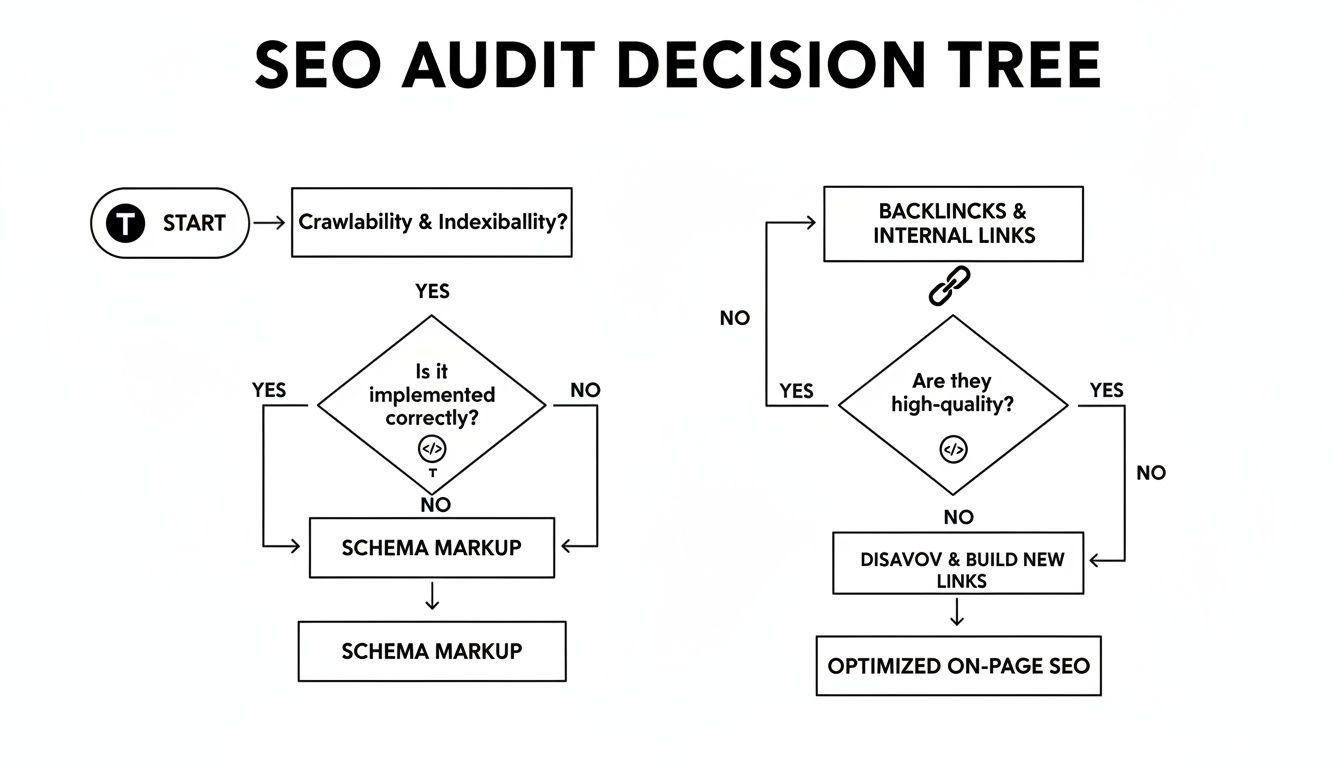
Think of it this way: if Google can’t find or understand your pages, even the most brilliant content won’t matter. This logic should guide how you structure your action plan.
What to Do With Your Content: The Four Fates
Based on the data you've gathered, every page in your inventory will fall into one of four buckets. Your job is to be the judge and assign a fate to each one. This takes the emotion and guesswork out of the equation.
Content Audit Action Framework
To make this crystal clear, I've put together a simple decision matrix. Use this framework to assign an action to every piece of content in your audit spreadsheet. It helps you stay objective and focused on what matters most.
| Content Status | Recommended Action | Example for a Restaurant Supplier | Priority Level |
|---|---|---|---|
| High Traffic, High Value | Keep As-Is | Your cornerstone "Guide to Commercial Kitchen Ventilation" that ranks #1 and generates leads daily. | Low (Monitor) |
| Outdated or Underperforming | Update & Improve | A 3-year-old "Walk-In Cooler Buying Guide" with outdated models and weak on-page SEO. | High |
| Keyword Cannibalization | Consolidate & Merge | Three separate, thin blog posts on fryer maintenance tips that are all competing and ranking poorly. | Medium |
| No Traffic, No Value | Delete & Redirect | An old press release about a 2018 trade show with zero traffic and no backlinks. | Low |
This table isn't just a guide; it's your new rulebook. By sticking to this logic, you ensure every decision is backed by data and directly contributes to your bottom line.
A Deeper Dive Into Each Action
1. Keep As-Is
These are your champions. They're the pages driving significant traffic, ranking for valuable keywords, and bringing in business. For a restaurant supplier, this might be your in-depth guide to choosing commercial convection ovens that consistently ranks on page one. Don't touch these. Just let them do their thing.
2. Update and Improve
This is where you'll spend most of your time, and it's where you'll see the biggest wins. You’re looking for content with potential that's just not living up to it. Maybe it’s a high-traffic post that’s three years old, with outdated product recommendations and a tired title. It's got the authority, but it needs a serious refresh.
Here's a tip from experience: A real update isn't just changing a few words. Treat it like a full relaunch. Add new sections, find fresh statistics, embed a new video, and rewrite the title tag and meta description to be more compelling. A study from Orbit Media found that bloggers who go all-in on updating old content are 2.5x more likely to report "strong results." It works.
3. Consolidate and Merge
This is your secret weapon against keyword cannibalization. It happens to everyone—over the years, you end up with multiple, weak articles all trying to rank for the same thing. For instance, you might find three different blog posts on "how to clean a commercial griddle," none of which are doing well.
The fix is simple: merge them. Take the best, most useful information from all three and combine it into one definitive, powerhouse guide. Then, delete the old, thin pages and set up 301 redirects from the old URLs to your new, consolidated masterpiece. This tells Google to pass all the authority from the old pages to the new one.
4. Delete and Redirect
It can feel wrong to delete content you spent time creating, but it's crucial for a healthy site. Some pages are just dead weight. I'm talking about that company event announcement from five years ago with zero traffic, no backlinks, and no strategic value.
These pages are digital clutter. They bloat your website and can dilute the authority of your important pages. The process is simple: delete the page and implement a 301 redirect to a relevant, live page, like your main blog index or a related product category. Never delete a page without a redirect, especially if it has even a handful of backlinks or a trickle of historical traffic.
How to Prioritize Your To-Do List
Okay, you've assigned an action to every URL. Now what? You can't tackle everything at once. The final step is to build a realistic roadmap.
Add one last column to your spreadsheet and label it "Priority." Then, tag each task as high, medium, or low.
- High Priority: Start with the money pages. These are high-traffic pages with poor conversion rates or content targeting your most profitable equipment categories. Fixes here have the biggest and fastest impact on your bottom line.
- Medium Priority: Move on to your content consolidation projects. These can be big wins but often take more time. Updates to pages with moderate traffic also fall into this category.
- Low Priority: Simple deletions and updates to non-critical, low-traffic pages can wait. Handle these when you have downtime.
This prioritized roadmap is the final output of your audit. It's a clear, actionable plan that ensures your efforts are focused where they'll make the most difference, driving better SEO performance and, ultimately, more sales.
Frequently Asked Questions About Content Audits
Even with a solid plan, jumping into a full-scale content audit can feel a bit daunting. It’s natural for questions to pop up. Over the years, I've seen restaurant equipment suppliers grapple with the same set of challenges, from timing the audit to deciding whether to bring in outside help.
Let's clear up some of those common questions. Think of this as a final gut check before you roll up your sleeves and get started.
How Often Should I Perform a Content Audit on My Website?
For a business like a restaurant equipment supplier—with a huge product catalog and, hopefully, a busy blog—a deep, comprehensive audit once a year is the way to go. This annual review lets you align everything with your big-picture business goals and stay ahead of major search engine updates.
But that doesn't mean you should set it and forget it for 364 days. I always recommend smaller, quarterly "health checks" to keep your finger on the pulse.
- Top 20 Product Category Pages: Are they holding their rankings? Have conversions dipped?
- Top 10 Performing Blog Posts: Watch out for content decay. It's a real thing—your once-star articles can slowly lose traffic if you don't refresh them.
- New Content Performance: How are the pages you published in the last 90 days doing? Are they getting the traction you expected?
This rhythm—a big annual audit and quick quarterly check-ins—is the sweet spot. It keeps your site in top shape without the whole process becoming a monster task.
What Is the Biggest Mistake to Avoid in a Content Audit?
Hands down, the biggest mistake is blindly deleting pages just because they have low traffic. It's an easy trap to fall into. You see a page with hardly any visitors and think, "Time to prune!" But traffic is only one piece of the puzzle.
Here's a classic example I see all the time: a super-specific spec sheet for a commercial combi oven gets maybe 15 visits a month. Looks like a dud, right? But what if five of those visitors fill out a "Request a Quote" form? Suddenly, that "low-traffic" page is one of your most valuable lead generators.
Always, always, always check for conversions and backlinks before you even think about hitting delete. Removing a page that has good backlinks—even with low traffic—can seriously damage your site's authority if you don't set up a proper 301 redirect.
Can I Do a Content Audit Myself or Do I Need an Agency?
You can absolutely do this yourself. armed with the framework in this guide and free tools like Google Analytics and Google Search Console, you have what you need to get a solid audit done. A DIY audit is probably the best way to get intimately familiar with your site's true strengths and weaknesses.
The trade-off is time. A proper audit is a serious time commitment, especially if you have a site with thousands of SKUs and years of blog posts. An agency brings a fresh set of eyes, advanced tools, and the experience to spot tricky technical SEO problems much faster.
A hybrid approach often works best. You could start the audit yourself to get a foundational understanding of your site. Then, you might bring in an expert to review your findings or handle the more technical implementation phase.
A great content audit isn't just an exercise; it's a clear, data-driven roadmap to a better-performing website that drives more qualified leads and sales. If you're looking for expert guidance from a team that lives and breathes the food service industry, Restaurant Equipment SEO can help you translate your audit findings into tangible results. You can learn more about our approach at https://restaurantequipmentseo.com.