
How to Find Pages That Link to a Page and Boost Your SEO
To figure out which pages are linking to a specific URL, you'll need to use a combination of free tools, like Google Search Console, and more powerful SEO platforms such as Ahrefs or Semrush. These tools are designed to map out your backlink profile, giving you a clear picture of which websites are driving traffic and authority to your pages. It’s a foundational skill for anyone serious about competitive analysis and building a smart link-building strategy.
Why Finding Linking Pages Is an SEO Game Changer

Learning who links to a webpage isn't just a routine SEO check-in; it's a powerful way to gather competitive intelligence. Think of every backlink as a vote of confidence from one site to another. When you start analyzing these "votes," you uncover a clear roadmap for growth.
By digging into the pages linking to your site—or, even better, a competitor's site—you get a direct look at their most effective content and outreach tactics. It's like someone handed you their playbook.
Uncovering Strategic Opportunities
Let's imagine you're a restaurant equipment supplier. You notice a competitor's product page for commercial ovens has racked up dozens of high-quality links. This is your cue to dig deeper. Are those links coming from influential food blogs, culinary school resource pages, or equipment review sites? Each source you identify is a new door opening for your own outreach efforts.
This process helps you:
- Identify Potential Partners: You'll find authoritative blogs and publications in your niche that are already interested in and linking to content just like yours.
- Discover Content Gaps: See which topics and formats consistently earn links, which helps you spot opportunities to create something even better.
- Refine Your Outreach: Figure out who the real kingmakers are in your industry so you can focus your relationship-building efforts where they'll have the most impact.
Backlinks are the currency of the web. Understanding where they come from and why they were given is the key to building a stronger, more resilient online presence that search engines trust.
The Competitive Edge in Action
In a cutthroat market like restaurant equipment sales, knowing who links to your top competitors is crucial for SEO survival. For instance, sites that regularly analyze competitor backlinks often see their own link acquisition rate jump by 42% or more. The data simply reveals a goldmine of guest posting targets and broken link-building opportunities. Before diving deep, it's always a good idea to refresh your memory by understanding the fundamentals of Search Engine Optimization.
In major markets like the US, where the food service equipment industry reached $28.6 billion in sales, ignoring this kind of intelligence means you're willingly falling behind. The data doesn't lie: 73% of top-ranking pages for a term like "commercial pizza ovens" get their links from a core group of just 50 industry-specific hubs. The first step to earning your own valuable links is simply identifying those hubs.
Mastering how to find the pages linking to a URL shifts your entire approach. You stop guessing what might work and start acting on what you know already works. It turns your SEO from a reactive, hope-based activity into a proactive strategy built on solid data and proven success.
Using Free Tools to Find Links Pointing to Your Site
You don't need to break the bank to start digging into your backlink profile. Some of the most powerful tools are completely free and come straight from the search engines themselves. These platforms give you a direct look at how Google and Bing see your site's authority, making them the perfect starting point for finding pages that link to your own content.
Think of Google Search Console (GSC) and Bing Webmaster Tools as your direct line to the source. The data they provide is first-party, meaning it’s not an estimate or a third-party crawl—it’s what the search engines have actually found. This is fantastic for confirming if a recent link-building effort paid off, figuring out which domains send you the most love, and catching potential problems early on.
Tapping into Google Search Console for Link Data
Google Search Console is essentially your window into how Google sees your website. The "Links" report is an absolute goldmine for understanding your backlink profile, showing you a solid sample of the links Google has discovered pointing to your domain.
Just head over to the "Links" section in the left-hand menu of your GSC property. Once you're there, you'll see a few key reports:
- External links: The main event, showing you pages from other sites linking to yours.
- Top linking sites: A list of the domains that link to your site most often.
- Top linking text: The anchor text people are actually using to link to you.
- Top linked pages: Your most popular pages, at least according to who's linking to them.
Let’s say you run an e-commerce store that sells restaurant equipment. By looking at your "Top linked pages" report, you might notice a blog post about maintaining commercial deep fryers has picked up several links from industry forums. Boom—that's a clear signal that your audience found that content valuable, and you should probably create more just like it. If you want a more detailed walkthrough, this guide explains how to check backlinks on Google in great detail.
The data you find in Google Search Console is more than just a list of URLs. It’s a story about your website's reputation through Google’s eyes. The patterns you spot here tell you what’s working and what’s not.
Don't forget you can export this data as a CSV file to really slice and dice it. I like to sort by "Target page" to zero in on a specific URL. This is incredibly useful for seeing how a specific content promotion or outreach campaign performed.
Digging into Bing Webmaster Tools for More Clues
It’s easy to focus only on Google, but ignoring Bing means you're leaving data on the table. Bing Webmaster Tools has its own surprisingly robust backlink tool, and it often surfaces links that GSC doesn't.
The "Backlinks" feature in Bing lets you see linking data for your site, and it even has a "Disavow Links" tool right in the same spot. One feature I particularly like is "Similar Sites," which can spark ideas for link opportunities by showing you sites that Bing considers topically similar to yours.
For a small company trying to gain a foothold, every bit of information helps. To really get a handle on your backlink profile and find new opportunities, it's often smart to supplement these free tools with dedicated SEO software for small businesses.
Free Backlink Checker Tool Comparison
So, how do these two free heavyweights stack up against each other? Here’s a quick side-by-side look.
| Feature | Google Search Console | Bing Webmaster Tools |
|---|---|---|
| Data Source | Directly from Google's index. | Directly from Bing's index. |
| Link Sample | Provides a representative sample of links. | Often shows a different, sometimes larger, set of links. |
| Competitor View | Only shows data for sites you own and have verified. | Includes a 'Similar Sites' tool for competitive insights. |
| Exporting | Easy one-click export to CSV or Google Sheets. | Simple one-click download of backlink data. |
Ultimately, you shouldn't choose one over the other.
By using both GSC and Bing Webmaster Tools together, you get a much richer, more complete picture of your backlink profile. When you cross-reference the reports, you can spot links that one search engine values more than the other, giving you a more holistic view of your site's authority. This is how you turn raw data into a real, actionable SEO strategy.
Using Advanced SEO Platforms to See Your Competitor's Links
While the free tools are great for getting a handle on your own website, you need to bring in the heavy hitters when it's time to analyze your competition. This is where premium SEO platforms earn their keep.
Tools like Ahrefs, Semrush, Moz, and Majestic are the industry gold standard for a reason. They crawl the web relentlessly, building massive, up-to-the-minute indexes of who links to whom. This gives you the power to essentially reverse-engineer a competitor's entire link-building playbook.
Instead of a small sample, these platforms show you pretty much everything. You can plug in any URL—a competitor's homepage, one of their top-ranking articles, or a specific product page—and get a detailed report of almost every single page linking to it. It’s less like a data dump and more like a treasure map.
Imagine you're a restaurant equipment supplier. You could take the URL of the #1 ranking page for "commercial ice machines" and see exactly who links to it. Is it a popular food service blog? A directory of kitchen suppliers? A review from a well-known culinary magazine? Every link you find is a potential outreach target for your own team.
How to Use Ahrefs Site Explorer
Many SEOs, myself included, turn to Ahrefs first. It’s widely known for having one of the biggest and freshest backlink indexes available. Finding a page's backlinks with it is dead simple, yet incredibly powerful.
Just pop your competitor's URL into the Site Explorer tool. Once the overview loads, click on the "Backlinks" report in the left sidebar. This screen is your new best friend. It shows a live, filterable list of every backlink pointing to that specific URL.
But the real magic is in the filters:
- Group similar links: This is a lifesaver. It rolls up multiple links from the same website into a single row, making it easy to spot sites that link out repeatedly.
- One link per domain: This view cleans up the noise, showing you only the best link from each referring domain. It's perfect for building a clean list of unique sites to contact.
- DR (Domain Rating): Sort your list by DR to put the most authoritative websites right at the top.
Let's say you’re analyzing a competitor's guide to "choosing a commercial refrigerator." By filtering for links only from sites with a DR of 50 or higher, you've instantly created a high-priority list of influential blogs and publications to build relationships with.
Finding Link Opportunities with Semrush
Semrush offers a similarly powerful set of tools with its Backlink Analytics feature. The process is the same: enter a URL and get a deep dive into its backlink profile. The report will show you every referring domain, the anchor text they used, and the authority of each linking page.
A strategy I've found incredibly effective is to look for patterns across multiple competitors. Back to our restaurant equipment supplier example—if you analyze your top three competitors and notice they all have links from the same handful of food safety blogs, that’s not a coincidence. It’s a strategy. It’s a big, flashing sign telling you that these blogs are seen as authorities in your niche, and you need to get on their radar.
This isn't just about simple link prospecting; it's about uncovering a strategic blueprint. For example, one supplier targeting "fryer equipment" keywords used Semrush and found over 950 pages linking to the top result. After digging in, they discovered that 41% of those links came from regional business directories and another 22% from equipment leasing blogs—two link sources they hadn't even considered. This single insight led to a targeted campaign that landed them 156 new links, pushing their domain authority from 32 to 48 in just nine months. Industry data backs this up, showing that competitor analysis like this generates 3.2 times more relevant links than just sending cold emails.
Leveraging Moz Link Explorer
Moz, a true pioneer in the SEO world, gives us the Link Explorer tool. Its proprietary metric, Domain Authority (DA), has long been an industry benchmark for gauging a site's ranking strength.
When you run a URL through Link Explorer, you get a clean breakdown of its inbound links. One feature I always check here is the "Spam Score." As you sift through a competitor's backlinks, a high spam score can flag low-quality or even toxic links. You obviously don't want to replicate those, but it gives you a ton of insight into the quality of their overall strategy.
Think of these tools as your SEO detectives. They don't just show you who is linking; they give you the clues to figure out why. Was it a guest post? A mention on a resource page? A paid placement? Every link tells a story about your competitor's tactics.
If you want to explore more tools for this kind of work, our guide on the best tools for competitor analysis is a great next step.
Using Majestic for Link Intelligence
Majestic is another long-standing player in backlink analysis, famous for its incredible historical index. This unique feature lets you see what a competitor's link profile looked like years ago, which is fantastic for understanding how their strategy has changed over time.
Majestic’s signature metrics are Trust Flow and Citation Flow.
- Trust Flow: This measures the quality of links pointing to a URL. High Trust Flow means the links are coming from authoritative, trustworthy sites.
- Citation Flow: This measures the quantity of links. High Citation Flow means a lot of link equity is flowing to the page, regardless of quality.
A strong, healthy backlink profile usually has a good balance between these two scores. If you analyze a competitor and see their Citation Flow is sky-high but their Trust Flow is in the gutter, it's a strong signal they've built a lot of low-quality links. That’s valuable intel. It tells you that a strategy focused on quality over quantity could be your key advantage.
By using these advanced platforms, you stop guessing and start knowing. You can pinpoint your competitors' most valuable links, identify the types of links they're getting, and see the exact anchor text that's moving the needle. This is how you find the pages linking to a specific URL and turn that raw data into a winning SEO plan.
Finding Hidden Links with Manual Search Techniques

While automated platforms are incredibly fast, relying on them exclusively means you'll probably miss the subtle clues and hidden gems that only manual digging can reveal. These hands-on methods are your secret weapon for uncovering linking opportunities that your competitors—and their tools—have completely overlooked.
Think of it this way: using a tool is like running a metal detector over a beach and finding all the common coins. Searching manually is like carefully sifting through the sand to find a rare artifact just beneath the surface. It takes more effort, but the payoff can be so much greater.
Mastering Google Search Operators
Google’s search bar is a surprisingly powerful tool, provided you know the right commands. These special commands, or search operators, let you refine your search to pinpoint exactly what you're looking for. The classic link: operator is pretty much useless now, but other creative combinations still work wonders.
The real power here lies in finding unlinked brand mentions. This is when a website mentions your brand, a product, or even a key person at your company but doesn't actually link back to your site. Honestly, this is some of the lowest-hanging fruit in link building.
Let's walk through a real-world example for a fictional restaurant supplier called "ProKitchen Gear":
-
The Command:
intext:"ProKitchen Gear" -site:prokitchengear.com -
What It Does: This search finds any page that mentions the exact phrase "ProKitchen Gear" but filters out results from your own website (
prokitchengear.com). - The Result: You get a clean list of third-party mentions. A quick, friendly outreach email thanking them for the shout-out and suggesting they add a link is often all it takes to score a new backlink.
Manual search techniques transform you from a passive data consumer into an active investigator. You're not just seeing what a tool shows you; you're actively hunting for clues and patterns that lead to high-value, earned links.
On-the-Fly Analysis with Browser Extensions
Another great manual approach is using browser extensions that serve up SEO data as you browse. These lightweight tools add a layer of link intelligence directly into your browser, making it dead simple to evaluate potential opportunities in real time.
Imagine you're reading an article on a popular industry blog. With an extension like the MozBar or Ahrefs' SEO Toolbar, you can instantly see the page's authority, its domain's strength, and even check its outbound links without ever leaving the page. This is fantastic for qualifying prospects on the spot.
Digging into Server Logs for Raw Data
For those who don't mind getting a bit more technical, your own server logs are an incredible source of truth. Every time a visitor clicks a link to get to your site, their browser sends a "referrer" header, which gets recorded in your server's access logs.
By analyzing this referrer data, you can trace traffic directly back to its source URL. This method can sometimes uncover links that the big SEO tools might miss, especially from smaller sites, forums, or pages that are behind a login wall. It’s definitely a more advanced technique, but it gives you a raw, unfiltered view of who is actually sending you traffic, helping you find pages that link to you in a way that's completely independent of any third-party tool.
Turning Raw Link Data Into an Actionable SEO Strategy
Finding the pages that link to a URL is really just the starting line. The real magic isn't in that raw list of links, but in what you decide to do with it. This is where you move past simple data collection and start building a serious competitive advantage.
Your goal is to transform a messy spreadsheet into a focused, high-impact SEO plan. It’s all about organizing what you’ve found and creating clear next steps that will actually move the needle for your business.
Getting Your Link Data Organized
When you first export backlink data from a tool like Ahrefs or Majestic, you're usually looking at a pretty chaotic spreadsheet. The first job is to bring some order to that chaos by categorizing every single link. Trust me, this segmentation is critical because not all links are created equal.
I always start by adding a few key columns to my spreadsheet:
- Link Type: Is this a link from a blog post, a resource page, a forum, a news article, or maybe a simple business directory? Knowing this tells you exactly what kind of content is attracting links in your space.
- Domain Authority: You'll want to pull in a metric like Domain Rating (DR) or Domain Authority (DA). This is your quick-and-dirty way to prioritize high-value links over the weaker ones.
- Topical Relevance: How closely related is the linking website to your own? A link from a major foodservice blog is worth its weight in gold compared to one from some random hobby site.
Once you start categorizing your data this way, patterns jump right out at you. You might suddenly realize that most of your competitor's best links are coming from guest posts on equipment review sites. That’s not just data; it's a roadmap for your next campaign.
Building Your Link Reclamation Plan
With your data neatly sorted, the first play is usually link reclamation. This is all about clawing back lost link equity and cashing in on low-hanging fruit. Honestly, it's often one of the quickest ways to get an SEO boost.
You're looking for two main targets here:
- Lost Backlinks: Tools like Ahrefs have a "Lost Links" report that’s invaluable. It shows you pages that used to link to you but don't anymore. Maybe the link got dropped during a site redesign, or the page was deleted. A friendly email to the site owner is often all it takes to get that link put back.
- Unlinked Mentions: Remember those manual search techniques we talked about? You should now have a list of sites that have mentioned your brand by name but didn't actually link to you. These are incredibly warm leads. Reaching out and politely asking them to turn that mention into a link is a natural request with a surprisingly high success rate.
A spreadsheet of competitor links isn't just a list—it's a blueprint. Each URL represents a successful relationship and a content strategy that worked. Your job is to decode that blueprint and apply it to your own efforts.
Crafting a Targeted Outreach Strategy Based on Competitor Wins
The next big move is to build a brand-new outreach campaign based entirely on what's already working for your competition. Instead of throwing darts in the dark, you now have a data-backed list of websites that are proven to link to content just like yours. You can dig deeper into structuring these campaigns in our guide to effective link building programs.
Your competitor analysis should give you a clear, prioritized list. I always tell my team to zero in on sites that link to multiple competitors but not to us. This is what we call a "link gap" analysis, and these websites are your absolute top-priority targets. They’re already interested in your industry; you just need to give them a reason to link to you, too.
Let me give you a real-world example of just how powerful this is. One supplier in the massive $42 billion global foodservice equipment market did this exact thing. They mapped out 2,400 inbound links to a top competitor's page and discovered that a staggering 53% of them came from safety compliance sites and HVAC trade journals. Armed with that knowledge, they launched a guest posting campaign focused on ventilation standards. The result? 289 new high-quality links and a rankings boost for 47 of their most important keywords.
This methodical process—organize, reclaim, and outreach—is how you stop just finding pages that link to a URL and start turning that knowledge into a powerful engine for SEO growth.
Common Questions About Finding Linking Pages
Once you start digging into backlink data, a few common questions always pop up. You'll wonder about timing, why different tools give you different numbers, and what to do about those inevitable spammy links.
Getting a handle on the right cadence for your checks and learning how to interpret the data from various sources is what separates a good analysis from a great one.
Think of it as a simple, repeatable process. You'll organize the raw data you find, work on reclaiming any valuable lost links, and then use that intel to launch smarter outreach campaigns.
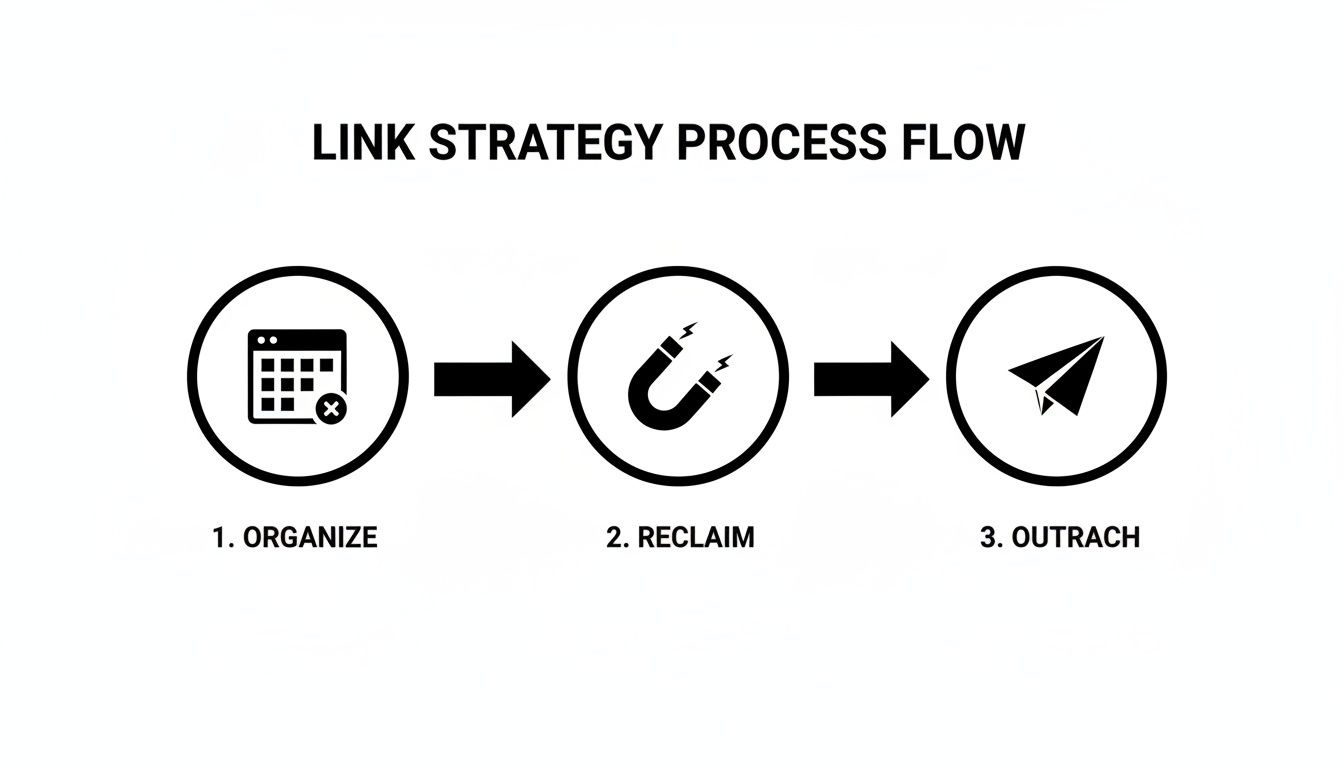
This cycle of organizing, reclaiming, and reaching out is the engine that will continuously improve your link profile. Let's tackle some of the most frequent questions that come up along the way.
Effective link analysis starts with asking the right questions. These FAQs will get you started on solid ground.
How Often Should I Check for New Backlinks?
For most websites, a quarterly backlink audit is a fantastic starting point. It's frequent enough to catch trends and problems before they grow too big.
However, if you're in a highly competitive industry or in the middle of a major link-building campaign, stepping that up to a monthly check-in will give you much fresher, more actionable data.
Here’s a quick guide to finding your rhythm:
- Quarterly Audits: A great baseline to monitor your site’s growth and spot potential issues.
- Monthly Reviews: Essential when you’re actively building links and need to track progress closely.
- Pre-Campaign Checks: Always pull fresh data right before planning new content or outreach to ensure your strategy is based on the latest landscape.
Ultimately, the best frequency comes down to your specific goals and how much time you can dedicate. The key is finding a balance that keeps you informed without drowning you in data.
Why Do Different SEO Tools Show Different Backlink Counts?
This is a classic one. You'll run a report in Ahrefs and then another in Google Search Console, and the numbers will almost never match up. Don't worry, nothing is broken.
Every platform crawls and indexes the web on its own schedule and with its own priorities. Ahrefs is known for its massive, constantly updated index, so it often reports the highest number of links. Google Search Console, on the other hand, only shows you what Google has actually processed and considered, which is invaluable for SEO but isn't a complete list of every link out there.
No single tool has a perfect map of the internet. The real magic happens when you use one primary tool for consistency and a second one to fill in the gaps and provide context.
By combining insights from different sources—say, Ahrefs for a broad view and GSC for Google's specific perspective—you get a much fuller, more reliable picture of your backlink profile. The variations just highlight why it's a mistake to rely on a single source of truth.
What Should I Do About Spammy Backlinks?
First, take a deep breath. Thanks to years of improvements in Google's algorithms, most spammy links are simply ignored and won't hurt your site.
The time to act is if you see a sudden, massive influx of low-quality links pointing to your site or, in the rare case, you receive a manual action penalty from Google. If that happens, the first step is always to try and get the link removed at the source by contacting the site owner.
If you decide action is needed, follow this order:
- Confirm the Impact: Don't just assume a link is bad. Review its quality and check Google Search Console for any manual action notifications.
- Request Removal: Send a polite email to the site owner asking for the link to be removed. It's a long shot, but it's the cleanest solution when it works.
- Disavow as a Last Resort: If you can't get the links removed and are confident they are causing harm, you can use Google’s Disavow Tool. But be extremely careful.
A word of caution: use the Disavow Tool sparingly. It’s a powerful instrument, and telling Google to ignore the wrong links can do more harm than good to your SEO.
Ready to take your link-building strategy to the next level? Get expert help from the team at Restaurant Equipment SEO. Visit https://restaurantequipmentseo.com to schedule a free consultation and start building a stronger backlink profile today.